
wechat-claude-code
v2026.4.12-15
Published
Chat with Claude Code from WeChat — desktop app (Electron) + CLI

Maintainers
 germey
Readme
WeChat Claude Code Bridge
Chat with Claude Code directly from WeChat using the Electron desktop app.
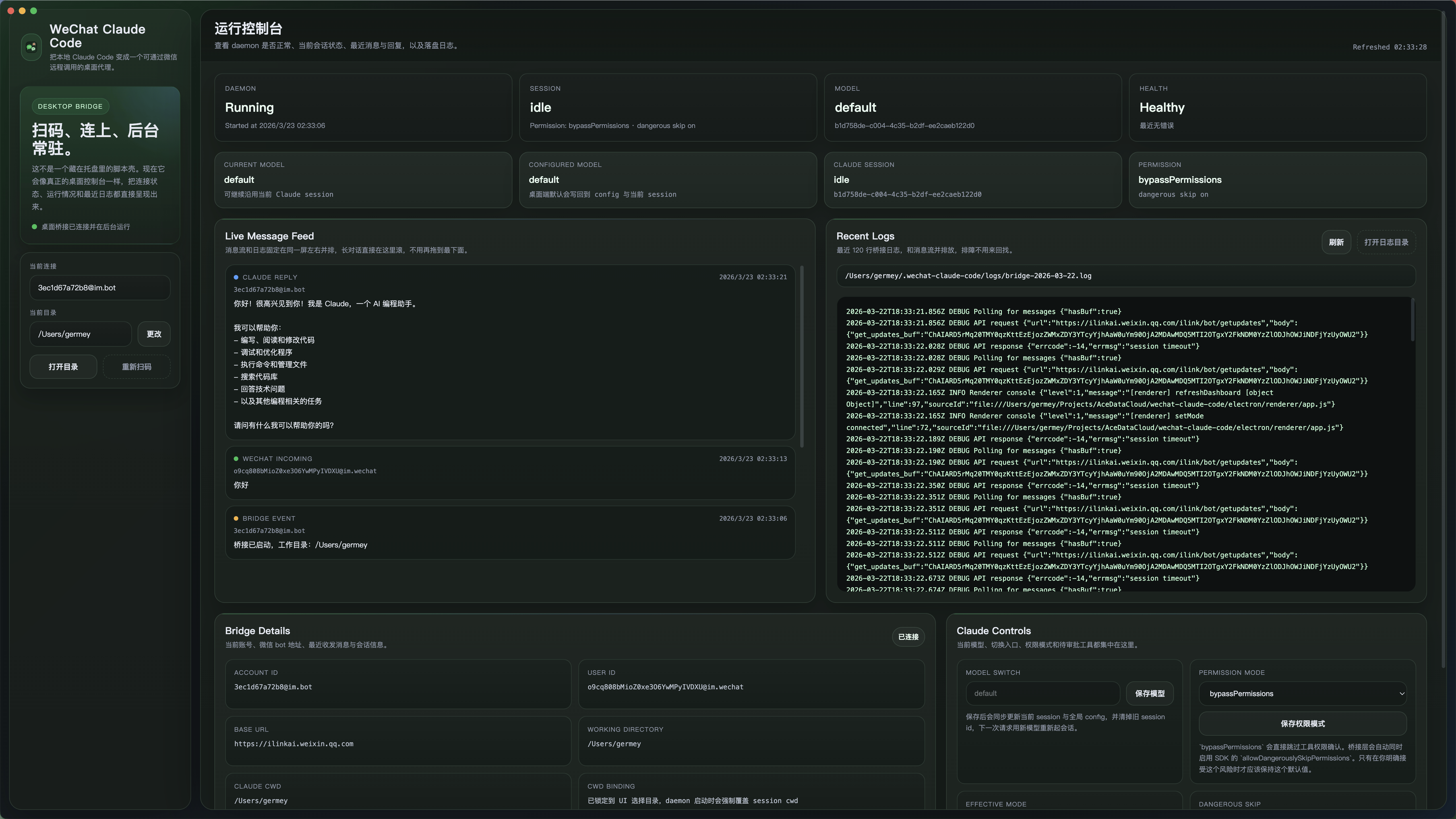
Features
- QR code login in the desktop app.
- Message bridge: text and image input to Claude Code.
- Runtime permission approval (
y/yesandn/no). - Session controls (
/help,/clear,/status,/model). - System tray for status, logs, and quick actions.
- Built-in localization with persisted UI language selection.
- Automated locale generation pipeline based on
transmart.
Requirements
- Node.js 18+
- macOS, Windows, or Linux
- A personal WeChat account
- Claude Code SDK support (
@anthropic-ai/claude-agent-sdk)
Installation
npm installThe postinstall script compiles TypeScript automatically.
Quick Start
- Build and launch the desktop app:
npm run devScan QR code to bind your WeChat account in the app's login dialog.
Start sending messages to Claude Code from WeChat!
Available Scripts
npm run build: Compile all TypeScript sources (Node.js + Electron).npm run dev: Build and run the Electron app in development mode.npm run pack: Build distributable packages withelectron-builder.npm run typecheck: Run TypeScript checks for both CLI and Electron code.npm run lint: Run ESLint checks.npm run lint:fix: Auto-fix lint issues when possible.npm run format: Format files using Prettier.npm run format:check: Verify formatting without changing files.npm run test: Run unit tests with Vitest.npm run test:coverage: Run tests with coverage report.npm run translate: Generate target locale files fromsrc/i18n/locales/zh-CN.jsonusingtransmart.npm run check: Runtypecheck + lint + testin one command.
Engineering Baseline
This project now includes a standard engineering toolchain:
- ESLint (
eslint.config.mjs) for code quality checks. - Prettier (
.prettierrc.json) for consistent formatting. - Vitest (
vitest.config.ts) for unit testing. - Husky + lint-staged for local Git hooks:
pre-commit: runslint-stagedon staged files.pre-push: runsnpm run test.
- CI quality gate (
.github/workflows/quality.yml):- Runs
npm ci,npm run typecheck,npm run lint,npm run teston PR/push.
- Runs
- Script convention: daily development only needs the top-level commands:
dev,build,pack.
CI Release Workflow
This project now includes GitHub Actions release automation at .github/workflows/release.yml.
- Trigger: every push to
mainautomatically creates a release. - Version scheme:
YYYY.M.D-RUN_NUMBER, for example2026.3.23-142. - Workflow behavior:
- bumps
package.json+package-lock.jsonto the computed version - commits the version bump back to
main - creates tag
vYYYY.M.D-RUN_NUMBER - builds desktop installers
- publishes a GitHub Release
- publishes the npm package
- bumps
- Required secret:
NPM_TOKENwith publish permission for the target npm package. - Note: npm publish will only succeed if the package name
wechat-claude-codeis available to your npm account, or if you later move to a scoped package name.
Build matrix outputs:
- Windows x64 installer (
.exevia NSIS) - macOS universal installer (
.dmg, supports Intel + Apple Silicon) - Linux x64 package (
.AppImage)
After the workflow completes, the GitHub Release will contain the generated installers and npm will receive the same version.
Localization
UI and runtime strings now live under src/i18n/locales/.
- Base locale:
src/i18n/locales/zh-CN.json - Shipped manual locale:
src/i18n/locales/en.json - Runtime locale is persisted in
~/.wechat-claude-code/config.env - The desktop renderer, Electron main process, daemon, CLI setup flow, and slash commands all read from the same message catalog
Local Translation Workflow
npm run translateThis uses transmart.config.js and requires OPENAI_API_KEY in your shell environment.
Automatic Translation Workflow
The repository includes .github/workflows/translate.yml.
- Trigger: push to
mainwhensrc/i18n/locales/zh-CN.jsonchanges - Behavior: installs dependencies, runs
npm run translate, opens a PR with the generated locale updates, auto-approves that PR, and enables squash auto-merge - Required secrets:
OPENAI_API_KEYandBOT_TOKEN
WeChat Commands
Available slash commands:
/help: Show command help./clear: Clear current Claude session./status: Show session status./model <name>: Switch Claude model for the current session.
Data Directory
Runtime data is stored under ~/.wechat-claude-code/:
accounts/: Bound account metadata.config.env: Global runtime configuration.sessions/: Per-account session data.get_updates_buf: Polling sync buffer.logs/: Rotating logs.
Project Structure
wechat-claude-code/
├── electron/               # Electron main/preload/renderer
├── src/
│   ├── claude/             # Claude SDK wrappers
│   ├── commands/           # Slash command router and handlers
│   ├── wechat/             # WeChat API/auth/media/message modules
│   └── config.ts           # Configuration
├── dist/                   # Compiled Node.js output
├── dist-electron/          # Compiled Electron output
└── package.json
Troubleshooting
- If login fails, check your QR code scanner and ensure the app is up to date.
- If permissions appear stuck, reply
yornin WeChat within 60 seconds. - If the app doesn't reflect changes, restart it with
npm run dev.
License
MIT