
weekly-git-summary
v1.2.0
Published
A CLI tool to generate weekly git commit summaries

Maintainers
 yinzhenyu
Readme
weekly-git-summary



一个跨平台的 CLI 工具,用于生成 Git 提交记录的周报汇总。支持多种输出格式(文本、JSON、Markdown),自动扫描项目目录并提取指定时间范围内的提交历史。
🚀 特性
- 跨平台支持 - 自动检测系统环境,Windows 使用 Node.js,macOS/Linux 使用 Bash 或 Node.js
- 多种输出格式 - 支持彩色终端输出、JSON 格式、Markdown 格式、HTML 格式
- 智能仓库扫描 - 自动扫描指定目录下的 Git 仓库(最大深度 2 层)
- 灵活的时间范围 - 支持自定义日期和预设时间范围(today, this-week, last-month 等)
- 多维度过滤 - 支持多作者过滤、消息模式匹配(正则表达式)
- 传统提交规范 - 支持 Conventional Commits 解析和统计分析
- 可视化展示 - 包含 Web 可视化界面,支持图表展示
- 统计分析 - 提供提交统计、参与者分析、类型分布等
- 零配置使用 - 开箱即用,无需复杂配置
📦 安装
全局安装
npm install -g weekly-git-summary使用 npx(推荐)
npx weekly-git-summary🎯 使用方法
基本用法
# 生成当前目录的本周提交汇总
weekly-git-summary

# 或使用 npx
npx weekly-git-summary
常用选项
# 指定目录和时间范围
weekly-git-summary --dir ~/projects --since 2023-01-01 --until 2023-01-31

# 过滤特定作者的提交
weekly-git-summary --author "张三" --since 2023-01-01

# 多作者过滤(OR 关系)
weekly-git-summary --author "张三" --author "李四" --author "王五"

# 使用预设时间范围
weekly-git-summary --time-range this-week
weekly-git-summary --time-range last-month

# 启用传统提交规范分析
weekly-git-summary --conventional --time-range this-week

# 消息模式过滤(支持正则表达式)
weekly-git-summary --message-pattern "feat|fix" --conventional

# 输出不同格式
weekly-git-summary --json
weekly-git-summary --md
weekly-git-summary --html

# 显示帮助信息
weekly-git-summary --help
📋 命令行参数
| 参数 | 简写 | 描述 | 默认值 |
| ------------------- | ---- | ------------------------------ | -------- |
| --dir | -d | 指定要扫描的目录 | 当前目录 |
| --since | -s | 开始日期 (YYYY-MM-DD) | 本周一 |
| --until | -u | 结束日期 (YYYY-MM-DD) | 今天 |
| --author | -a | 按作者过滤提交(可多次使用) | 所有作者 |
| --message-pattern | | 过滤符合模式的提交信息(正则) | 无 |
| --conventional | | 启用传统提交规范解析和统计 | false |
| --time-range | | 预设时间范围 | 无 |
| --json | -j | 以 JSON 格式输出 | false |
| --md | -m | 以 Markdown 格式输出 | false |
| --html | | 以 HTML 格式输出 | false |
| --help | -h | 显示帮助信息 | - |
时间范围预设
--time-range 参数支持以下预设值:
today- 今天yesterday- 昨天this-week- 本周(周一到周日)last-week- 上周this-month- 本月last-month- 上月
📊 输出格式
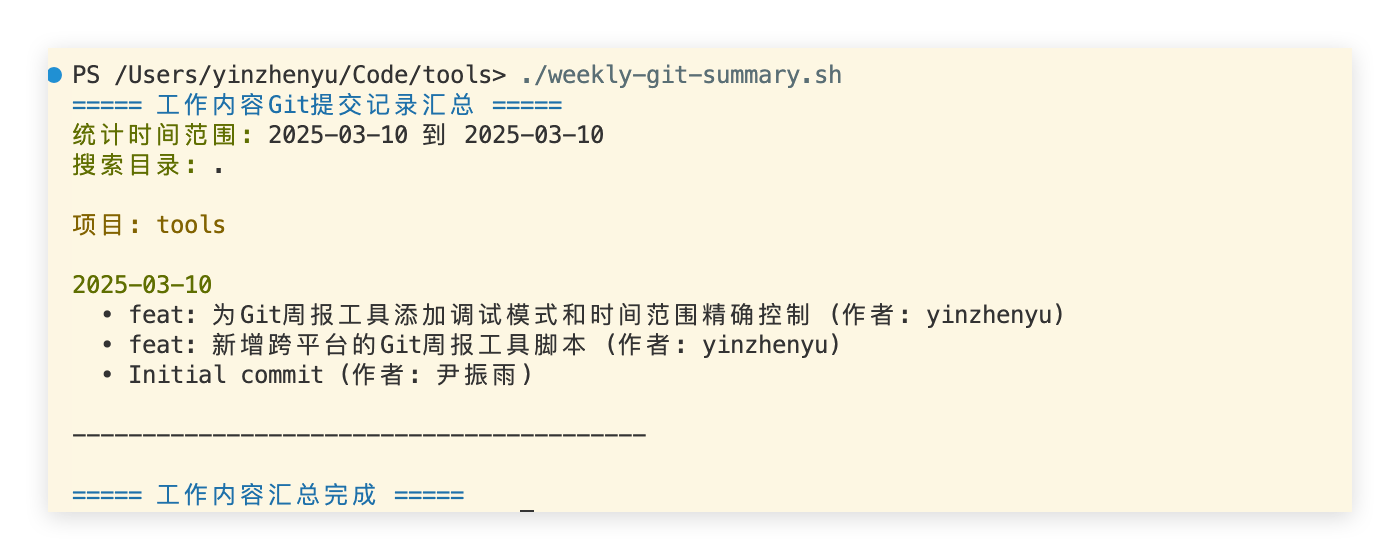
1. 彩色终端输出(默认)
工作内容Git提交记录汇总

统计时间范围: 2023-06-26 到 2023-07-02
搜索目录: .

📦 my-project (github.com/user/my-project)

📅 2023-07-02
  • feat: 添加用户认证功能 (作者: 张三, hash: abc123)
  • fix: 修复登录页面样式问题 (作者: 李四, hash: def456)

📅 2023-07-01
  • docs: 更新 API 文档 (作者: 王五, hash: ghi789)

===== 统计信息 =====
总提交数: 15
参与人数: 3
参与者: 张三, 李四, 王五

===== 提交类型分布 =====
功能: 8 次
修复: 4 次
文档: 2 次
样式: 1 次
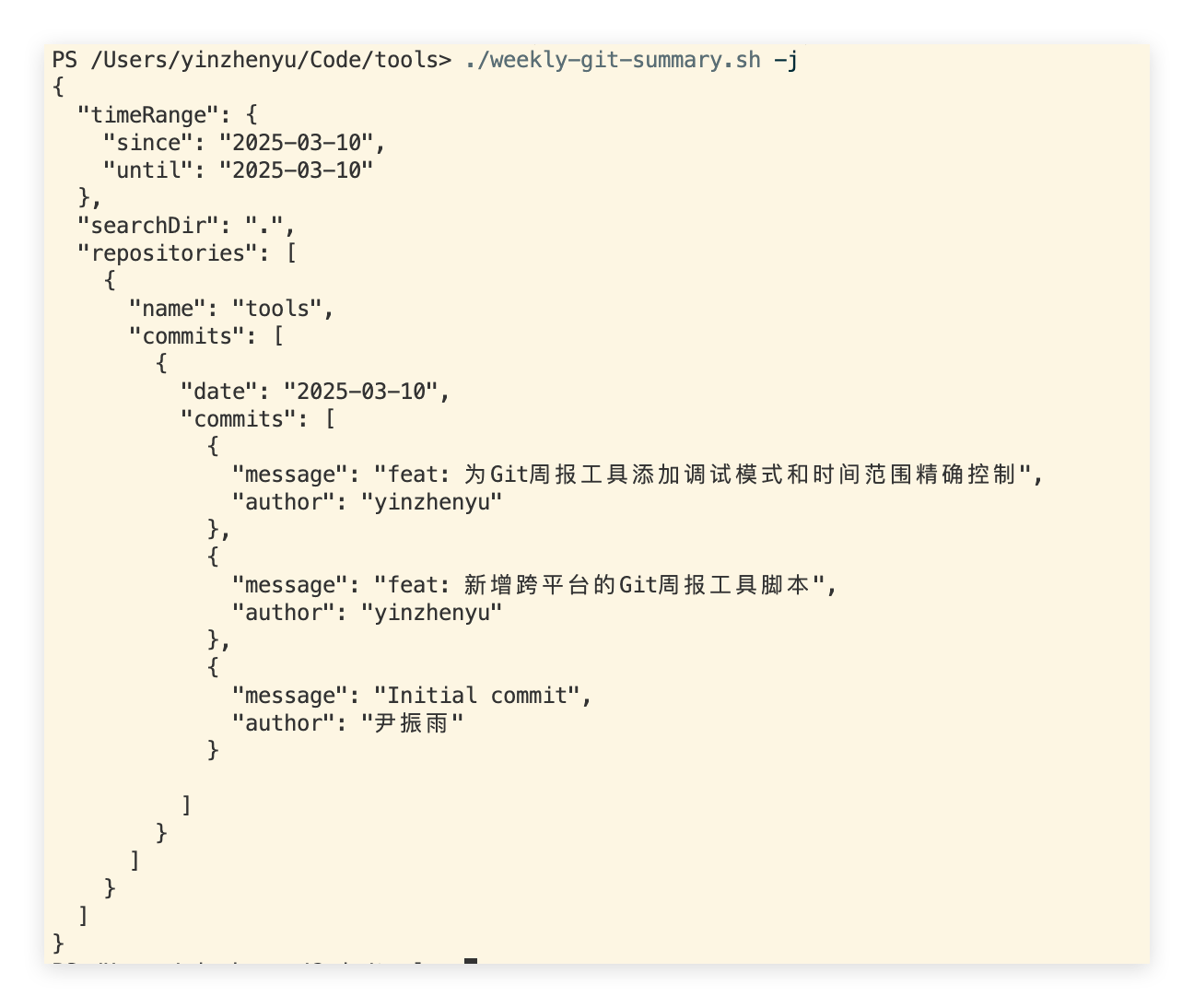
2. JSON 格式
{
  "timeRange": {
    "since": "2023-06-26",
    "until": "2023-07-02"
  },
  "searchDir": ".",
  "conventional": true,
  "messagePattern": "feat|fix",
  "statistics": {
    "totalCommits": 15,
    "participantCount": 3,
    "participants": ["张三", "李四", "王五"],
    "typeDistribution": {
      "feat": 8,
      "fix": 4,
      "docs": 2,
      "style": 1
    }
  },
  "repositories": [
    {
      "name": "my-project",
      "url": "github.com/user/my-project",
      "commits": [
        {
          "date": "2023-07-02",
          "commits": [
            {
              "message": "feat: 添加用户认证功能",
              "author": "张三",
              "hash": "abc123",
              "type": "feat"
            }
          ]
        }
      ]
    }
  ]
}
3. Markdown 格式
# 工作内容 Git 提交记录汇总

- **统计时间范围**: 2023-06-26 到 2023-07-02
- **搜索目录**: .

## my-project

### 2023-07-02

- feat: 添加用户认证功能 (作者: 张三, hash: abc123)
- fix: 修复登录页面样式问题 (作者: 李四, hash: def456)

### 2023-07-01

- docs: 更新 API 文档 (作者: 王五, hash: ghi789)

## 统计信息

- **总提交数**: 15
- **参与人数**: 3
- **参与者**: 张三, 李四, 王五

### 提交类型分布

- **功能**: 8 次
- **修复**: 4 次
- **文档**: 2 次
- **样式**: 1 次
🔧 高级功能
传统提交规范 (Conventional Commits)
启用 --conventional 参数后,工具会解析符合 Conventional Commits 规范的提交信息:
# 启用传统提交规范分析
weekly-git-summary --conventional --time-range this-week
支持的提交类型:
feat: 新功能fix: 修复 bugdocs: 文档更新style: 代码格式调整refactor: 重构perf: 性能优化test: 测试相关build: 构建系统ci: CI 配置chore: 维护性工作revert: 回滚更改
输出效果:
📅 2023-07-02
  • [功能] 添加用户认证功能 (作者: 张三, hash: abc123)
  • [修复] 修复登录页面样式问题 [BREAKING] (作者: 李四, hash: def456)
消息模式过滤
使用 --message-pattern 参数过滤符合特定模式的提交信息(支持正则表达式):
# 只显示功能和修复相关的提交
weekly-git-summary --message-pattern "feat|fix"

# 过滤包含特定关键词的提交
weekly-git-summary --message-pattern "用户|登录|认证"

# 使用复杂正则表达式
weekly-git-summary --message-pattern "^(feat|fix)(\(.+\))?:"
多作者过滤
支持同时过滤多个作者的提交记录(OR 关系):
# 过滤多个作者
weekly-git-summary --author "张三" --author "李四" --author "王五"

# 支持作者名称中的空格
weekly-git-summary --author "John Doe" --author "Jane Smith"
统计分析
工具会自动生成详细的统计信息:
- 基础统计: 总提交数、参与人数、参与者列表
- 类型分布: 各种提交类型的数量统计(启用
--conventional时) - 参与度分析: 各个参与者的贡献情况
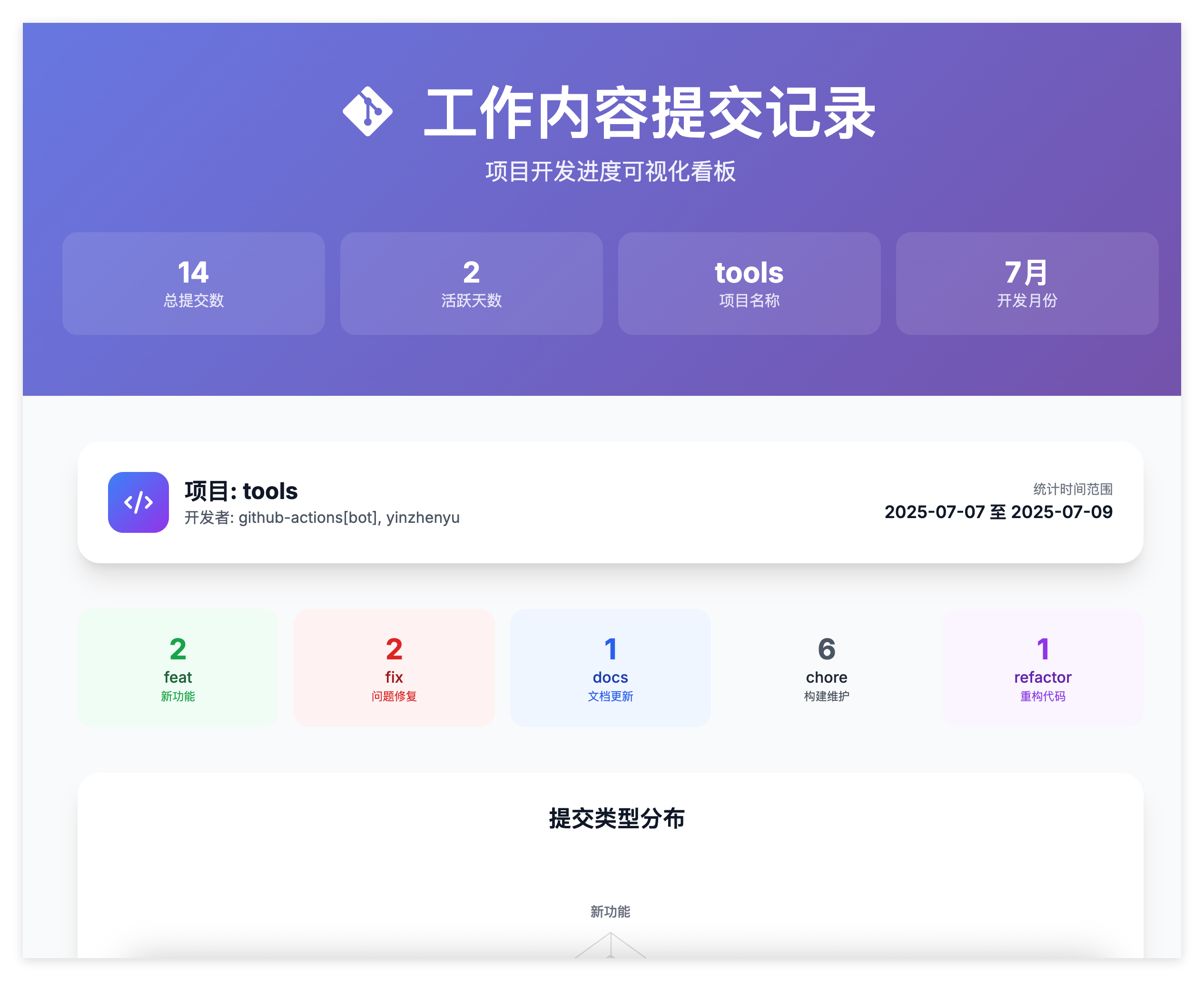
🎨 可视化界面
项目包含一个精美的 Web 可视化界面 (git-log.html),提供:
- 🌓 深色/浅色主题切换
- 📊 提交类型分布雷达图
- 📈 提交统计卡片
- 🕒 交互式时间线
- 📱 响应式设计
🛠️ 开发
环境要求
- Node.js ≥ 22.0.0
- Bun (用于构建)
- Git 命令行工具
本地开发
# 克隆项目
git clone <repository-url>
cd weekly-git-summary

# 安装依赖
bun install

# 构建项目
bun run build

# 运行测试
bun test

# 监视模式测试
bun test --watch

# 本地链接测试
npm link
weekly-git-summary --help
项目结构
weekly-git-summary/
├── scripts/
│   ├── cli.ts                 # CLI 入口点(TypeScript)
│   ├── weekly-git-summary.ts  # TypeScript 脚本实现
│   ├── weekly-git-summary.sh  # Shell 脚本实现
│   ├── weekly-git-summary.ps1 # PowerShell 脚本实现
│   ├── git-log.html           # Web 可视化界面模板
│   └── dist/                  # 示例截图
├── tests/
│   ├── cli.test.ts            # CLI 功能测试
│   ├── build.test.ts          # 构建系统测试
│   ├── integration.test.ts    # 集成测试
│   └── windows.test.ts        # Windows 兼容性测试
├── build/                     # 构建输出目录
├── build.ts                   # Bun 构建配置
├── package.json              # 项目配置
├── tsconfig.json             # TypeScript 配置
├── CLAUDE.md                 # 项目开发指南
└── README.md                 # 项目文档
架构设计
该项目采用智能的跨平台架构:
TypeScript CLI 包装器 (
scripts/cli.ts)- 检测操作系统类型
- 自动选择对应的脚本实现
- 透明传递命令行参数
平台特定实现
- Windows: Node.js 脚本 (跨平台兼容)
- macOS/Linux: Bash 脚本(已集成 URL 转换功能)或 Node.js 脚本 (回退)
- PowerShell: 支持 Windows PowerShell 环境
- 功能完全一致,参数格式统一
构建系统
- 使用 Bun 进行 TypeScript 编译
- 输出 ESM 格式的 Node.js 模块
- 自动生成可执行的 CLI 工具
🧪 测试
项目包含全面的测试套件:
# 运行所有测试
bun test

# 查看测试覆盖率
bun test --coverage
测试内容
- CLI 功能测试 - 验证命令行参数处理、输出格式等
- 构建系统测试 - 验证构建过程和输出文件
- 跨平台兼容性 - 验证不同系统环境下的行为
- 错误处理 - 验证异常情况的处理
📄 许可证
MIT License - 详见 LICENSE 文件
🤝 贡献
欢迎提交 Issue 和 Pull Request!
贡献指南
- Fork 项目
- 创建功能分支 (
git checkout -b feature/AmazingFeature) - 提交更改 (
git commit -m 'Add some AmazingFeature') - 推送到分支 (
git push origin feature/AmazingFeature) - 打开 Pull Request
开发规范
- 使用 TypeScript 进行类型安全的开发
- 遵循 ESLint 和 Prettier 规范
- 为新功能添加相应的测试
- 更新相关文档
🔗 相关链接
📞 支持
如果您遇到任何问题或有功能建议,请:
喜欢这个项目?请给它一个 ⭐️