
weibo-archiver
v0.6.2
Published
Weibo archiver CLI tool


Readme
Weibo Archiver CLI (微博存档器命令行工具)
本工具帮助你通过命令行下载和归档微博用户的微博、评论、图片、关注列表和收藏列表。
运行方式
通过 Node.js 运行脚本:
node weibo-archiver.mjs [参数]核心参数说明
--uid (用户ID): 此参数为必填项。在微博网页版 (weibo.com)
打开目标用户的主页,浏览器地址栏中 https://weibo.com/u/${uid} 的这一串数字
uid 部分即为用户ID。
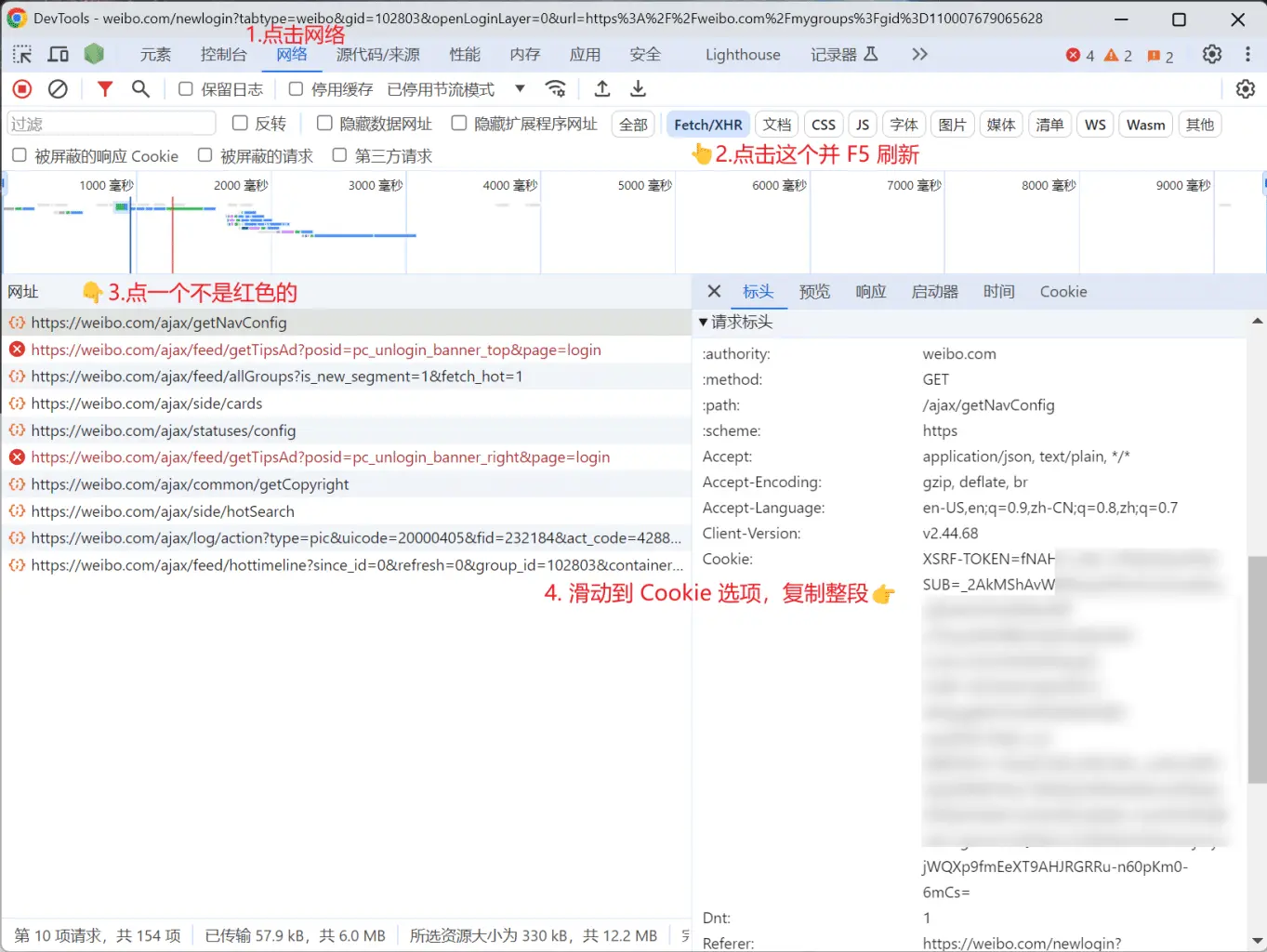
--cookie (微博 Cookie): 爬取特定用户的数据时必须提供此参数。
如何获取 Cookie:
- 在浏览器中登录你的微博账号。
- 打开浏览器的开发者工具 (通常按
F12)。 - 切换到 "网络 (Network)" 标签页。
- 参考下图步骤
默认保存位置
数据默认保存在 ~/.config/weibo-archiver/{uid} 目录下。
- 在 Windows 系统中,
~通常指C:\Users\{你的用户名}。 - 在 macOS 和 Linux 系统中,
~指/Users/{你的用户名}或/home/{你的用户名}。
参数选项
以下是可用的命令行参数:
| 参数 | 描述 | 类型 | 是否必需 | 默认值 |
|:------------------|:-------------------------------|:----------|:------|:--------|
| --uid | 用户的数字 ID | string | 是 | |
| --cookie | 微博登录的 Cookie 字符串 | string | 否 | |
| --fetchAll | 是否获取所有数据 (若为 false,则尝试增量更新) | boolean | 否 | true |
| --hasRepost | 是否包含转发的微博 | boolean | 否 | true |
| --hasComment | 是否包含微博的评论 | boolean | 否 | true |
| --repostPic | 是否包含转发微博中的图片 | boolean | 否 | true |
| --commentCount | 每条微博获取的评论数量上限 | number | 否 | 5 |
| --sinceId | 从此微博 ID 之后开始获取 | string | 否 | "" |
| --startAt | 开始日期 (格式: YYYY-MM-DD),用于筛选微博 | string | 否 | |
| --endAt | 结束日期 (格式: YYYY-MM-DD),用于筛选微博 | string | 否 | |
| --curPage | 从指定的微博列表页码开始获取 (一般情况下无需手动设置) | number | 否 | 1 |
| --hasFollowings | 是否爬取用户的关注列表 | boolean | 否 | true |
| --hasFavorites | 是否爬取用户的收藏列表 | boolean | 否 | true |
| --hasWeibo | 是否爬取用户的微博列表 | boolean | 否 | true |
| --useConfig | 是否使用配置文件中的设置 | boolean | 否 | false |
配置文件 (config.json)
当你首次成功为一个用户(或在一个新的 savePath下)归档数据后,工具会在保存目录下(例如
~/.config/weibo-archiver/{uid}/config.json 创建一个
config.json 文件。
此文件会保存你的 cookie(以便后续运行时无需再次输入)以及 since_id(用于增量更新)等配置。
使用示例
首次完整备份某个用户的全部微博数据 (需要提供 cookie):
node weibo-archiver.mjs --uid=1234567890 --cookie="YOUR_COPIED_COOKIE_STRING_HERE"(请将 1234567890 替换为实际的用户 UID,并将 YOUR_COPIED_COOKIE_STRING_HERE 替换为你复制的真实 Cookie 字符串)
使用配置文件作为参数:
node weibo-archiver.mjs --uid=1234567890 --useConfig按时间范围筛选,并且只导出微博帖子 (不包含转发、评论、关注和收藏):
node weibo-archiver.mjs --uid=1234567890 --startAt="2023-01-01" --endAt="2023-12-31" --hasWeibo=true --hasRepost=false --hasComment=false --hasFollowings=false --hasFavorites=false仅备份用户的关注列表和收藏列表:
node weibo-archiver.mjs --uid=1234567890 --hasWeibo=false注意事项
- Cookie 安全: 你的 Cookie 包含敏感的登录信息,请妥善保管,不要泄露给他人。
- 微博限制: 频繁或大量的请求可能会触发微博的接口限制。如果遇到错误或数据不完整,请尝试稍后再运行脚本,或调整抓取频率/范围。
详细说明
关于工具的更多详细功能、实现细节或高级用法,请参阅 说明文档。