
weq8c
v0.3.5
Published
[](https://npmjs.org/package/weq8c)


Readme
WEQ8C 0.3.5

A parametric equaliser for Web Audio.
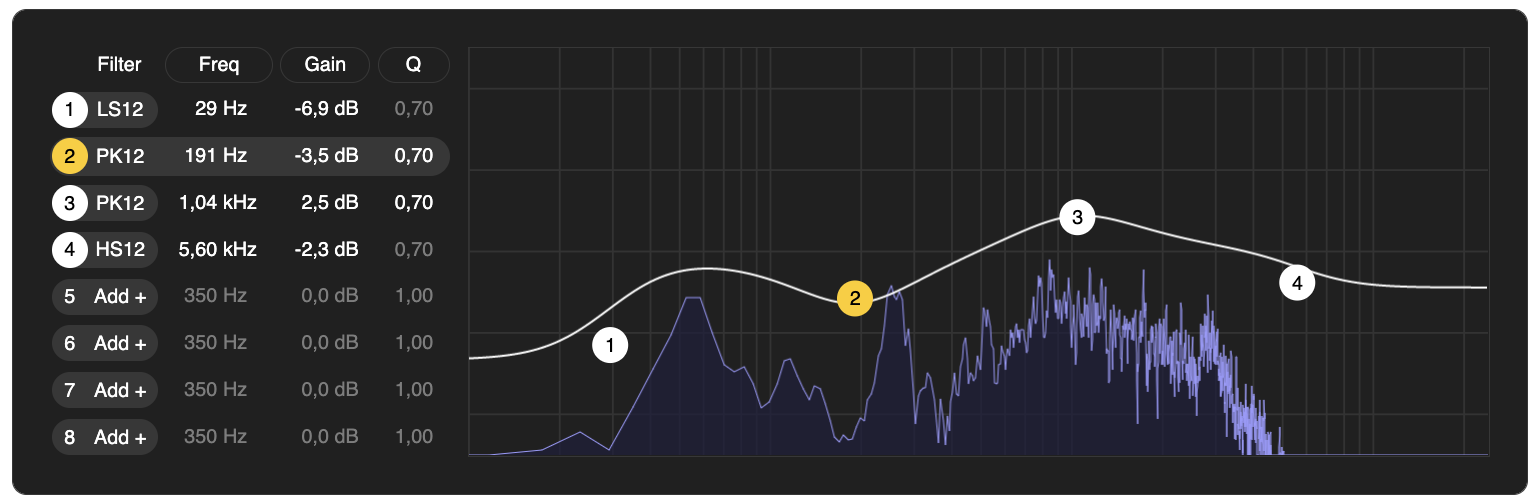
Sculpt the spectrum of your Web Audio graph using a filter bank of up to eight filters, with an intuitive UI inspired by Ableton Live's EQ Eight.
- Built on top of standard BiquadFilterNodes.
- Includes lowpass, highpass, lowshelf, highshelf, peaking, and notch filters, all with -12dB or -24dB roll-off.
- Controlled with a Web Component UI, or headlessly with a TypeScript/JavaScript API.
Usage
Install
As an NPM package:
yarn add weq8c
# or
npm install weq8c
Setup and Connect The Runtime
The audio processing of the equaliser all happens in an instance of the WEQ8Runtime class. You'll need to import it, initialise it using your AudioContext, and connect it to the signal path of the audio source you wish to equalise:
import { WEQ8Runtime } from "weq8c"; // or from "https://cdn.skypack.dev/weq8c"

let weq8 = new WEQ8Runtime(yourAudioCtx);
yourAudioSourceNode.connect(weq8.input);
weq8.connect(yourAudioDestinationNode);
Plug in The UI
The user interface for the equaliser is provided by a Web Component called <weq8-ui />. First import the UI module so that this web component gets registered:
import "weq8c/ui"; // or "https://cdn.skypack.dev/weq8c/ui"Then in your HTML, where you want the equaliser UI to appear, add the element:
<weq8-ui />And finally, connect the WEQ8Runtime you initialised into this UI by setting it as a property:
document.querySelector("weq8-ui").runtime = weq8;You should see the fully functional UI appear on your page.
Programmatic Control
You can also control the EQ runtime directly with JavaScript. This is useful if you have some alternative UI controls you wish to use, or if you want to operate the EQ fully headlessly.
Note: If you're only using programmatic control, you need not import the weq8c/ui module at all, and can operate purely on the runtime.
All control methods take the filter number 0-7 as the first argument.
weq8.setFilterType(filterNumber, "lowpass12"); // or "lowpass24", "highpass12", "highpass24", "bandpass", "lowshelf12", "lowshelf24", "highshelf12", "highshelf24", "peaking12", "peaking24", "notch12", "notch24"
weq8.toggleBypass(filterNumber, true); // true to bypass this filter, false to (re-)connect it.
weq8.setFilterFrequency(filterNumber, 1000); // filter frequency in Hz
weq8.setFilterQ(filterNumber, 1.0); // filter Q
weq8.setFilterGain(filterNumber, 0.0); // filter gain in dB
The types, frequencies, Qs, and gains are as documented for the standard BiquadFilterNode. The filter types suffixed with 12 are singular BiquadFilterNodes and the types suffixed with 24 are two BiquadFilterNodes in series.
Persisting Filter State
This library does not persist the filter configuration between page loads. Instead, it provides a data structure you can serialize and load back, so that you may persist it on the application level.
To get notified whenever the filter state changes, subscribe to the filtersChanged event on the runtime:
weq8.on("filtersChanged", (state) => {
  // state is a data structure you can store in a variable, or serialize to JSON.
});
When initialising the runtime on a subsequent load, you may provide a previous state to directly load the equaliser into:
let weq8 = new WEQ8Runtime(yourAudioCtx, state);Anti-Distortion & Level Controls (WEQ8C Exclusive)
WEQ8C introduces dynamic output saturation/clipping algorithms and channel level controls to prevent digital clipping when boosting equalizer bands:
- Input & Output Gain: Control the level of the signal entering the EQ bank (
weq8.inputGain = 1.2) or exiting the final processing stage (weq8.outputGain = 0.8). - Saturation Modes:
none: Passthrough mode.soft: Soft clipping using smooth hyperbolic tangent (tanh) curves.hard: Hard clipping that flat-clamps sample amplitude.foldback: A foldback/mirror distortion wave-shaper that reverses peaks exceeding the threshold.limit: Standard brickwall-like dynamic limiter.
- Dynamic Threshold Control: Set the threshold parameter (
weq8.setSaturationMode(mode, { threshold: 0.8 })) between0.1and1.0.
Backwards Compatibility
WEQ8C is fully backwards compatible with the original weq8 package. All legacy method names, events, and configuration states are preserved unchanged. You can drop in weq8c as a replacement without modifying existing code.
Custom CSS Injection (WEQ8C Exclusive)
WEQ8C (WEQ8 fork) introduces a native API for injecting custom CSS directly into the Web Components' internal Shadow DOM. This allows you to safely theme the equalizer without hacky DOM workarounds.
To apply custom styles, use the static addCustomStyles(cssString) method on the UI components. It's best to do this before or right as you instantiate the UI:
import { WEQ8UIElement, EQUIFilterRowElement } from "weq8c/ui";

const customCss = `
  .filter-handle {
    background: #ff0055 !important;
    color: white !important;
  }
  .filter-handle.selected {
    background: #00ffcc !important;
  }
`;

// Injects the CSS directly into the constructable stylesheets
WEQ8UIElement.addCustomStyles(customCss);
EQUIFilterRowElement.addCustomStyles(customCss);
Note: Calling this method forces the internal rendering engine to completely re-evaluate its cached stylesheets, so it will correctly apply to all newly created instances of the equalizer.
Development
Run npm run dev and open your browser in http://localhost:3000 to get a development page with live reloading.