
whatspup
v1.0.0
Published
An application to use whatsapp via cli


Readme
Whatspup
Use Whatsapp from commandline/console/cli using GoogleChrome puppeteer! :smile:
Features
- :white_check_mark: Send and receive messages
- :white_check_mark: Read Receipts
- :white_check_mark: Switch between users to chat with
- :white_check_mark: Popup notifications for new chat messages
- :white_check_mark: Privacy settings for popup notifications
- :white_check_mark: One-time authentication, no need to scan QR code again and again
- :white_check_mark: Windowless/headless (hidden) mode
- :white_check_mark: Colorful chat messages
Of course, it is not possible to send/receive picture messages from command line.
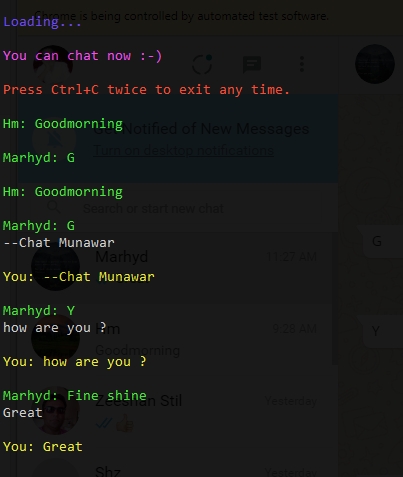
Screenshot
Requirements
- Node v8+
- puppeteer v0.13.0+
Tested on Windows with Node v8.9.1 and puppeteer v0.13.0
Installation
- Clone this repository.
git clone https://github.com/sarfraznawaz2005/whatspup.git - Type
npm install - Type
node chat.js USERNAME(case-sensitive) - Chrome will open up, now just scan Whatsapp QR Code once via whatsapp app in your mobile
- Wait for connection and start typing your messages :smile:
NOTE: Once you have connected by scanning QR code, your session will be saved so you won't have to scan it again and again unless you revoke from whatsapp app or by deleting tmp folder.
Commands
Changing User
You can switch chat with another user anytime by typing on console:
--chat USERNAME (case-sensitive)
NOTE: USERNAME is supposed to be a person with whom you have already initiated a conversation in whatsapp. In other words, we use a selector to click that user's name from conversations list.
Clear Chat Screen
To clear chat screen, type --clear.
Options
You can set various options in config.js file.
Others
- You can send common emojis directly by typing
:smile:,:lol:,:happy:,:love:,:wink:OR;-),:-),<3, etc
Issues
- Currently does not seem to work in invisible/headless mode (seems to be a bug in puppeteer currently). So you have to set
windowoption totruein config.js file.
Contribute
You are welcome to contribute to this project.
Disclaimer
This project is not affiliated with official whatsapp in any sense.