
whistle.mockbubu
v2.2.8
Published
mock response data


Readme
whistle.mockbubu
whistle.mockbubu is an extension script plugin for whistle that provides the following features:
- Real-time generation of mock files from captured API responses
- Mock file management
Installation
$ w2 install whistle.mockbubuUsage
Configure whistle rules
Default mode uses pathname
pattern mockbubu://[mode]Generate Mock Files
Pathname Mode: Uses the interface's origin + pathname as the filename
pattern mockbubu:// or pattern mockbubu://pathnameAfter configuring the rules and enabling the plugin, mockbubu will capture matching request data in real-time
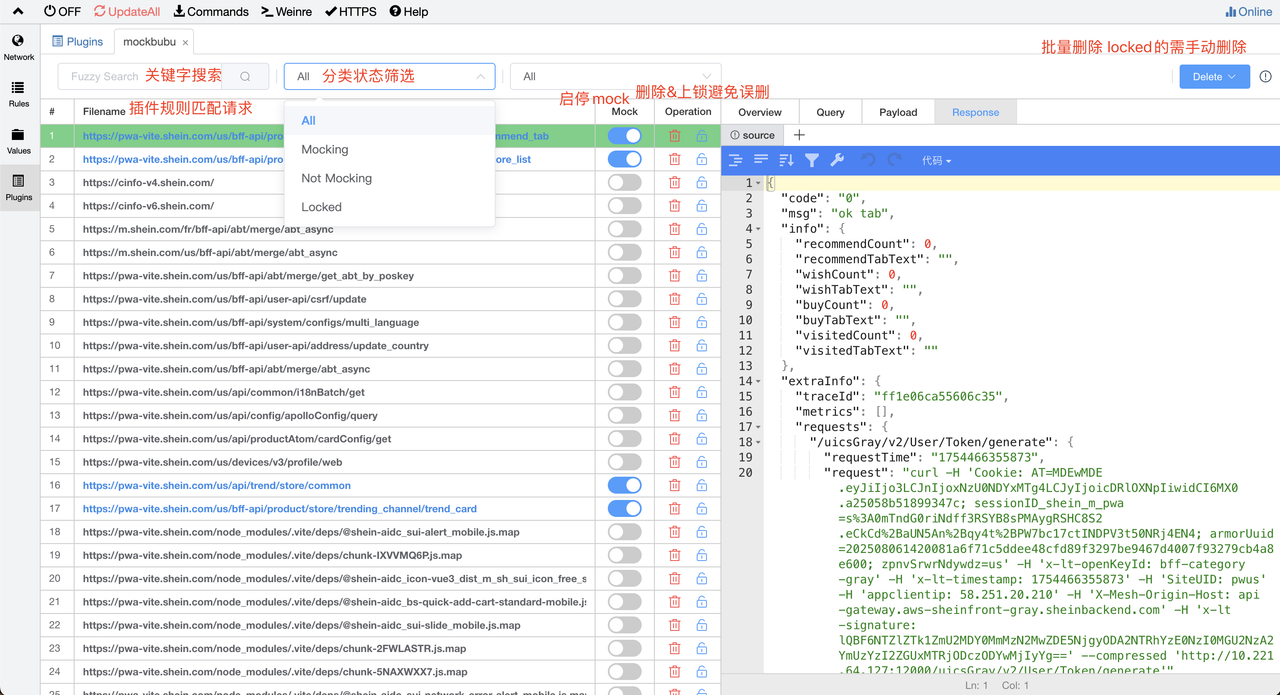
Start Mocking
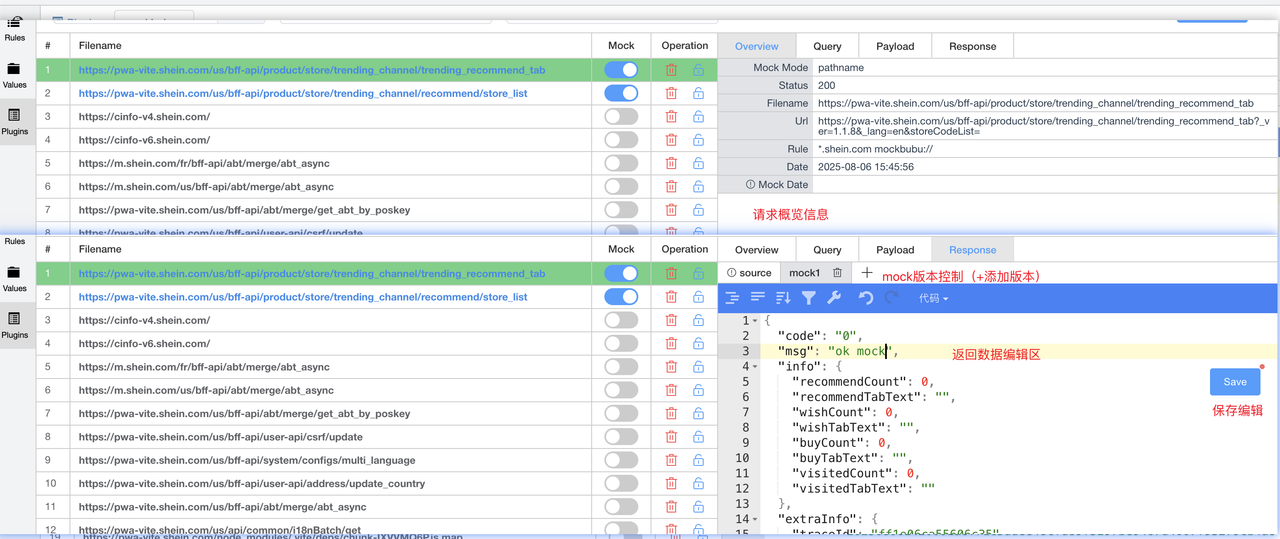
Step 1: Enable the mock switch for the file. When mockbubu intercepts the corresponding request, it will directly return the matched request data. After enabling the mock switch, you can manage file content in the Response panel.
Step 2: Manage file content in the Response panel
Edit Files
- Supports file editing
- Supports keyboard shortcuts for saving: Mac: Command + S / Windows: Ctrl + S
Multiple Versions
- Supports creating different versions of file content. Click to switch between different versions for instant effect and return that version's data
- The "source" version is the default generated version containing the original API response data and supports modification
Switch Mock Files
- Mock return content uses the currently selected version
whistle.mockbubu
whistle.mockbubu 是whistle的一个扩展脚本插件,包括以下功能
- 实时生成捕获接口的 mock 文件
- 管理 mock 文件
安装
$ w2 install whistle.mockbubu
用法
配置 whistle 规则
mode默认使用 pathname
pattern mockbubu://[mode]生成 mock 文件
pathname 模式:使用接口的 origin + pathname 作为文件名
pattern mockbubu:// 或者 pattern mockbubu://pathname配置规则并开启插件后,mockbubu将实时获取匹配到的请求数据
开始 mock
第一步:开启文件的 mock 开关,拦截到对应请求mockbubu将直接返回对应匹配请求的数据,开启mock开关后可在Response面板管理文件内容
第二步:在 Response 面板管理文件内容
编辑文件
- 支持文件编辑
- 支持快捷键保存 Mac: Command + s / Windows: Ctrl + s
多版本
- 支持新增不同版本的文件内容,点击切换不同版本即刻生效返回该版本数据
- 其中 source 版本是默认生成的,是原始接口响应数据,支持修改
切换 mock 文件
- mock 返回内容使用当前选中的版本
开发者文档
如果你需要参与 whistle.mockbubu 的开发、维护或迭代,请阅读以下文档:
包含以下内容:
- 项目架构设计
- 完整业务流程
- 关键业务逻辑和判断
- 数据存储设计
- API 接口清单
- 重要注意事项
- 迭代开发指南(影响范围和可行性分析)
- 故障排查指南
- 编码规范
代码质量标准和最佳实践
贡献
欢迎提交 Issue 和 Pull Request。在提交 PR 前,请确保:
- 阅读了开发者指南
- 遵循编码规范
- 测试了所有相关功能
- 更新了相关文档
License
MIT