
whygraph
v0.1.3
Published
The graph of why. So your agent knows before it touches anything.

Maintainers
 geovanie
Readme
Whygraph
The graph of why. So your agent knows before it touches anything.



Whygraph captures the architectural decisions behind your codebase — the tradeoffs accepted, the alternatives rejected, the patterns you deliberately chose — and makes them queryable by AI agents before they write a single line.
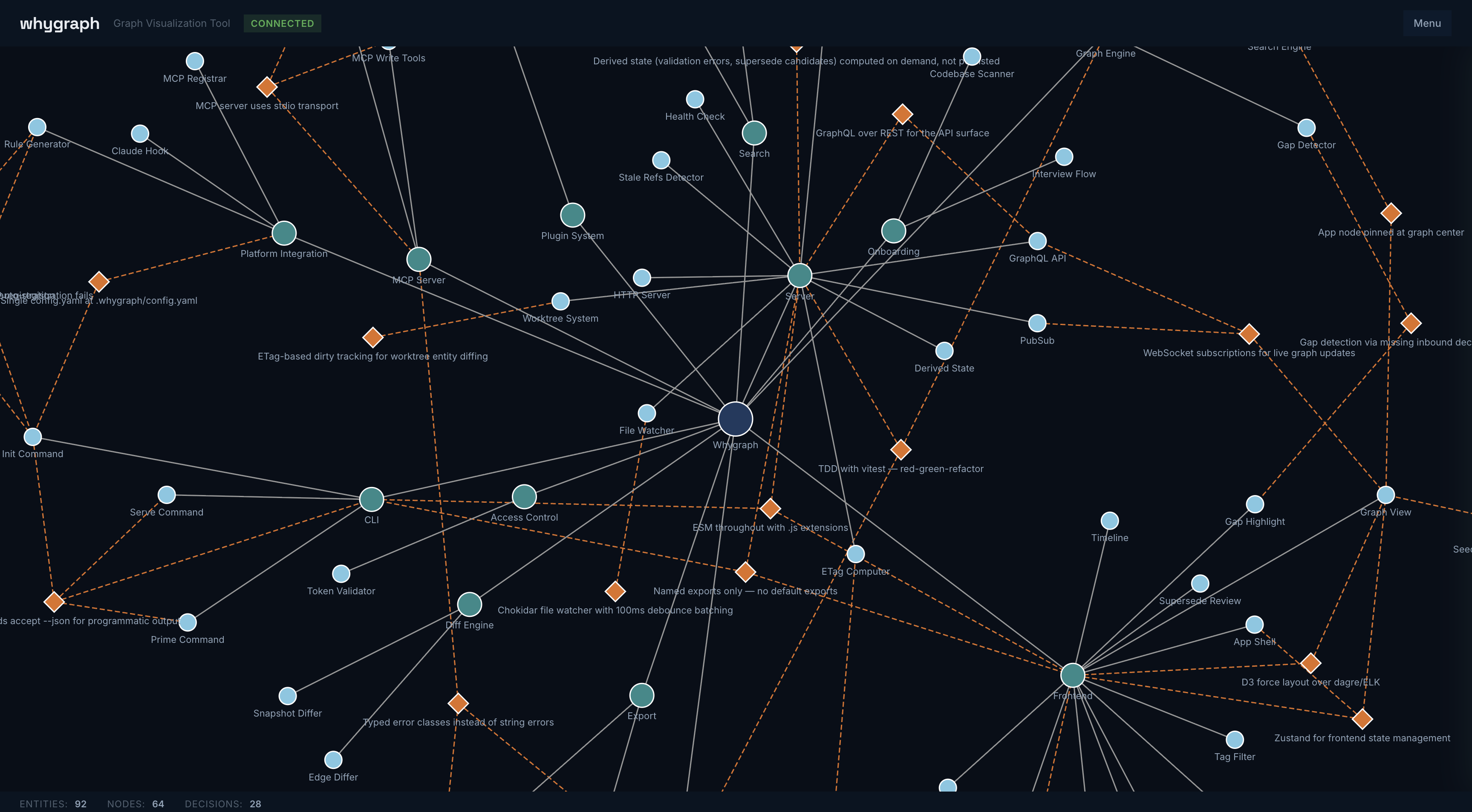
The Problem
You're vibe-coding. The agent is fast. Features ship in minutes. Then three sessions later, it confidently rebuilds something you already tried and abandoned. It re-introduces the pattern you explicitly rejected. It optimizes for the local signal — passing tests, satisfying the prompt — while losing the thread of why the architecture is shaped the way it is.
This isn't a hallucination problem. It's a memory problem. The agent isn't wrong. It just doesn't know the why.
Quickstart
npm install --save-dev whygraph
npx whygraph init
npx whygraph up
init walks you through two prompts — app name and environment — then registers the MCP server and writes agent instructions to CLAUDE.md (Claude Code) or AGENTS.md (Cursor, Copilot, other).
Initialized whygraph in .whygraph/
  App node: wg-ab12
  Config: /your/project/.whygraph/config.yaml
  MCP: registered

Run 'whygraph up' to start the server.
up starts the server in the background:
whygraph server running at http://localhost:4777 (pid 12345)From here, agents capture decisions automatically as they work. Run whygraph viz to open the graph visualization.
What Agents See
When an agent is about to modify src/auth/session.ts, it calls whygraph_context and gets back the decisions that shaped that code:
{
  "nodes": [
    { "id": "wg-sess", "label": "Component", "name": "Session Management" }
  ],
  "decisions": [
    {
      "id": "wg-d001",
      "title": "JWT over server-side sessions",
      "status": "active",
      "context": "Needed stateless auth to support horizontal scaling...",
      "decision": "Use short-lived JWTs with silent refresh via interceptor.",
      "tradeoffs": "Gained: stateless, horizontally scalable. Lost: cannot invalidate tokens server-side.",
      "alternatives": "Server-side sessions — rejected: requires sticky sessions or shared store."
    }
  ]
}
The agent knows what was decided, why, what was traded away, and what was rejected — before it touches anything.
MCP Tools
Whygraph exposes six MCP tools for agent integration. Read tools are always available. Write tools require strict mode (whygraph config --mcp-mode strict).
| Tool | Mode | Description |
| --------------------------------- | ----- | ------------------------------------------------------- |
| whygraph_context(file, symbol?) | read | Get decisions affecting the code you're about to modify |
| whygraph_get_decisions(filters) | read | Query decisions by status, tags, or date range |
| whygraph_get_gaps(limit?) | read | Find structural nodes with no recorded decisions |
| whygraph_list_nodes(filters) | read | List app, feature, and component nodes |
| whygraph_create_decision(...) | write | Create a decision with full validation |
| whygraph_create_node(...) | write | Create a structural node |
In default mode, write tools are not registered. Agents write decision files directly to .whygraph/graph/ as markdown. The file watcher picks them up, validates, and flags issues as JSON sidecars that the whygraph issues command can resolve.
Platform Integration
Whygraph works with any AI development environment.
| Platform | Agent Instructions | MCP Registration |
| ----------- | ------------------ | --------------------------------------- |
| Claude Code | CLAUDE.md | Auto-registered via claude mcp add |
| Cursor | AGENTS.md | .cursor/mcp.json (written by init) |
| Copilot | AGENTS.md | .vscode/mcp.json (written by init) |
| Other | AGENTS.md | MCP_SETUP.md with manual instructions |
Claude Code gets the deepest integration: MCP auto-registration, strict mode write tools, and instructions baked directly into CLAUDE.md.
The Graph
Whygraph models your application as a hierarchy of nodes with decisions attached to the nodes they affect.
App: MyProject
├── Feature: Auth
│   ├── Component: Session Management
│   │   └── ◆ JWT over sessions (active)
│   └── Component: Token Refresh
│       └── ◆ Silent refresh via interceptor (active)
└── Feature: API Layer
    ├── Component: Rate Limiting
    │   └── ◆ Redis-backed sliding window (active)
    └── ◆ REST over tRPC (active)
Node types: App → Feature → Component, with Decision nodes attached via AFFECTS edges.
Decision fields: title, date, context, decision, tradeoffs, alternatives, status, affects, tags
Tags (fixed taxonomy): arch, data, security, performance, integration, infra, ux
Decisions are never deleted. A superseded decision stays in the graph with a SUPERSEDES edge explaining how the architecture evolved.
CLI
| Command | Description |
| ------------------------------ | --------------------------------------------------------------------------- |
| whygraph init | Set up whygraph: choose environment, register MCP, write agent instructions |
| whygraph up | Start the server in the background |
| whygraph down | Stop the server |
| whygraph restart | Stop and restart the server |
| whygraph serve | Start the server in the foreground |
| whygraph status | Check server status and entity counts |
| whygraph viz | Open the graph visualization in a browser |
| whygraph issues | List and interactively resolve validation issues |
| whygraph validate | Validate all entities and cross-references |
| whygraph config [--flag val] | View or modify configuration |
| whygraph mcp | Start the MCP stdio server |
All commands accept --json for programmatic output.
Philosophy
The why is not in the code. You can read a codebase and understand what it does. You cannot read it and understand what was tried before, what was rejected, and what trade-offs were accepted.
Decisions, not documentation. Structured records — context, choice, tradeoffs, alternatives — not prose. Structure is what makes decisions queryable by agents.
Append-only. Superseded decisions stay in the graph. They explain the path, not just the destination.
Repo-native. The graph lives in .whygraph/, versioned with your code. No external service. No account required.
Agent-first. The MCP tools and agent instructions are the primary interface. The CLI and visualization exist so humans can inspect what agents will read.
Never lose data. Entity files are always written, even if validation fails. Issues are tracked in sidecars, not by rejecting writes.
Limitations
- The server must be running for MCP read tools and live visualization to work. In default mode, agents can write decision files directly to
.whygraph/graph/without the server — they'll be picked up when it starts. - Multi-agent worktree support detects divergence but does not auto-merge. Conflict resolution follows standard git workflow.
- The fixed tag taxonomy (
arch,data,security,performance,integration,infra,ux) is intentional — it keeps decisions queryable. Custom tags are not supported in v1. - No cloud sync or hosted option. The graph is local to your repo.
Multi-Agent / Worktree Support
Whygraph runs one server per repo and watches all git worktrees. When agents work in parallel:
- Each worktree's
.whygraph/graph/is watched independently - ETag-based dirty tracking detects divergence from the main graph
- Entity IDs use NanoIDs to prevent collisions across concurrent agents
- Conflict resolution happens at git merge time
Acknowledgments
- Matt Pocock — the development workflow used to build this project (TDD, PRD-first, simplify) is based on his 5 Skills for Claude Code
License
MIT © Geovanie Ruiz