
widget-ccat-angular
v0.0.4
Published
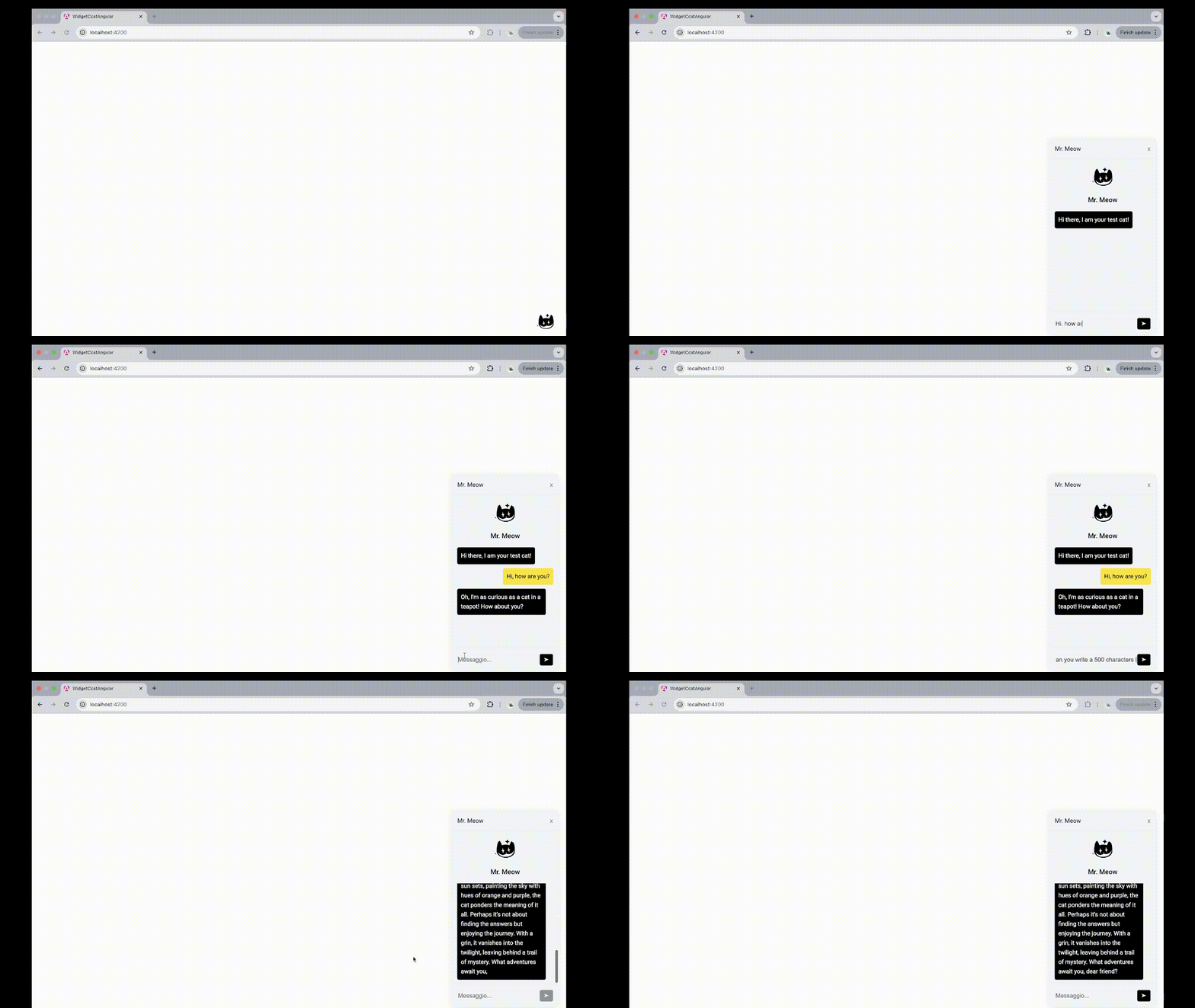
An elegant and fully customizable **Angular widget** for seamless integration with **Cheshire Cat AI**. Perfect for adding a conversational assistant to your Angular apps with minimal setup.


Readme
🐱 Cheshire Cat AI Chat Widget
An elegant and fully customizable Angular widget for seamless integration with Cheshire Cat AI.
Perfect for adding a conversational assistant to your Angular apps with minimal setup.
💬 Plug, personalize, and play: your smart chatbot is ready to go.
🚀 System Requirements
- Angular 19.2.0 (developed with angular 19.2.0, not tested with previous versions, if you have a previous version let us know if it works for you and we'll add it to the list of working angular versions)
- Connection to a running cheshire-cat instance
- The
ccat-apipackage must be installed (vianpm i ccat-api)
📦 Installation
Install via npm:
npm i ccat-chat-widget-angular🧩 Component Configuration (Standalone)
Since this is a standalone component, you can import it directly into your component without needing to declare it in a module.
import { Component } from "@angular/core";
import { CatClient } from "ccat-api";
import { WidgetCcatComponent } from "ccat-chat-widget-angular";

@Component({
  selector: "app-root",
  standalone: true,
  imports: [WidgetCcatComponent],
  template: `
    <app-widget-ccat
      [baseUrl]="'localhost'"
      [port]="1865"
      [userId]="'user'"
      [initialPhrase]="'Welcome! How can I assist you today?'"
      [userMessageBgColor]="'#e0f7fa'"
      [botMessageBgColor]="'#f1f8e9'"
    ></app-widget-ccat>
  `,
})
export class AppComponent {}
🖼️ Template Usage
You can drop the widget anywhere in your HTML and configure it via inputs:
<app-widget-ccat
  [baseUrl]="'localhost'"
  [port]="1865"
  [userId]="'user'"
  [initialPhrase]="'Hi! How can I help you?'"
  [userMessageBgColor]="'#fee600'"
  [botMessageBgColor]="'#000000'"
></app-widget-ccat>
⚙️ Customizable Properties
🔌 Connection Settings
| Property | Default | Description |
| ---------- | ------------- | --------------------------------------------------------------------------- |
| baseUrl | 'localhost' | Cheshire Cat server URL |
| port | 1865 | Port number |
| userId | 'user' | Unique user identifier |
| secure | false | Enables HTTPS connection |
| chatType | 'streaming' | Chat type: streaming (tokens stream in live) or chat (waits full reply) |
💬 Message Settings
| Property | Description |
| ---------------- | ---------------------------------------------------------- |
| initialPhrase | Initial bot message |
| sorryPhrase | Error message when something goes wrong |
| agentName | Custom name for your bot |
| imgSrc | Logo or avatar image URL |
| imgAlt | Alt text for the image |
| openChatImgSrc | Logo or avatar image URL for the image that opens the chat |
| openChatImgAlt | Alt text for the image that opens the chat |
🎨 Style Settings
| Property | Default | Description |
| ------------------------------ | ----------- | ------------------------------- |
| userMessageBgColor | '#fee600' | User message background color |
| userMessageTextColor | '#000000' | User message text color |
| botMessageBgColor | '#000000' | Bot message background color |
| botMessageTextColor | '#ffffff' | Bot message text color |
| chatContainerBgColor | '#f3f6fc' | Chat container background color |
| chatBodyTopBottomBorderColor | '#eeeeee' | Border color for the chat body |
| sendBtnBgColor | '#000000' | Send button background color |
🛠 Support
For issues, bugs, or feature requests, please open an issue on the GitHub repository.
📄 License
Copyright (C) 2025 CLDev
You should have received a copy of the GNU General Public License along with this program. If not, see https://www.gnu.org/licenses/.
🧠 Ready to bring your UI to life? Let your chatbot be the first to smile. With Cheshire Cat AI, it’s already purring.