
wii-cli
v0.0.7
Published
基础开发组项目管理工具
Downloads
22


Readme
wii-cli
基础开发组项目脚手架
安装
npm i wii-cli功能
- 创建项目
- 支持选择PC、H5、wxapp、h5webpack、pcwebpack等类型的项目创建
- 支持小程序一键创建页面更新 app.json
- 支持一键创建组件,一键安装单个组件或批量安装组件
- 支持 wmu 一键发布测试代码
- 支持创建 vue 文件
- 支持一键上传腾讯云
- 支持 git 一键提交功能
- 支持一键上传腾讯 CDN 功能
- 支持 WAU 一键发布 CDN 功能
- 支持 FIS 项目一键发布,可以按顺序发布依赖的模块
- 新增开发者注册能力
新增功能
wii module create [moduleName]
# wii module create button
├── packages
│   └── wii-button
│       ├── README.md
│       ├── index.js
│       ├── package.json
│       └── src
│           └── index.vue
wii module refer [moduleName1] [moduleName2]
- 自动添加组件依赖关系
# wii module refer core button
├── wii-button
│   ├── README.md
│   ├── index.js
│   ├── node_modules
│   │   └── wii-core -> ../../wii-core
│   ├── package.json
│   └── src
│       └── index.vue
└── wii-core
    ├── README.md
    ├── index.js
    ├── package.json
    └── src
        └── index.vue
wii module update
- 自动更新所有模块依赖关系,如修改了core,执行该命令后,所有得依赖模块会重新更新
wii module publish
- 会将全部更新模块做分离发布操作
Changes:
 - @wau2/wii-core: 0.0.21 => 0.0.22
 - @wau2/wii-button: 0.0.10 => 0.0.11
如何使用
1. wii create [项目名称],会出现如下提示:
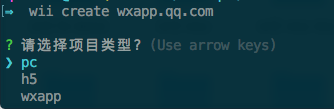
2. 选择项目类型,如果使用该种子模块输入wxapp
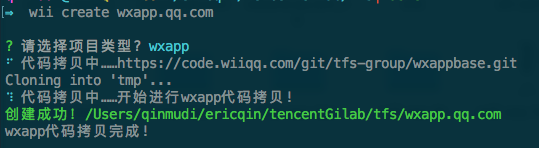
3. 执行 npm i 安装必要依赖模块
4. 执行 npm run dev 会进入开发监听模式
小程序
1. wii wxapp createPage [页面名称,支持路径]
会自动更新 app.json
wii wxapp createPage user 会创建pages/user/user.(js,wxml,less,json)
wii wxapp createPage user/list/index 会创建pages/user/list/index.(js,wxml,less,json)
2. wii wxapp createComp [组件名称,支持路径]
wii wxapp createComp user 会创建compoents/user/user.(js,wxml,less,json)
wii wxapp createComp user/list/index 会创建compoents/user/list/index.(js,wxml,less,json)
2. wii wxapp install [组件名称/all]
wii wxapp install rate 会将rate组件安装到项目中
wii wxapp install all 会将 wii.conf.json 文件中配置的所有组件安装到项目中,如下所示:
{
    "components":[
        "flex",
        "tab",
        "rate",
        "popup",
        "price",
        "upload"
    ]
}
vue
wii vue create [文件名称,支持路径]
wii vue create components/user 会创建 src/components/user/index.vue
wii vue create components/user/list/abc 会创建 src/components/user/list/abc
生成文件内容如下:
<style lang="less">
    .wii-abc {

    }
</style>

<template>
    <div class="wii-abc">
        // your template code
    </div>
</temlate>

<script>
    export default {
        name: 'Wiiabc',
        data(){
            return {}
        }
    }
</script>
wmu
1.wii wmu test [配置文件路径]
会将 wmu 编译到配置文件指定的目录,进行测试
2.wii wmu publish (暂为开放)
会将 wmu 编译发布到 tnpm 上
qcloud
1.wii qcloud start [配置文件路径]
会将 src/test 文件夹下所有的文件都上传到指定的腾讯文件存储中
{
    "REGION": "your_region",
    "APPID": "your_appid",
    "BUCKET": "your_bucket",
    "DIR_NAME": "your_dirname",
    "SECRETID": "your_secretid",
    "SECRETKEY": "your_srcretkey",
    "FILE_PATH": "src/test/**"
}
git
1.wii git push [注释内容]
会自动执行 git pull,git add .,git commit 注释,'git push'
ps:如果不填写注释内容,提交注释为 auto commit
tencent cdn
1.wii cdn start [配置文件路径]
{
    "cookiePath": "./cookie.md",
    "filePath": "./src/test/**",
    "folderName": "2018/wii-cli/test2",
    "overwrite": 1
}
WAU 一键发布腾讯 CDN
1.wii wau publish [版本号]
会自动将 WAU 代码一键发布腾讯内部 CDN
FIS 项目一键发布
1.wii fis deploy [配置文件]
会将所有依赖的项目按照培训顺序进行发布
"app": {
    "deployPath": "/Users/erikqin/tencent/yyn/php/yn_app",
    "dependents": [{
        "name": "h5common",
        "path": "/Users/erikqin/tencent/yyn/fe/app_fe_common"
    }, {
        "name": "app",
        "path": "/Users/erikqin/tencent/yyn/fe/app_fe"
    }]
}- wii fis deploy app
注册开发者信息
wii register
- 信息会用在注释、以及相关发布日志中,可以放心填写。
wii register

请认证填写以下信息,后续的开发流程中都会需要!
请输入您的姓名 秦睦迪
请输入您的英文名或拼音 erikqin
请输入您的电话号码 13800138000
请输入您的公司名称 腾讯科技(北京)有限公司
一键创建中间层子模块
1.wii node create [项目名称]
一键创建子模块,功能待开发
一键创建中间层页面
1.wii node createPage [controller路径]
一键生成对应的页面和静态资源
wii node createPage user/user/info

/Users/erikqin/tencent/test/wiitest/src/views/user/user/info.html 创建成功!
/Users/erikqin/tencent/test/wiitest/src/static/user/user/info.js 创建成功!
/Users/erikqin/tencent/test/wiitest/src/static/user/user/info.less 创建成功!
请将下面的内容拷贝到controller/manage/app.js中
/**
 * Copyright (c) 2018 Tencent, All rights reseved.
 * @fileOverview list入口
 * @author 秦睦迪
 * @version 1.0.0
 * @since 2018-06-12
 * @description
 *  1) list Controller
 */
exports.list = async function() {
    await this.render('manage/app/list', {
        title: 'Hello , Wii-Node!'
    })
}