
woosh-cli
v1.0.18
Published
A comprehensive CLI tool for automating Solana token operations, including token creation, distribution, staking, and market simulation.


Readme
Woosh CLI - Solana Automation Tool
A comprehensive CLI tool for automating Solana token operations, including token creation, distribution, staking, and market simulation.
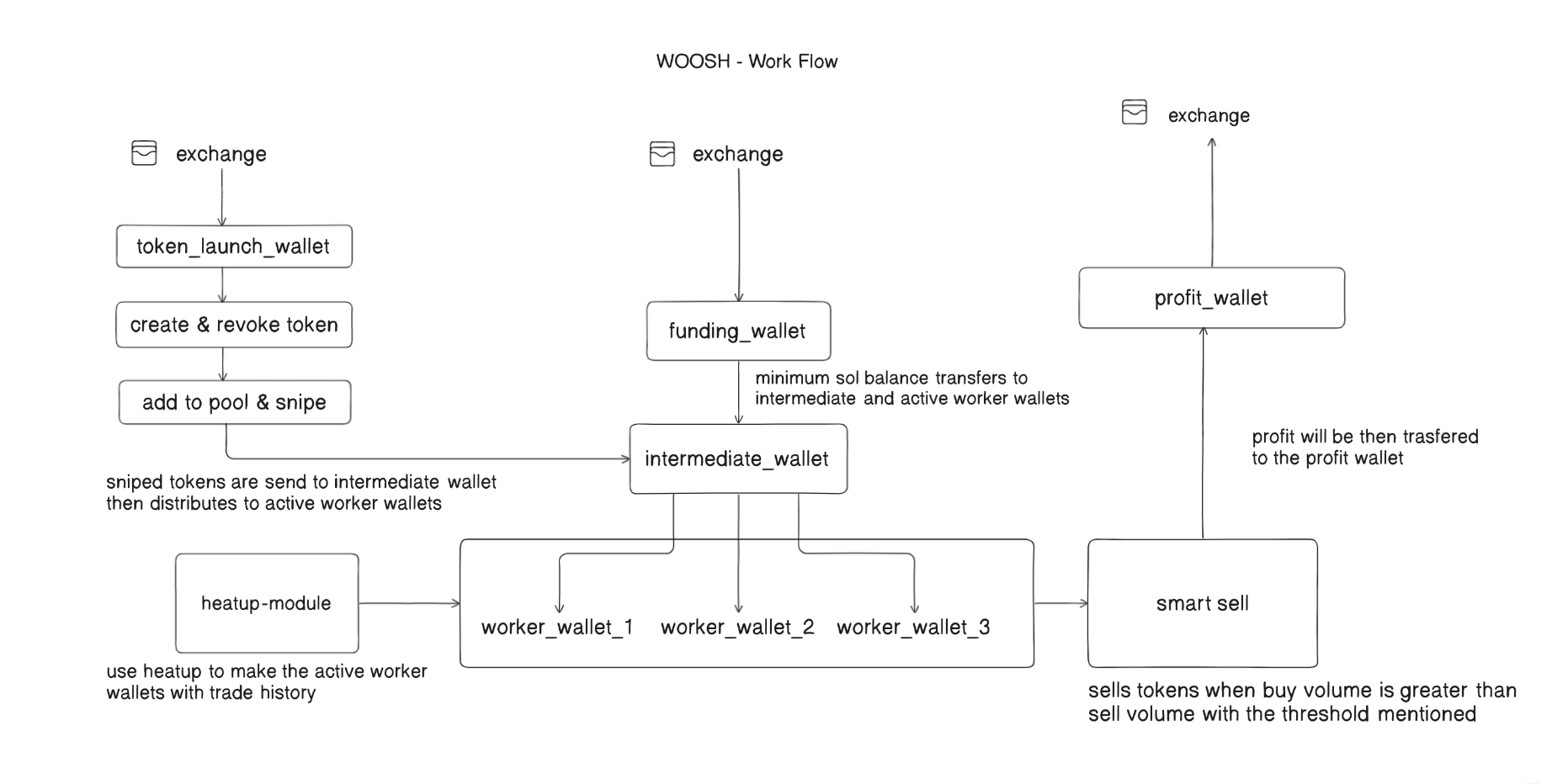
Prerequisites
- Node.js installed
- Properly configured
woosh.configfile - Solana wallets set up for launch, funding, and worker operations
Installation
npm install -g woosh-cli
# or
yarn global add woosh-cli
Configuration
Ensure your woosh.config file is properly configured before running any commands. The CLI will automatically check your configuration on startup.
Command Reference
🪙 Token Tools (woosh tool)
Token utilities for creation, revoking authorities, and SOL wrapping.
woosh tool create-token
Creates and mints a new token using the launchWallet defined in your config file.
Usage:
woosh tool create-tokenwoosh tool revoke-token
Revokes mint authority for the created token. This is a critical security step before launching publicly.
Usage:
woosh tool revoke-tokenwoosh tool wrap-sol-snipe
Wraps native SOL into WSOL for launch sniping. Required for interaction with tokens during launch.
Usage:
woosh tool wrap-sol-snipe🔥 HeatUp Engine (woosh heatup)
Simulate market activity by buying/selling with worker wallets before token distribution.
woosh heatup buy
Simulates token purchases across active worker wallets using the buy_amount from config. Each wallet buys Token B using Token A.
Usage:
woosh heatup buyNote: This process runs with a 3–5s delay per wallet.
woosh heatup sell
Simulates token sales across active worker wallets. Token B is sold, and the corresponding token account is closed.
Usage:
woosh heatup sellNote: This is a slow process with a 3–5s delay per wallet.
💰 Meteora Tools (woosh meteora)
Manage pool creation and staking for your token using Meteora Stake2Earn pools.
woosh meteora create-pool
Creates and locks a Stake2Earn pool using config parameters: pool_token_percentage, pool_sol_amount, and snipe_amount. Pool is permanently locked post creation.
Usage:
woosh meteora create-poolwoosh meteora smart-sell
Calculates total buy & sell volume. If buy volume is greater than sell volume, a percentage (buy_threshold) worth of tokens are sold from 4 random active wallets.
Usage:
woosh meteora smart-sellwoosh meteora sell <percentage>
Sells a specific percentage of the token supply from 4 random active wallets.
Usage:
woosh meteora sell 5.5Arguments:
percentage- Percentage of total supply to sell (e.g., 5.5 for 5.5%)
📈 Staking Operations (woosh stake)
Stake operations using active worker wallets.
Requirements:
enable_active_wallet_staking: truein configactive_wallet_stake_percentagedefined in config
woosh stake start
Stakes tokens from active worker wallets into the Stake2Earn pool. Staking amount is based on active_wallet_stake_percentage from config.
Usage:
woosh stake startwoosh stake report
Generates an Excel (.xlsx) report showing staking status across all active worker wallets.
Usage:
woosh stake reportwoosh stake claim
Claims all accumulated staking fees from the Meteora pool for active worker wallets.
Usage:
woosh stake claimwoosh stake unstake
Unstakes tokens previously staked from active worker wallets.
Usage:
woosh stake unstake🔁 Multi-Wallet Maintenance (woosh multi)
Multi-wallet maintenance utilities using multi_wallet_settings from config. Handles SOL funding, token layering, ATA creation, and cleanup.
woosh multi transfer-sol
Transfers SOL from the funding wallet to active and intermediate wallets. Amounts are defined by active_wallet_sol_balance and intermediate_wallet_sol_balance in config.
Usage:
woosh multi transfer-solwoosh multi transfer-tokens
Executes token layering: transfers from launch wallet → intermediate → active wallets. Uses transfer_batch_size for randomized batch transfers.
Usage:
woosh multi transfer-tokenswoosh multi create-ata
Creates Associated Token Accounts (ATAs) for all intermediate and active wallets. Optional but recommended before token transfers.
Usage:
woosh multi create-atawoosh multi close-accounts
Closes empty token accounts from intermediate wallets post-transfer. This reclaims SOL and reduces clutter.
Usage:
woosh multi close-accountswoosh multi close-inactive
Closes token accounts and wallets with no activity (zero balance) among active wallets. Remaining SOL is sent to the profit_wallet_address.
Usage:
woosh multi close-inactivewoosh multi full-refund
Transfers all Solana and token balance from worker wallets to token launch wallet.
Usage:
woosh multi full-refund📊 Reporting (woosh create-report)
Generates an Excel (.xlsx) report showing SOL and token balances across all intermediate and active wallets.
Usage:
woosh create-report🚀 Launch Automation (woosh launch)
Run predefined automation workflows for token launch.
woosh launch full
Executes the complete launch sequence end-to-end:
- Fund wallets with SOL
- Simulate heat-up (buy/sell)
- Clean up inactive wallets
- Mint token
- Create ATAs
- Revoke token authority
- Wrap SOL
- Create and lock pool
- Transfer tokens to active wallets
- Final cleanup
Usage:
woosh launch fullwoosh launch post-heatup
Executes post heat-up sequence for launch:
- Fund wallets with SOL
- Mint token
- Create ATAs
- Revoke token authority
- Wrap SOL
- Create and lock pool
- Transfer tokens to active wallets
- Final cleanup
Usage:
woosh launch post-heatupConfiguration Requirements
Your woosh.config file should include:
Required Settings
launchWallet- Wallet for token creationfundingWallet- Wallet for funding operationsprofit_wallet_address- Address for profit collectionactive_wallet_sol_balance- SOL amount for active walletsintermediate_wallet_sol_balance- SOL amount for intermediate wallets
Optional Settings
buy_amount- Amount for heat-up buy operationspool_token_percentage- Percentage of tokens for pool creationpool_sol_amount- SOL amount for pool creationsnipe_amount- Amount for sniping operationstransfer_batch_size- Batch size for token transfersenable_active_wallet_staking- Enable staking functionalityactive_wallet_stake_percentage- Percentage of tokens to stakebuy_threshold- Threshold for smart-sell operations
Error Handling
All commands include error handling and will display clear error messages if something goes wrong. Failed commands will exit with status code 1.
Support
For issues and questions, please refer to the project documentation or submit an issue on the repository.
Version
Current version: 1.0.0
⚠️ Important Security Notes:
- Always revoke token authority before public launch
- Keep your wallet private keys secure
- Test all operations on devnet before mainnet deployment
- Ensure sufficient SOL balance in funding wallets before operations
Woosh Guide- Meteora Stake2Earn Pool Launch Guide with multiple wallet
This guide will walk you through the complete process of launching a token on Meteora Stake2Earn pool using the Woosh CLI tool.
Prerequisites
- Woosh CLI tool installed on your PC (follow the installation guide)
- Phantom wallet with 3 wallets created
- Helius or QuickNode RPC access
Step 1: Configuration Setup
1.1 Wallet Configuration
Create 3 wallets in Phantom:
- Launch Wallet - Used for token minting and operations
- Funding Wallet - Used to fund all operations
- Profit Wallet - Used to receive profits (address only required)
Copy the private keys from the first two wallets and the address from the third wallet, then configure them in woosh.config.json:
{
  "mainnet": false,
  "rpc": "https://api.devnet.solana.com",
  "wallet": {
    "launch_wallet_private_key": "your_launch_wallet_private_key",
    "funding_wallet_private_key": "your_funding_wallet_private_key",
    "profit_wallet_address": "your_profit_wallet_address"
  }
}
1.2 RPC Configuration
Sign up for Helius or QuickNode and replace the RPC URL in the config file with your own RPC endpoint.
1.3 Network Configuration
- Set
mainnet: truefor mainnet launch - Set
mainnet: falsefor devnet testing - For devnet testing, visit Solana faucet and paste your funding wallet address to receive 5 SOL
1.4 Token Information
Configure your token details in the config file:
"token": {
  "tokenName": "Your Token Name",
  "decimals": 6,
  "symbol": "TICKER",
  "supply": "1000000000",
  "image": "./logo.png",
  "description": "Token description",
  "imgType": "image/png",
  "imgName": "logo.png",
  "telegram": "https://t.me/your_telegram",
  "twitter": "https://twitter.com/your_twitter",
  "website": "https://your-website.com"
}
1.5 Token Logo Setup
Copy your token logo to the same directory as woosh.config.json. If the filename is not logo.png, rename it accordingly (ensure the extension matches your image type).
Step 2: Token Creation
Once all configuration details are set, mint your token:
woosh tool create-tokenThis command will:
- Mint the token directly to your launch wallet
- Create a
tokenInfo.jsonfile with important details including mint address - Important: Do not delete the
tokenInfo.jsonfile as it contains essential information
Step 3: Multi-Wallet Setup
3.1 Configure Multi-Wallet Settings
"multi_wallet_settings": {
  "intermediate_wallet_count": 5,
  "intermediate_wallet_sol_balance": 0.05,
  "active_wallet_count": 5,
  "active_wallet_sol_balance": 0.005,
  "enable_active_wallet_stake": false,
  "active_wallet_stake_percentage": 50
}
Wallet Calculation:
- Intermediate wallets: 5 wallets
- Active worker wallets: 5 × 5 = 25 wallets (active_wallet_count is a multiplier)
- SOL required for worker wallets: 0.005 × 25 = 0.125 SOL
- SOL required for intermediate wallets: 0.05 × 5 = 0.25 SOL
- Total SOL needed in funding wallet: 0.375 SOL minimum
3.2 Transfer SOL to Wallets
woosh multi transfer-solThis will distribute SOL to all intermediate and active wallets. You can adjust transfer speed in transfer_settings if needed.
3.3 Verify Wallet Balances
woosh create-reportThis generates a wallet_balance.xlsx file showing SOL and token balances for all wallets.
Step 4: Heatup Process (Optional)
Note: Heatup only works on mainnet, not devnet.
The heatup process makes active worker wallets appear as if they were trading before receiving your token:
"heatup_settings": {
  "heatup_token_a": "So11111111111111111111111111111111111111112",
  "heatup_token_b": "6p6xgHyF7AeE6TZkSmFsko444wqoP15icUSqi2jfGiPN",
  "buy_amount_a": 0.001,
  "slippage": 50,
  "delay_in_sec": 1
}
This configuration will buy Trump coin using 0.001 SOL from each worker wallet with a 1-second delay between transactions.
Estimated time: 5 seconds per wallet × 25 wallets = 125 seconds total
Step 5: Pool Creation
5.1 Configure Pool Settings
"pool_settings": {
  "pool_token_percentage": 74,
  "pool_sol_amount": 0.15,
  "snipe_amount": 0.97,
  "pool_lock_percentage": 100
}
This configuration will:
- Use 74% of token supply for pool creation
- Pair with 0.15 SOL
- Snipe with 0.97 SOL worth
- Lock 100% of LP permanently in Stake2Earn pool
5.2 Create Meteora Pool
woosh meteora create-poolThis command will:
- Create the Meteora pool
- Snipe the token
- Lock the LP tokens
- Store sniped tokens in the launch wallet
Step 6: Token Distribution
6.1 Transfer Sniped Tokens
woosh multi transfer-tokensThis process:
- Transfers all tokens from launch wallet to intermediate wallets
- Intermediate wallets distribute random amounts to active wallets
- Continues until all intermediate wallets are empty
6.2 Verify Token Distribution
woosh create-reportCheck the generated wallet_balance.xlsx file to verify token and SOL balances.
6.3 Close Intermediate Accounts
woosh close-accountsThis command:
- Closes token accounts on intermediate wallets
- Reclaims SOL and burns tokens below decimal point
- Returns all SOL to the funding wallet
Step 7: Market Exit Strategies
7.1 Smart Sell (Automated)
Configure smart sell settings:
"smart_sell_settings": {
  "solana_tracker_api_key": "your_api_key",
  "token_address": "your_token_address",
  "pool_address": "your_pool_address",
  "interval": 15,
  "buy_volume_threshold": 0.2
}
Run the smart sell bot:
woosh meteora smart-sellHow it works:
- Checks buy/sell volume every 15 seconds
- When buy volume > sell volume, sells 20% of buy volume
- Uses 4 random worker wallets for selling
- Press
Ctrl+Cto stop the bot
7.2 Manual Sell
Sell a specific percentage of total supply:
woosh meteora sell 1%This command:
- Checks balances of all worker wallets
- Selects 4 wallets with largest holdings
- Sells 1% of total supply to market
Step 8: Funds Management
8.1 Refund Excess SOL
woosh multi refund-solSends excess SOL from worker wallets to profit wallet while maintaining minimum balance.
8.2 Full Refund (Return Everything)
woosh multi full-refundReturns all tokens and SOL from active worker wallets back to the token launch wallet.
8.3 Close Inactive Token Accounts
woosh multi close-inactiveCloses token accounts for worker wallets with token balance below decimal point and returns SOL to launch wallet.
Complete Configuration File
{
  "mainnet": false,
  "rpc": "https://api.devnet.solana.com",
  "wallet": {
    "launch_wallet_private_key": "",
    "funding_wallet_private_key": "",
    "profit_wallet_address": ""
  },
  "token": {
    "tokenName": "token",
    "decimals": 6,
    "symbol": "ticker",
    "supply": "1000000000",
    "image": "./logo.png",
    "description": "this is a description",
    "imgType": "image/png",
    "imgName": "logo.png",
    "telegram": "",
    "twitter": "",
    "website": ""
  },
  "pool_settings": {
    "pool_token_percentage": 74,
    "pool_sol_amount": 0.15,
    "snipe_amount": 0.97,
    "pool_lock_percentage": 100
  },
  "multi_wallet_settings": {
    "intermediate_wallet_count": 5,
    "intermediate_wallet_sol_balance": 0.5,
    "active_wallet_count": 1,
    "active_wallet_sol_balance": 0.5,
    "enable_active_wallet_stake": false,
    "active_wallet_stake_percentage": 50
  },
  "stake_settings": {
    "maximum_stake_wallet": 100,
    "unstake_lock_duration_in_hour": 48,
    "full_unlock_fee_duration_in_day": 48,
    "start_fee_distribution_in_sec": 10
  },
  "batch_settings": {
    "transfer_batch_size": 5,
    "transactions_per_second": 5,
    "delay_in_sec": 1
  },
  "heatup_settings": {
    "heatup_token_a": "So11111111111111111111111111111111111111112",
    "heatup_token_b": "6p6xgHyF7AeE6TZkSmFsko444wqoP15icUSqi2jfGiPN",
    "buy_amount_a": 0.001,
    "slippage": 50,
    "delay_in_sec": 1
  },
  "smart_sell_settings": {
    "solana_tracker_api_key": "",
    "token_address": "",
    "pool_address": "",
    "interval": 0.1,
    "buy_volume_threshold": 20
  }
}
Important Notes
- Always test on devnet before mainnet deployment
- Ensure sufficient SOL balance in funding wallet before operations
- Keep
tokenInfo.jsonfile safe - it contains critical information - Heatup process only works on mainnet
- Smart sell bot runs continuously until manually stopped
- Double-check all configuration settings before proceeding with each step