
worker-link
v0.0.7
Published
Opinionated library to work with threads in Node.js.


Readme
Worker Link
Opinionated library to work with threads in Node.js.
Attention: This library is in heavy development, you should not use it in production.
Prologue
I really like the Elixir way to deal with processes and concurrent communication. But I really love Node and all JS community. And I love so much types and resilient programming. This is the reason to creating this library.
The worker-link library is a set of classes and functions to write JavaScript classes that can run in parallel. Yes, parallel. This library is built on top of Node.js worker_threads module.
Getting Started
npm install worker-linkExample with TypeScript
// fib-worker.ts
import {worker, WorkerJob} from 'worker-link';

@worker({filename: __filename})
export class FibWorker extends WorkerJob {
  fib(num: number): number {
    if (num === 0 || num === 1) {
      return num;
    }
    return this.fib(num - 1) + this.fib(num - 2);
  }

  receive(data: number, from: string) {
    const result = this.fib(data);
    this.reply(result, from);
  }
}
// index.ts
import {spawn} from 'worker-link';
import {FibWorker} from './fib-worker';
for (let i = 0; i < 8; i++) {
const fw = spawn(FibWorker);
fw.send(43)
.then((res) => console.log(`[${i}] fib(43) = ${res}`))
.finally(() => fw.exit());
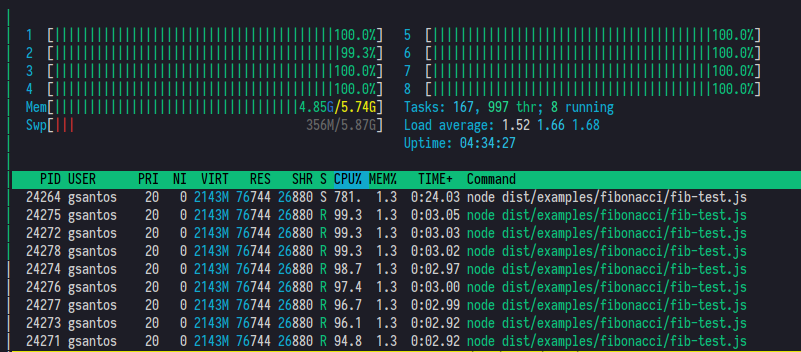
}Remember: you need to compile first because the decorator @worker uses the __filename injected reference. The code uses all threads of an AMD Ryzen 7 processor:
Example with JavaScript
// ./simple-worker.js
const {worker, WorkerJob} = require('worker-link');

class SimpleWorker extends WorkerJob {
  receive(data) {
    console.log('receive data:', data);

    this.reply('OK!');
  }
}

module.exports = worker({filename: __filename})(SimpleWorker);
Then create another file:
// ./index.js
const {spawn} = require('worker-link');
const SimpleWorker = require('./simple-worker');

const sw = spawn(SimpleWorker);

sw.send('hello!').then((data) => console.log('received from thread:', data));
Then run with node:
$ node index.jsYou should see the following message in your terminal:
$ node index.js

receive data: hello!
received from thread: OK!
You terminal will be stuck at here, because the thread is running and waiting for more messages. To end a process you need to call the exit method when the promise terminate:
// ./index.js
const {spawn} = require('worker-link');
const SimpleWorker = require('./simple-worker');

const sw = spawn(SimpleWorker);

sw.send('hello!')
  .then((data) => console.log('received from thread:', data))
  .finally(() => sw.exit());
Now run the node index.js again and your terminal will be released after the thread reply:
$ node index.js

receive data: hello!
received from thread: OK!

$
How it works?
All thread-classes should extend of the WorkerJob class because this class implements the reply method, used to respond when a given message is received.
In TypeScript you can decorate the thread-class with the worker function, or you can compose it, as the way that it works with JavaScript.
When you spawn a thread-class the method send is exposed and you can send any type of messages to that class and wait for the response. The send method returns a Promise, so it's easy to handle the thread result.
All spawned thread-class does not terminate when respond to a given message, if you need to terminate a thread, you can call the method exit.
Roadmap
- [x] Spawn classes as threads.
- [ ] Spawn classes wrapped in supervisors.
- [ ] Spawn supervisors wrapped in supervisors creating the supervisor tree.
- [ ] Better Typescript support