
worldbank-data360
v0.1.6
Published
TypeScript SDK for World Bank Data360 API

Maintainers
 rblyz
rblyzReadme
worldbank-data360
CLI and TypeScript SDK for the World Bank Data360 API. Search 12,000+ indicators across 100+ databases — GDP, population, climate, health, education. No API key required.



Install
npm install -g worldbank-data360Or run without installing:
npx worldbank-data360 discoverQuick start
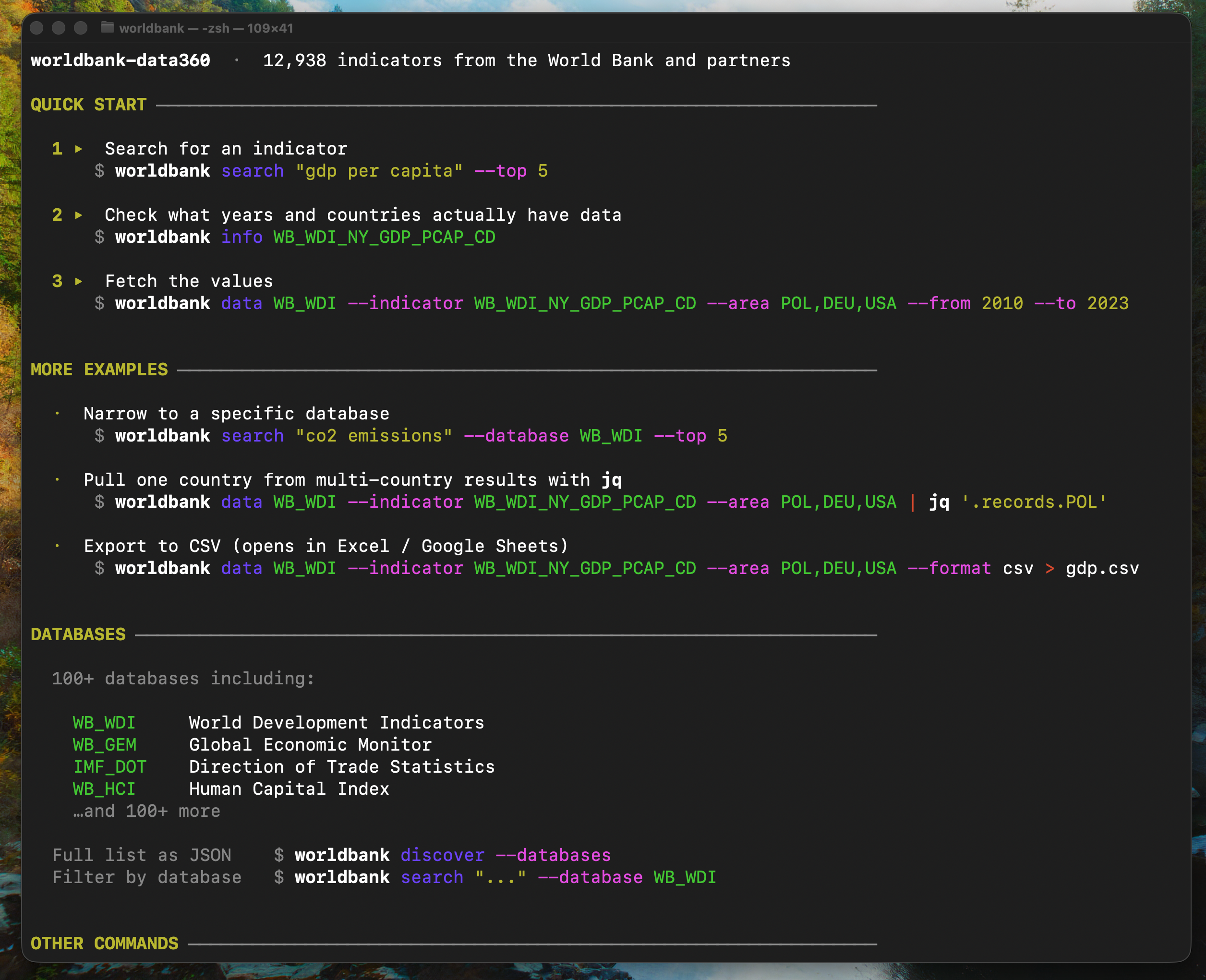
worldbank discoverPrints a guide with examples. Follow the steps — search, check coverage, fetch.
CLI
Search
worldbank search "life expectancy" --top 5 --database WB_WDI{
"total": 549,
"shown": 5,
"items": [
{
"id": "WB_WDI_SP_DYN_LE00_IN",
"name": "Life expectancy at birth, total (years)",
"databaseId": "WB_WDI",
"score": 76.2,
"topics": ["People", "Health"]
}
]
}The indicator ID encodes the database: WB_WDI_SP_DYN_LE00_IN → database WB_WDI.
Check coverage
Before fetching, see which countries and years actually have data:
worldbank info WB_WDI_SP_DYN_LE00_IN{
"name": "Life expectancy at birth, total (years)",
"database": "World Development Indicators (WDI)",
"areas": 265,
"years": "1960–2024"
}If years is a list, the indicator is not published annually — gaps are expected. info also shows disaggregation dimensions (sex, age, urbanisation) when available.
Fetch data
worldbank data WB_WDI --indicator WB_WDI_SP_DYN_LE00_IN --area POL,DEU,USA --from 2010 --to 2023Multiple countries → records grouped by country code automatically:
{
  "count": 42,
  "indicator": "WB_WDI_SP_DYN_LE00_IN",
  "indicatorName": "Life expectancy at birth, total (years)",
  "database": "WB_WDI",
  "meta": { "UNIT_MEASURE": "YR" },
  "records": {
    "DEU": [{ "period": "2010", "value": 80.5 }, ...],
    "POL": [...],
    "USA": [...]
  }
}
Single country → flat array. Repeated metadata in meta, not in every record. SDMX placeholders (_T, _Z) stripped automatically. Pagination is automatic — API caps at 1000 records per call, SDK fetches all pages.
Indicators with sex/age breakdowns show dimensions per record:
worldbank data WB_HCI --indicator WB_HCI_HCI --area FIN,SWE --from 2018 --to 2020{
"records": {
"FIN": [
{ "period": "2018", "value": 0.814 },
{ "period": "2018", "SEX": "M", "value": 0.786 },
{ "period": "2018", "SEX": "F", "value": 0.844 }
]
}
}Export to CSV
Open directly in Excel or Google Sheets:
worldbank data WB_WDI --indicator WB_WDI_NY_GDP_PCAP_CD --area POL,DEU,USA --from 2010 --to 2023 --format csv > gdp.csvarea,period,value
DEU,2010,40408.71
POL,2010,12602.34
USA,2010,48466.73
...Sex/age breakdowns become columns automatically.
All commands
| Command | Description |
|---|---|
| worldbank discover | Quick start guide with examples |
| worldbank discover --databases | List all 100+ databases as JSON |
| worldbank search <query> [--top N] [--database ID] | Search indicators by keyword |
| worldbank info <INDICATOR_ID> | Show name, countries, year range, dimensions |
| worldbank data <DB> --indicator <ID> [--area] [--from] [--to] [--top N] [--all] [--format json\|csv] | Fetch data |
| worldbank explain <DB> --indicator <ID> [...] | Preview query without fetching |
| worldbank countries | List all countries with ISO alpha-3 codes |
Hints appear in stderr after each command — pipe 2>/dev/null to silence.
SDK
npm install worldbank-data360import { WorldBankClient } from 'worldbank-data360'
const client = new WorldBankClient()
const result = await client
.data('WB_WDI')
.indicator('WB_WDI_NY_GDP_PCAP_CD')
.area(['POL', 'DEU', 'USA'])
.from('2010').to('2023')
.fetch()Data queries
const result = await client
  .data('WB_WDI')
  .indicator('WB_WDI_SP_POP_TOTL')
  .area(['POL', 'DEU', 'USA'])
  .from('2000').to('2023')
  .sex('F')           // demographic filters
  .age('Y15T24')
  .urbanisation('U')
  .fetch()
Search
const results = await client
  .search()
  .search('poverty')
  .database('WB_WDI')
  .top(10)
  .fetchItems()
// → { total, shown, items: [{ id, name, databaseId, score, topics? }] }
Discover databases
const overview = await client.discover()
// → { totalIndicators: 12938, databases: [{ id: 'WB_WDI', name: '...', indicatorCount: 1534 }, ...] }
AI-first methods
// Preview query without fetching
const info = client.data('WB_WDI').indicator('WB_WDI_SP_POP_TOTL').area(['POL']).from('2010').to('2023').explain()

// Format as markdown table for an LLM prompt
const ctx = await client.data('WB_WDI').indicator('WB_WDI_SP_POP_TOTL').area('POL').from('2020').to('2023').toContext()
Error handling
import { SDKRequestError } from 'worldbank-data360'

try {
  await client.data('INVALID_DB').fetch()
} catch (err) {
  if (err instanceof SDKRequestError) {
    console.log(err.sdkError.message)    // "HTTP 400 from GET /data360/data"
    console.log(err.sdkError.suggestion) // "Check your DATABASE_ID..."
  }
}
API reference
| Method | Endpoint |
|---|---|
| .discover() | POST /data360/searchv2 (facets) |
| .data() | GET /data360/data |
| .search() | POST /data360/searchv2 |
| .disaggregation() | GET /data360/disaggregation |
| .countries() | GET /V2/country (World Bank V2) |
Both APIs are public — no authentication required.
Data attribution
Data sourced from the World Bank Data360 API and World Bank V2 API. Subject to World Bank Terms of Use.
Unofficial open-source wrapper, not affiliated with or endorsed by the World Bank Group.
License
MIT