
worldmonitor
v0.2.1
Published
Command-line client for the World Monitor global-intelligence API — script country briefs, risk scores, conflict/cyber/market feeds, and MCP tools without writing an API integration.

Maintainers
 worldmonitor
Readme
worldmonitor



Official command-line client for the World Monitor
global-intelligence platform. Run worldmonitor for a full terminal dashboard
(news, markets, conflict, military flights, cyber, climate, predictions, live
news channels and webcams, intel, platform health) with mouse support, themes
and animations. Script country briefs, risk scores, and
conflict / cyber / market / news feeds — plus any registered MCP tool — from
your shell or an agent, without writing an API integration.
The package is dependency-free ESM and runs on Node 18+. The dashboard reads the same public bootstrap tiers the web app reads, so it needs no API key; the scripting commands are a thin wrapper over the MCP server with a REST escape hatch.
📖 Full documentation: Terminal dashboard · Command-line client
Install
npm install -g worldmonitor   # installs the `worldmonitor` command (alias: `wm`)
# or run without installing:
npx worldmonitor tools
Terminal dashboard
worldmonitor            # open the dashboard (same as `worldmonitor tui`)
worldmonitor web        # open the original web dashboard instead
The dashboard boots in a couple of seconds. Views:
| Key | View | What it shows |
|---|---|---|
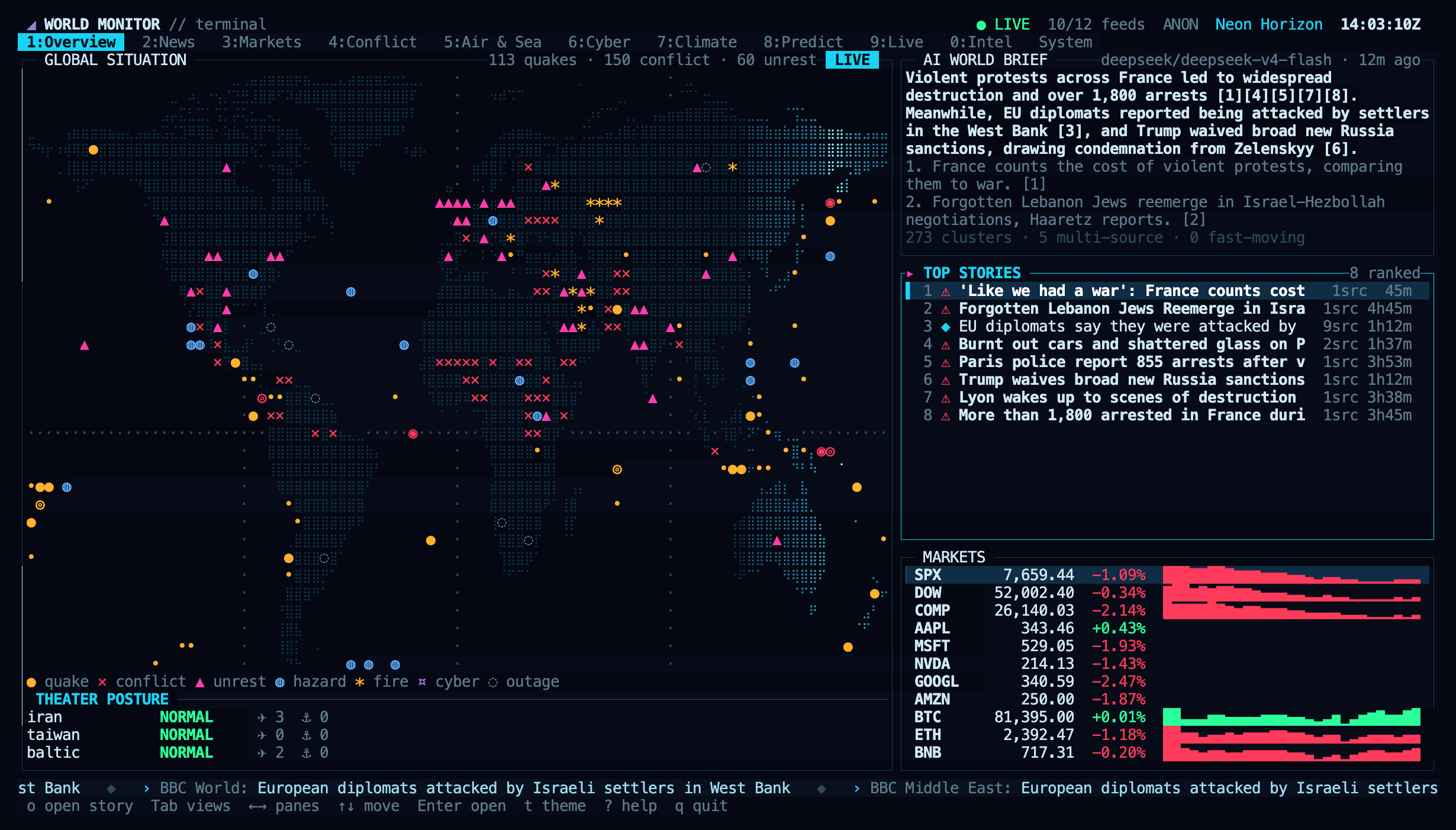
| 1 | Overview | Braille world map with live blips and a radar sweep, AI world brief, ranked top stories, market strip, theater posture |
| 2 | Map | Zoomable world map and rotating globe with every dashboard layer, NASA satellite imagery, hover highlighting, info cards, search |
| 3 | Brief | The AI world brief as a page: story lines beside the sources they cite and related live headlines |
| 4 | News | Digest sections, ranked and classified headlines, story detail |
| 5 | Markets | Indices, commodities, FX, crypto with sparklines, sector heatmap, macro signals, fear & greed, ETF flows, Gulf markets |
| 6 | Conflict | Country instability ranking, UCDP armed-conflict events, unrest signals, posture, correlation cards |
| 7 | Air & Sea | Live military aircraft on the map, airport delays, chokepoints, vessel density, shipping stress |
| 8 | Cyber | Threat indicators, DDoS mix, service status, internet outages and traffic anomalies |
| 9 | Climate | Earthquakes, hazards and outbreaks, weather alerts, climate anomalies, planet vitals |
| 0 | Predict | Prediction markets by domain and AI scenario forecasts |
| Alt+1 | Live | The dashboard's live news channels and webcams, played in the terminal |
| Alt+2 | Intel | GDELT topic feeds, sanctions pressure, travel advisories, social velocity, spending |
| Alt+3 | System | Platform health, per-source freshness, themes, player status |
Controls: Tab / Shift+Tab switch views, ← → move between panes, ↑ ↓
move in lists, Enter expands the selected row of any view into a detail
overlay, o opens its link in the browser, t cycles themes (T picks one),
a toggles animations, r refreshes, ? shows help, q quits. Everything is
also clickable, and the wheel scrolls lists.
The Map view zooms (wheel, + -) and pans (drag, arrows) a world map drawn
from the dashboard's own 50 m geometry, or an auto-rotating globe (g), with
NASA satellite imagery (s, i cycles Blue Marble, daily true colour and
night lights) and the live day/night terminator (d). L picks the
layers: cables, pipelines, energy storage and disruptions, data centers,
ports, airports and delays, chokepoints, trade routes, bases, nuclear sites,
radiation monitors, spaceports, military aircraft, satellites, hotspots,
conflict zones, quakes, fires, storms, weather alerts, outbreaks, protests,
outages, cyber infrastructure, ship-traffic density, exchanges, mines, tech
HQs, choropleths and more. Hover anything to highlight its whole layer and read
its card; click pins, Enter opens the full record, / searches.
The dashboard guide has
screenshots of every view, all keys, options and troubleshooting.
Themes: Neon Horizon, Matrix, Amber CRT, Red Alert, Glacier, Synthwave. The
choice persists in $XDG_CONFIG_HOME/worldmonitor/tui.json. Flags:
--theme <id>, --no-anim, --fps <n>, --base-url <url>.
Live video plays through mpv (with yt-dlp for YouTube):
inside the terminal using the Kitty graphics protocol on Ghostty, Kitty and
WezTerm, or truecolor cells elsewhere (Enter), in an mpv window (w), or in
the browser (b). Without mpv the browser is used.
worldmonitor web starts the Vite dev server when run inside a repository
checkout and opens it; anywhere else it opens
worldmonitor.app/dashboard. Flags:
--hosted, --port <n>, --no-open, --url <url>.
Quick start
# Discover every tool — public, no key needed
worldmonitor tools

# All data commands except `call get_sources` need a subscription API key
# (get one at https://worldmonitor.app/pro)
export WORLDMONITOR_API_KEY=wm_xxxxxxxx

worldmonitor world                       # live global situation brief
worldmonitor country IR                  # AI strategic brief for a country
worldmonitor risk DE                      # country risk / resilience scores
worldmonitor conflicts --country IR --limit 5
worldmonitor markets --asset_class crypto
worldmonitor call get_cyber_threats --min_severity 7
Commands
Dashboard:
tui(or no command on a terminal) — interactive terminal dashboardweb— the original web dashboard (dev server in a checkout, hosted otherwise)
Data commands map to MCP tools/call. call get_sources is the sole credential-free, daily-quota-free data call; its anonymous path has a separate fail-closed ceiling of 10 calls/minute/IP. Every other data command requires --api-key:
world— live global situation briefcountry <ISO>— AI strategic brief for a country (ISO 3166-1 alpha-2)risk <ISO>— country risk / resilience scoresmarkets— equities, commodities, crypto, FX quotesconflicts— recent conflict events (--country,--min_fatalities,--limit)cyber— cyber-threat indicators (--min_severity,--threat_type,--country)news— classified news intelligence (--topic,--country,--alerts_only)disasters— earthquakes, fires, storms (--dataset,--active_only)sanctions— sanctions designations (--country,--query)forecasts— scenario forecasts (--domain,--region)maritime <ISO>— maritime / port activity for a country
MCP and REST:
tools— list every MCP tool (public — no key needed)call <tool> [--arg val]— call any MCP tool (--args '<json>'for typed args)prompts/resources— list MCP prompt / resource templateshealth— API status / health check (requires--api-key)get <path> [--param val]— call a raw REST path (host-relative/api/…)list [service]— list documented REST operations from the live OpenAPI spec
Any --key value pair you pass that is not a recognised flag becomes a tool or
request parameter, so every tool argument is reachable without special wiring.
Every tool also accepts a jmespath argument that projects the response
server-side before it crosses the wire — typically 80–95% smaller:
worldmonitor markets --jmespath 'data."stocks-bootstrap".quotes[?symbol==`AAPL`].{s:symbol,p:price}'See the JMESPath guide for worked examples.
Flags
--api-key <key>— user API key (or envWORLDMONITOR_API_KEY)--mcp-url <url>— MCP endpoint (defaulthttps://worldmonitor.app/mcp)--base-url <url>— REST base (defaulthttps://api.worldmonitor.app)--args <json>— typed arguments object for a tool call--timeout <ms>— request timeout (default 30000)--theme <id>,--no-anim,--fps <n>— dashboard only; other commands pass them to the API as parameters--hosted,--port <n>,--no-open,--url <url>—webonly; other commands pass them to the API as parameters--raw— print the response body verbatim--compact— print single-line JSON-h, --help/-v, --version
Exit codes
0— success1— request or transport error (the response body is written to stderr)2— usage error
Programmatic use
import { run } from 'worldmonitor/run';

const code = await run(['risk', 'IR'], { env: process.env });
License
MIT-licensed thin client (the World Monitor platform itself remains AGPL-3.0). Part of the World Monitor project.