
wpdockerize
v1.0.7
Published
wpdockerize is a package that allows you to effortlessly generate a `docker-compose.yml` file to set up a simple WordPress stack
Downloads
84

Maintainers
 diegobetto
Readme
wpdockerize
wpdockerize is a package that allows you to effortlessly generate a docker-compose.yml file to set up a simple WordPress stack. Through an interactive command, it enables you to define customized configurations for Docker, WordPress, MailHog, and MySQL, eliminating the complexity of manually writing the file.
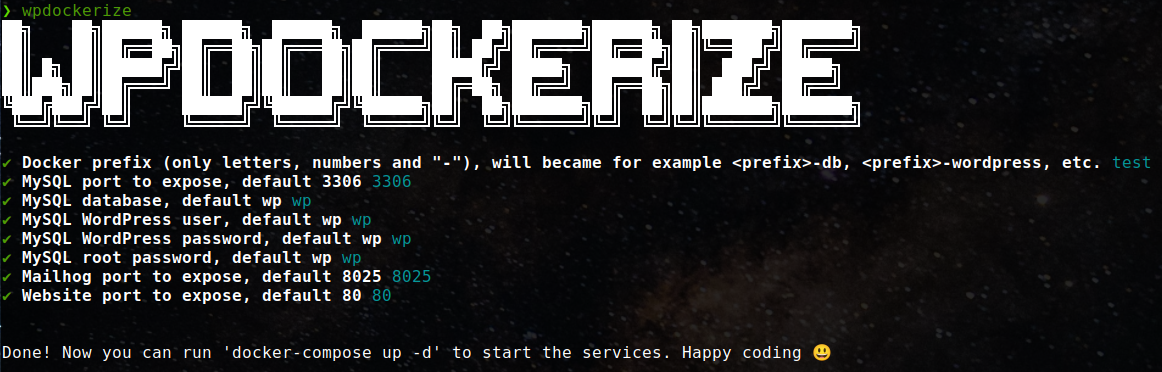
With wpdockerize, you can quickly set up a containerized and ready-to-use WordPress development environment.
Table of Contents
Installation
You can install the package globally using npm to access it easily from anywhere:
npm install -g wpdockerizeUsage
Once installed, you can simply run the wpdockerize command to start the interactive process:
wpdockerizeThe command will guide you through a series of questions to configure essential variables such as:
- Docker containers prefix
- MySQL details (user, password, port, etc.)
- MailHog configurations (SMTP and port)
- WordPress port
At the end of the process, a docker-compose.yml file will be generated in the current directory.
Requirements
To use wpdockerize, you need:
- Node.js and npm.
- Recommended version: Node.js >= 16.x
- Docker.
- Ensure you have Docker and Docker Compose installed on your system.
License
This project is licensed under the GNU GPLv3 License.
Enjoy your simplified WordPress development experience with Docker! 🚀