
wpkg-table-pro
v1.0.9
Published
> yarn add wpkg-table-pro > 引入样式 ```ts import 'wpkg-table-pro/dist/style.css'; ```

Maintainers
 yilongwang72
Readme
Antd4 Table 增强
yarn add wpkg-table-pro 引入样式
import 'wpkg-table-pro/dist/style.css';TablePlusDemo
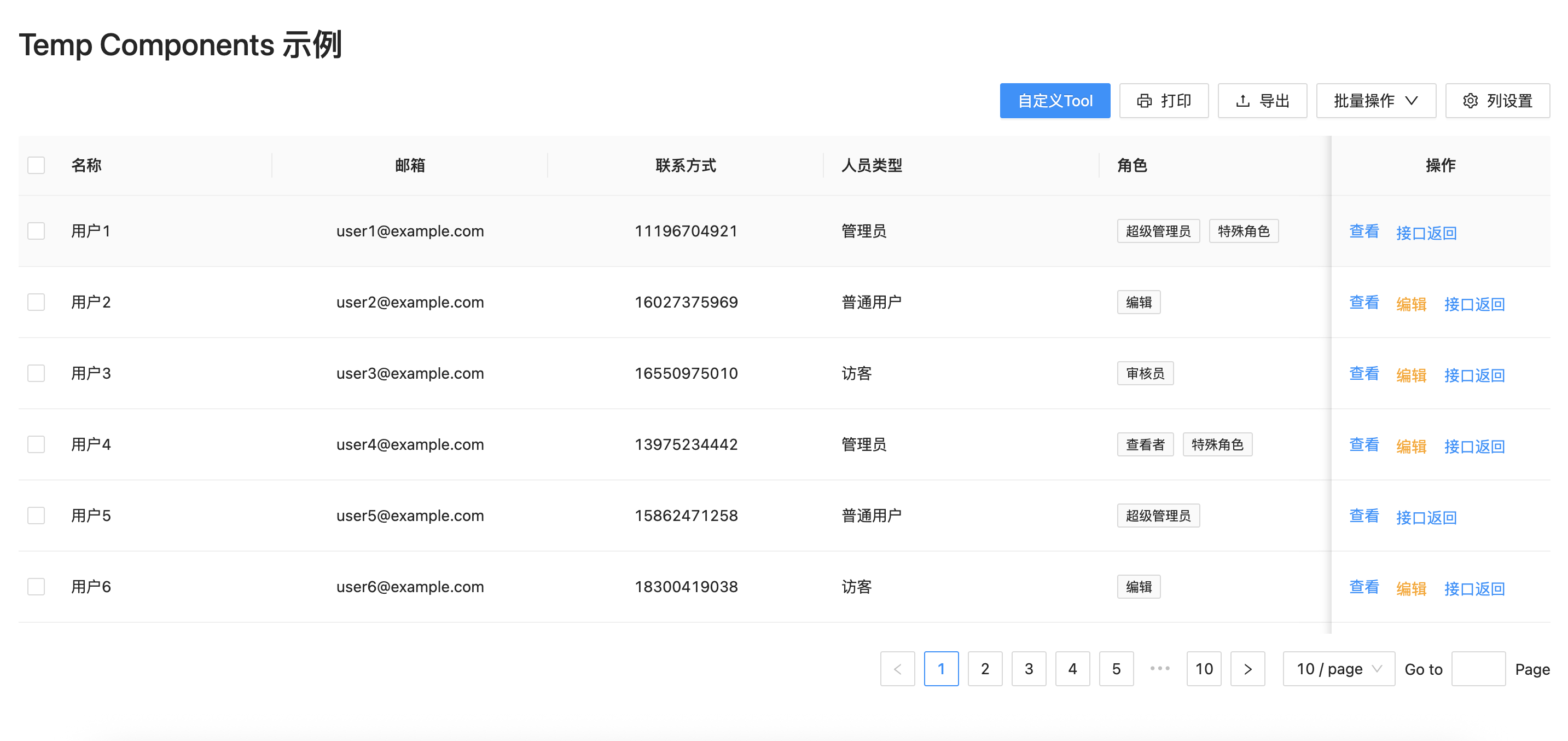
如果你要更新数据 可以给tablePlus 传一个ref 会暴露出来一个 refresh 方法 如果你有搜索表单 你可以把搜索表单的值 传给 tablePlus 的 params 属性
import TablePlus from '../components/TablePlus'
import type { ColumnPlusType } from '../components/TablePlus/types'
import { ExportOutlined, DeleteOutlined } from '@ant-design/icons';
import { Button, Tag } from 'antd'

interface User {
    name: string
    email: string
    phone: string
    type: { name: string }
    roles: { id: string | number; name: string }[]
}

const columns: ColumnPlusType<User>[] = [
    {
        dataIndex: 'name',
        title: '名称',
        key: 'name',
        width: 200
    },
    {
        dataIndex: 'email',
        title: '邮箱',
        key: 'email',
        align: 'center'

    },
    {
        dataIndex: 'phone',
        title: '联系方式',
        key: 'phone',
        align: 'center'
    },
    {
        dataIndex: 'type',
        title: '人员类型',
        key: 'type',
        render: (type) => type.name
    },
    {
        dataIndex: 'roles',
        title: '角色',
        key: 'roles',
        render: (roles) => (
            <div style={{ display: 'flex', flexWrap: 'wrap' }}>
                {roles.map((item: any) => (
                    <Tag key={item.id} style={{ marginRight: 8 }}>{item.name}</Tag>
                ))}
            </div>
        )
    },
    {
        dataIndex: 'operation',
        title: '操作',
        key: 'operation',
        width: 200,
        fixed: 'right',
        align: 'center',
        operations: [
            {
                key: 'edit',
                label: '编辑',
                buttonProps: {
                    style: {
                        color: 'orange'
                    }
                },
                show: (record)=>{
                    //如果角色是超级管理员 不可以被人编辑
                    const isAdmin = record.roles.find((role:any) => role.name === '超级管理员');
                    return !isAdmin;
                }
            },
        ],
        render:(_:any,record:User,index:number)=>{
            return <>
                <a onClick={() => { console.log('查看', record) }}>查看</a>
            </>
        },
        operateClick: (key: string, record: User) => {
            console.log(key, record)
        }
    }
]

const fetchData = async (params: Record<string, any>) => {
    const { page = 1, pageSize = 10, keyword = '' } = params;

    // 模拟延迟
    await new Promise(resolve => setTimeout(resolve, 500));

    // 创建模拟数据
    const mockUsers: User[] = Array.from({ length: 100 }, (_, index) => ({
        name: `用户${index + 1}${keyword ? `-${keyword}` : ''}`,
        email: `user${index + 1}@example.com`,
        phone: `1${Math.floor(Math.random() * 10000000000).toString().padStart(10, '0')}`,
        type: { name: index % 3 === 0 ? '管理员' : index % 3 === 1 ? '普通用户' : '访客' },
        roles: [
            { id: index, name: index % 4 === 0 ? '超级管理员' : index % 4 === 1 ? '编辑' : index % 4 === 2 ? '审核员' : '查看者' },
            ...(index % 3 === 0 ? [{ id: `extra-${index}`, name: '特殊角色' }] : [])
        ]
    }));

    // 模拟搜索过滤
    let filteredData = [...mockUsers];
    if (keyword) {
        filteredData = filteredData.filter(user =>
            user.name.includes(keyword) ||
            user.email.includes(keyword) ||
            user.phone.includes(keyword)
        );
    }

    // 分页处理
    const startIndex = (page - 1) * pageSize;
    const endIndex = startIndex + pageSize;
    const paginatedData = filteredData.slice(startIndex, endIndex);

    // 添加操作按钮
    const result = paginatedData.map(item => {
        return {
            ...item,
            actions: [
                { key: 'edit2', label: '接口返回'},
            ]
        };
    });

    // 返回模拟响应
    return {
        data: result as User[],
        total: filteredData.length,
        success: true
    };
};

const TablePlusDemo = () => (
    <div>
        <TablePlus
        toolBarRender={()=>{
            return <Button type='primary'>自定义Tool</Button>
        }}
        options={{
            print:{
                show:true,
                onClick:()=>{
                    console.log("print");
                }
            },
            outPut:{
                show:true,
                onClick:()=>{
                    console.log("outPut");
                }
            },
            batch: {
                onClick: (rows, key) => {
                    console.log("最外边的Rows》》", rows);
                    console.log("最外边的key》》", key);
                },
                dropDownOptions: [
                    {
                        label: '批量删除2',
                        key: 'batchDelete',
                        icon: <DeleteOutlined />
                    },
                    {
                        label: '批量导出',
                        key: 'batchOutput',
                        icon: <ExportOutlined />
                    }
                ]
            }
        }} style={{ width: 1440 }} scroll={{ x: 1440, y: 400 }} pagination={{ pageSize: 10 }} columns={columns} request={fetchData} />
    </div>
)

export default TablePlusDemo
FormPlusDemo

import { ExportOutlined } from '@ant-design/icons';
import { Button, Form } from 'antd'
import FormPlus, { FormConfig } from '../components/FormPlus';

const genderOptions = [
    { label: '男', value: 'male' },
    { label: '女', value: 'female' },
    { label: '其他', value: 'other' },
];


const FormPlusDemo = () => {
    const [form] = Form.useForm();
    const formConfig: FormConfig = {
        items: [
            // 基本信息部分
            {
                label: '邮箱',
                name: 'email',
                type: 'text',
                props: {
                    placeholder: '请输入邮箱地址',
                },
            },
            {
                label: '手机号',
                name: 'phone',
                type: 'text',
                props: {
                    placeholder: '请输入手机号码',
                    maxLength: 11,
                },
                rules: [
                    { required: false, message: '请输入手机号码' },
                    { pattern: /^1[3-9]\d{9}$/, message: '请输入有效的手机号码' },
                ],
            },
            {
                label: '性别',
                name: 'gender',
                type: 'radio',
                options: genderOptions,
                props: {
                    buttonStyle: 'solid',
                },
            },
            {
                label: '年龄',
                name: 'age',
                type: 'number',
                props: {
                    placeholder: '请输入年龄',
                    min: 18,
                    max: 120,
                    style: { width: '100%' },
                },
            },
            {
                label: '出生日期',
                name: 'birthdate',
                type: 'date',
                props: {
                    placeholder: '请选择出生日期',
                    style: { width: '100%' },
                    format: 'YYYY-MM-DD', // 日期格式
                },
            },
            {
                label: '个人简介',
                name: 'bio',
                type: 'text',
                props: {
                    placeholder: '请输入个人简介',
                    rows: 4,
                    maxLength: 200,
                    showCount: true,
                },
            },
        ],
        onSubmit: (values) => {
            console.log('表单提交数据:', values);
        },
        onReset: () => {
            console.log('表单已重置');
        },
        layout: 'horizontal',
        form: form,
        onValuesChange: () => {
        },
        actionBarRender: (<>
            <Button type="primary" icon={<ExportOutlined />} onClick={() => { console.log('导出') }}>
                自定义
            </Button>
        </>
    )
    }

    return (
        <FormPlus {
            ...formConfig
        }></FormPlus>
    )
}

export default FormPlusDemo