
wslog-proxy
v0.1.1
Published
Record any WebSocket traffic and watch it live in a browser dashboard. No code changes.

Maintainers
 houysengleang
Readme
wslog


Point your app at wslog, open the browser, watch every WebSocket message. No code changes.
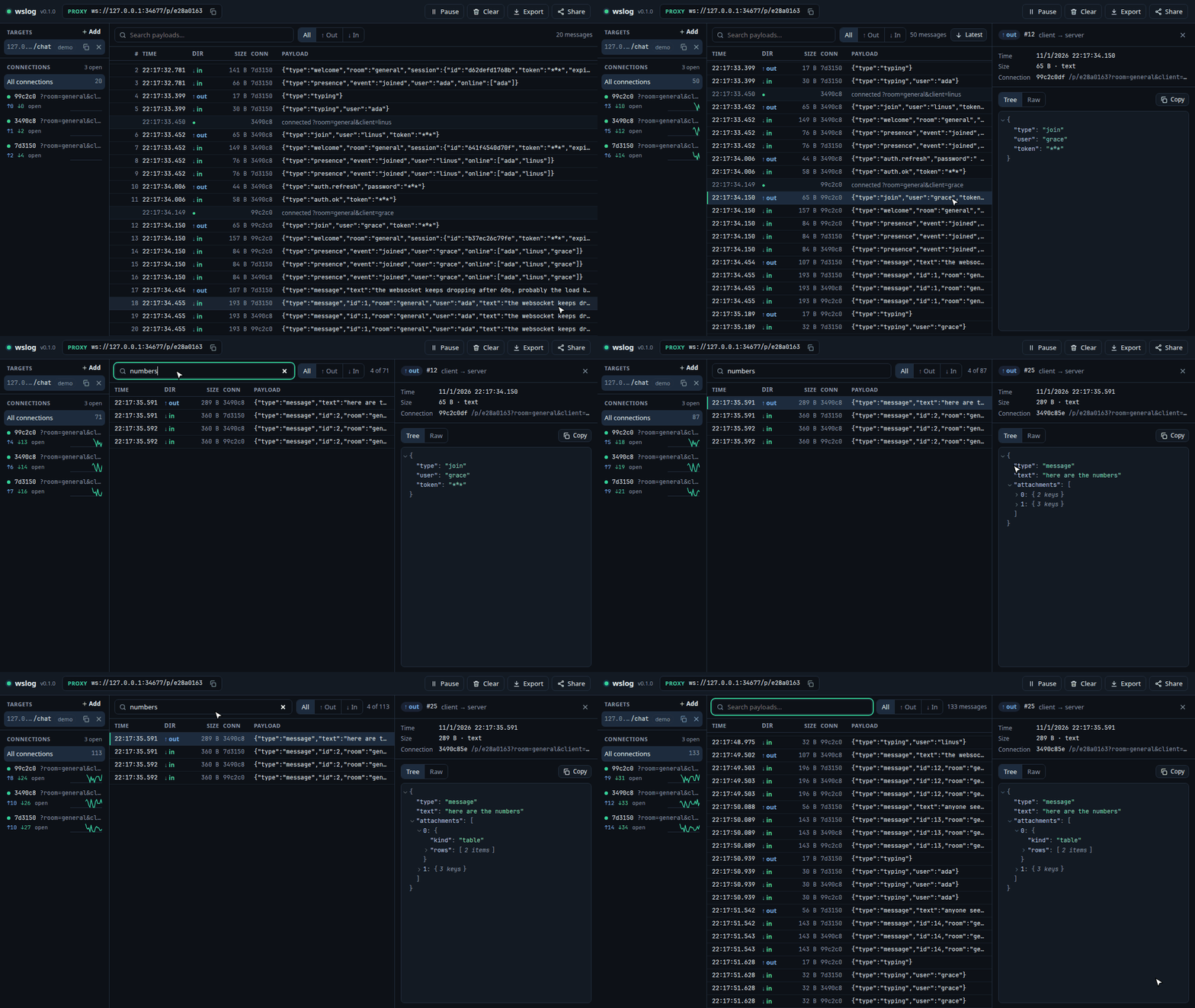
wslog is an open-source proxy that sits between your client and your WebSocket server, records every message, and streams it live to a browser dashboard.
npx wslog-proxy          # dashboard at http://localhost:4000
npx wslog-proxy --demo # same, plus a fake chat server so you can try it- Open
http://localhost:4000. - Paste the
ws://orwss://URL your app connects to. - Copy the proxy URL (e.g.
ws://127.0.0.1:4000/p/3f9a1c2b) and use it in your app instead. - Watch messages arrive live.
Path and query are passed through: ws://127.0.0.1:4000/p/3f9a1c2b/chat?room=1 reaches <target>/chat?room=1. Handshake headers (cookies, Authorization, Origin) and the negotiated subprotocol are forwarded too. Proxy URLs are derived from the target URL, and wslog remembers your targets (in ~/.config/wslog/targets.json), so the proxy URL in your app keeps working across restarts.
Features
| | |
| --- | --- |
| Proxy | Forwards text and binary frames both ways; mirrors close codes; passes handshake rejections (401, 404, …) through |
| Setup in the browser | Paste a target URL, get a proxy URL. No flags to learn |
| Multiple targets | Proxy several servers at once, each with its own proxy URL; click one to see only its traffic |
| Live traffic table | Time, direction, size, connection, preview. Virtualized, stays fast with tens of thousands of rows |
| Detail pane | Collapsible JSON tree, raw view, hex/base64 for binary, copy |
| Connections sidebar | Status, close code, in/out counts, 30-second message-rate sparkline |
| Controls | Pause/resume, search, filter by direction, connection, or target, clear, export JSON |
| Share link | Read-only live view protected by a token |
| Storage | In memory (default), JSONL file, or SQLite, with a size limit |
| Demo mode | --demo starts a fake chat server with simulated users |
| Safe defaults | Binds to localhost; masks configured fields before anything is stored |
Install
npx wslog-proxy                              # no install
npm i -g wslog-proxy && wslog                # global; the command is `wslog`
docker run -p 4000:4000 ghcr.io/hoysengleang/wslog  # Docker
Requires Node.js 22 or newer.
In Docker, localhost means the container. Use ws://host.docker.internal:8080 to reach a server on your machine; on Linux, also pass --add-host=host.docker.internal:host-gateway to docker run. The container listens on 0.0.0.0, so open the admin link printed in the logs, or set a known token with -e WSLOG_ADMIN_TOKEN=.... The printed links assume -p 4000:4000; if you map another port, set -e WSLOG_PUBLIC_URL=http://localhost:<port>. To remember targets across container restarts, add -v wslog:/home/node/.config/wslog.
Options
| Flag | Env | Default | Purpose |
| --- | --- | --- | --- |
| [target-url...] | WSLOG_TARGET | – | Register targets on startup. Pass several, or separate them with spaces or commas in the env var |
| -p, --port | WSLOG_PORT | 4000 | Dashboard and proxy port |
| -H, --host | WSLOG_HOST | 127.0.0.1 | Bind address. Use 0.0.0.0 only on a trusted network |
| --public-url | WSLOG_PUBLIC_URL | from host and port | Address people use to reach wslog, for printed and share links, e.g. http://localhost:8080 when Docker maps port 8080 |
| -m, --mask | WSLOG_MASK | none | Field names to hide, e.g. token,password |
| --max-messages | WSLOG_MAX_MESSAGES | 10000 | Storage limit; oldest dropped first |
| --max-payload | – | 1048576 | Bytes kept per message; longer payloads are truncated (still forwarded in full) |
| --store | WSLOG_STORE | memory | memory, ./traffic.jsonl, or ./traffic.db (SQLite, needs Node.js 22.13+) |
| --share-token | WSLOG_SHARE_TOKEN | random | Token for the read-only share link |
| --admin-token | WSLOG_ADMIN_TOKEN | random | Token for full access from other machines |
| – | WSLOG_TARGETS_FILE | ~/.config/wslog/targets.json | Where targets are remembered between runs. Set it empty to keep them in memory only |
| --demo | – | off | Start a fake chat server (also masks token, password) |
| -o, --open | – | off | Open the dashboard in your browser |
| --verbose / -q, --quiet | – | – | Debug logging / errors only |
Memory: the memory and .jsonl stores keep messages in RAM, up to --max-messages × --max-payload bytes in the worst case (about 10 GB with the defaults if every message were 1 MB). For heavy traffic, lower --max-payload or use a .db (SQLite) store.
Security
WebSocket traffic often carries tokens and personal data, so wslog is safe by default:
- It listens on
127.0.0.1only. Requests from this machine get full access; anything else needs a token. - Masking happens before storage. Masked values never reach disk, the dashboard, or exports. JSON is masked at any depth, including JSON encoded inside strings; other text by
key=value/"key": "value"patterns (escaped or not), and URLs by query parameter, including target URLs. Binary frames that contain UTF-8 text are masked the same way. Passwords in URLs (ws://user:pass@host) are always hidden. - Handshake headers (cookies,
Authorization) are forwarded to your server but never stored or shown. Only theUser-Agentis recorded. - Saved traffic (
.jsonl,.db) and the targets file are readable only by your user. Fields you did not mask are stored as sent, so treat these files like logs that contain secrets. - Share links are read-only and need the share token.
- When wslog listens beyond localhost (including in Docker), it prints the admin link in its logs. Anyone who can read those logs gets full access, so keep them private or set your own
--admin-token. - The dashboard API rejects cross-origin requests, including
Origin: null(sandboxed iframes, local HTML files). Access without a token needs a localHostname, so DNS rebinding cannot reach it. Other sites cannot frame the dashboard. - v0.1 has no user accounts. Do not expose wslog to the internet.
Found a vulnerability? Please report it privately; see SECURITY.md.
How it compares
| | wslog | Browser DevTools | wscat / websocat | mitmproxy | | --- | --- | --- | --- | --- | | Works for non-browser clients (Node, mobile, IoT) | ✅ | ❌ | ✅ (you are the client) | ✅ | | Live UI built for WebSocket traffic | ✅ | ✅ | ❌ | partial | | Search, filter, export across connections | ✅ | limited | ❌ | ✅ | | Share a live view with a teammate | ✅ | ❌ | ❌ | ❌ | | Setup | one command, no certs | none | none | proxy config + CA cert for TLS |
Development
npm install
npm run dev      # server on :4000 (with --demo) + Vite dashboard on :5173
npm run check    # typecheck + lint + unit tests
npm run test:e2e # real browser against a real wslog (first time: npx playwright install chromium)
npm run build    # dist/ (server) + dist/web (dashboard)
See docs/architecture.md for how the code is organized and how to extend it, and CONTRIBUTING.md to get started.