
wt-manager
v1.7.2
Published
CLI tool for managing Git worktrees efficiently with GitHub integration

Maintainers
 achtan
Readme
Git Worktree Manager
The dashboard Git forgot to include.
The Problem
Git worktrees let you work on multiple branches simultaneously—but managing them? That's where the fun ends.
- "Which folder was that again?" - You have 5 worktree directories and zero memory of which one has
feature/auth - The GitHub tab dance - Constantly switching to check if that PR got merged yet, or if it's still sitting in review purgatory
- Stale worktree graveyard - Merged PRs pile up as forgotten worktrees, each one silently judging your organizational skills
- Three tools, zero coordination - Git knows your worktrees. GitHub knows your PRs. Your filesystem knows your folders. They don't talk to each other.
The Solution
wt gives you the dashboard Git forgot to include.
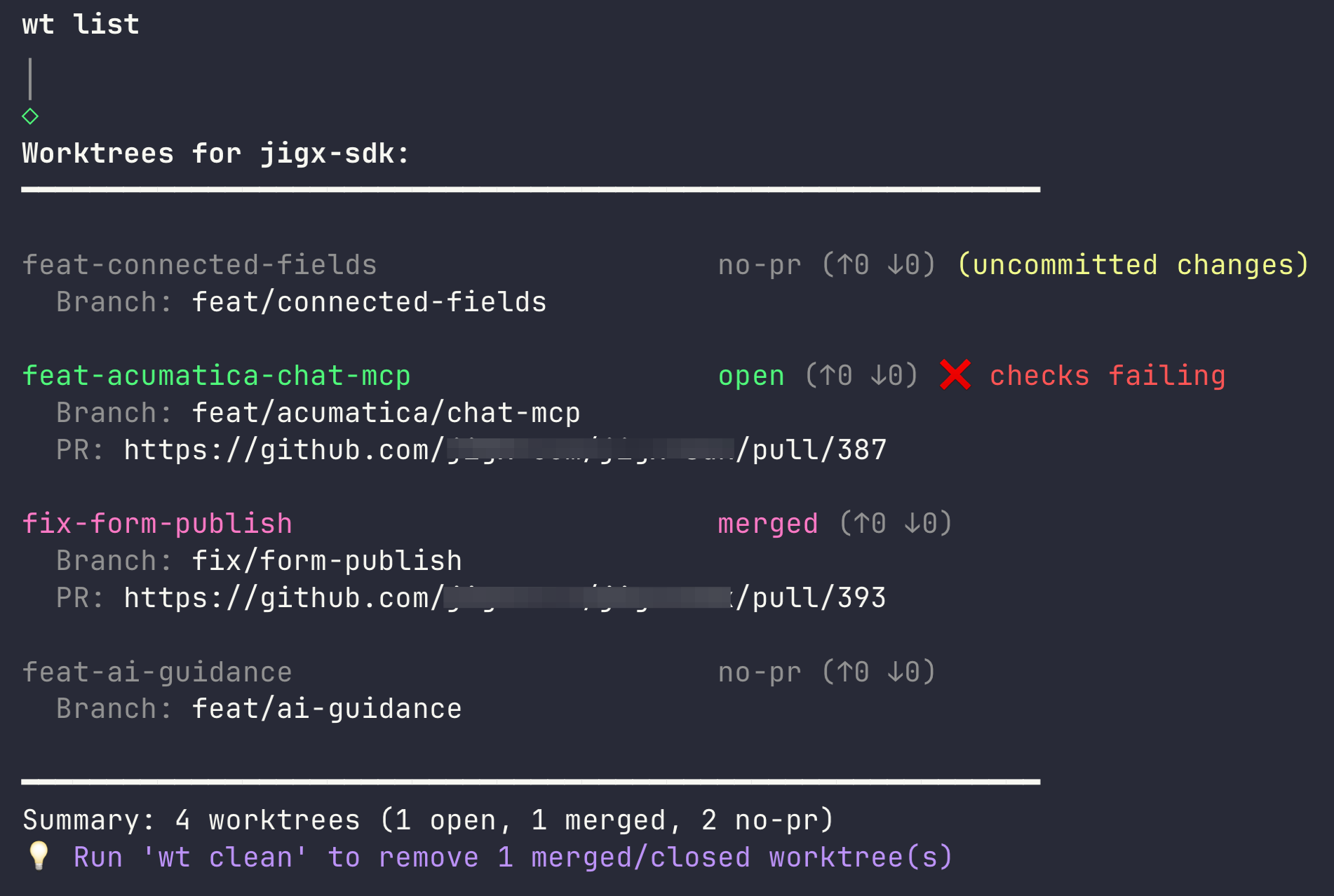
The wt list command shows you everything:
- All your worktrees with their PR status (open/draft/merged/closed)
- Which branches are ahead/behind
- CI check status (passing/failing)
- Uncommitted changes warnings
And when you're done? wt clean finds all merged/closed PRs and removes their worktrees and branches in one go. It even asks nicely before deleting anything.
Quick Start
Requirements: Bun 1.0+, Git, and GitHub CLI (gh auth login)
# Install globally
bun install -g wt-manager

# Create a new worktree
wt new feature/my-feature

# See all worktrees with PR status
wt list

# Quick status of current worktree
wt status

# Copy worktree path to clipboard
wt path

# Clean up merged/closed worktrees
wt clean

# Check environment setup
wt doctor
Commands
wt new <branch-name> [base-branch]
Create a new worktree for a new branch. Worktrees are created in ../<repo>-worktrees/ directory.
# Create worktree from default branch
wt new feature/new-feature

# Create worktree from specific base branch
wt new feature/new-feature develop

# CI/CD: get just the path
wt new feature/new-feature -q

# Composable with cd
cd $(wt new feature/new-feature -q)

# Interactive but skip the postCreate command
wt new feature/new-feature --no-post-create
Arguments:
<branch-name>- Name of the new branch to create[base-branch]- Base branch to create from (default: auto-detected from origin/HEAD)
Options:
-q, --quiet- Print only the worktree path (implies--no-post-create, skips clipboard)--no-post-create- Skip thepostCreatecommand from.wtrc.js
Behavior:
- Automatically creates the worktree directory structure
- Converts slashes in branch names to dashes for directory names (e.g.,
feature/foo→feature-foo) - Shows spinner during creation
- Fails if branch already exists locally
- Copies/symlinks files based on
.wtrc.jsconfig (see Configuration) - Runs post-create commands from config
- Copies worktree path to clipboard for easy navigation
wt list (alias: ls)
List all worktrees with their status, PR information, and branch details.
# List all worktrees with status
wt list

# JSON output format
wt list --json
Options:
--json- Output in JSON format (disables spinner)
Output includes:
- Worktree directory name
- PR status (open/draft/merged/closed/no-pr)
- Branch ahead/behind counts relative to default branch
- Uncommitted changes indicator
- CI check status (passing/failing)
- Current worktree indicator
- PR URL (if available)
- Summary statistics
Example output:
Worktrees for my-repo:
━━━━━━━━━━━━━━━━━━━━━━━━━━━━━━━━━━━━━━━━━━━━━━━━━━━━━━━━━━━━

feature-auth                             open (↑3 ↓0)
  Branch: feature/auth
  PR: https://github.com/owner/repo/pull/123

bugfix-login                             merged (↑0 ↓2)
  Branch: bugfix/login

━━━━━━━━━━━━━━━━━━━━━━━━━━━━━━━━━━━━━━━━━━━━━━━━━━━━━━━━━━━━
Summary: 2 worktrees (1 open, 1 merged)
💡 Run 'wt clean' to remove 1 merged/closed worktree(s)
wt clean
Remove worktrees for branches with merged or closed PRs, abandoned folders, and orphan worktrees. Uses interactive checkbox selection.
# Clean up merged/closed worktrees (interactive)
wt clean

# Dry run to see what would be removed
wt clean --dry-run

# Skip interactive selection (select all)
wt clean --force
Options:
-d, --dry-run- Show what would be removed without actually removing-f, --force- Skip interactive selection (removes all cleanable items)
What it detects:
- Merged/Closed worktrees - Worktrees with merged or closed PRs
- Abandoned folders - Directories in worktrees folder without
.git(leftover from manual deletions) - Orphan worktrees - Directories with
.gitfile pointing to non-existent gitdir
Safety features:
- Shows spinner while checking PR status
- Automatically skips worktrees with uncommitted changes (warns user)
- Skips the current worktree
- Interactive checkbox selection to choose what to remove
- Automatically deletes local branch when removing worktree
- Only processes worktrees in
<repo>-worktrees/directory
Example flow:
Scanning worktrees...
Checking PR status...
Scanning for abandoned folders...

⚠ Skipped (uncommitted changes):
  bugfix-draft (bugfix/draft)

? Select worktrees to remove:
❯ ◯ feature-old (MERGED)
  ◯ bugfix-done (CLOSED)
  ◯ leftover-dir (abandoned)
  ◯ broken-wt (orphan)

Removing feature-old...
✓ Removed: feature-old (branch deleted)

━━━━━━━━━━━━━━━━━━━━━━━━━━━━━━━━━━━━━━━━━━━━━━━━━━━━━━━━━━━━
✓ Cleaned up 1 worktree(s)!
Run 'wt list' to see remaining worktrees.
wt remove <name> (alias: rm)
Remove a specific worktree by name. Interactive with safety prompts for uncommitted changes and unpushed commits.
# Remove by branch name
wt remove feature/my-feature

# Remove by directory name
wt remove feature-my-feature

# Keep the local branch (only remove worktree)
wt remove feature/my-feature --keep-branch

# Force removal (skip all prompts)
wt remove feature/my-feature --force
Arguments:
<name>- Worktree name (matches branch name or directory name)
Options:
--keep-branch- Keep the local branch after removing the worktree-f, --force- Force removal even with uncommitted changes or unpushed commits
Safety features:
- Shows uncommitted changes before removal
- Option to view diff before discarding changes
- Warns about unpushed commits before branch deletion
- Warns about branches with no remote tracking
- Interactive prompts to abort, keep branch, or proceed
Example flow:
Worktree: feature-my-feature
  Path: /path/to/repo-worktrees/feature-my-feature
  Branch: feature/my-feature

⚠ Uncommitted changes detected:

Modified:
  src/file.ts

? What would you like to do?
❯ Show diff
  Discard changes and remove
  Abort

✓ Removed worktree: feature-my-feature
✓ Deleted branch: feature/my-feature

Run 'wt list' to see remaining worktrees
wt path [name]
Select a worktree interactively and copy its path to clipboard. Useful for quick navigation.
# Interactive selection
wt path

# Fuzzy match and copy directly
wt path auth

# Quiet mode for scripting (prints raw path, no clipboard)
wt path -q feature
cd $(wt path -q feature)
Arguments:
[name]- Optional fuzzy match on branch or directory name
Options:
-q, --quiet- Output path only (for scripting). Requires name argument.
Behavior:
- Without argument: Shows interactive list of worktrees to select from
- With argument: Fuzzy matches and copies path directly to clipboard
- With
-q: Prints raw path to stdout (no spinner, no clipboard, no colors) - Shows PR status and ahead/behind counts in the selection list
Example:
? Select worktree:
❯ ● feature-auth                  (↑2 ↓0) [open]
  ○ feature-api                   (↑5 ↓1) [draft]
  ○ bugfix-login                  [merged]

✓ Copied to clipboard: /path/to/repo-worktrees/feature-auth
wt status
Show quick status of the current worktree.
wt statusOutput includes:
- Branch name with ahead/behind counts
- PR status and check runs (if available)
- Modified and untracked file counts
Example output:
feature/auth (↑2 ↓5)
PR #42 open - ✓ checks passing
https://github.com/owner/repo/pull/42
3 modified, 1 untracked
wt init
Initialize a .wtrc.js configuration file in the current repository.
wt initBehavior:
- Creates
.wtrc.jsin the main worktree root with default configuration - If config already exists, shows a message and exits without overwriting
wt doctor
Check environment and configuration for potential issues.
wt doctorChecks performed:
| Check | Pass | Warn/Fail |
|-------|------|-----------|
| Git installed | Shows version | Error |
| Inside git repo | Shows repo name | Error |
| GitHub CLI installed | Shows version | Warning with install link |
| GitHub CLI authenticated | Shows username | Warning to run gh auth login |
| Worktrees directory | Shows count | Info if none yet |
| Config file | Shows if found | Info if using defaults |
Example output:
Checks:
  ✓ Git: 2.43.0
  ✓ Repository: my-repo
  ✓ GitHub CLI: 2.40.0
  ✓ GitHub auth: username
  ✓ Worktrees: 3 worktrees in ../my-repo-worktrees
  ○ Config: using defaults (no .wtrc.js)

All checks passed!
Configuration
Create a .wtrc.js file in your repository root to configure worktree behavior (or use wt init):
export default {
  worktreePath: '$REPO-worktrees/$DIR',
  copy: [
    '.idea/runConfigurations/**',
    '.idea/codeStyles/**',
    '!.idea/workspace.xml'
  ],
  symlink: [
    '.env'
  ],
  postCreate: 'npm install && code $PATH',
}
Configuration Options
| Option | Type | Default | Description |
|--------|------|---------|-------------|
| worktreePath | string | $REPO-worktrees/$DIR | Path template for new worktrees (relative to parent of main repo) |
| copy | string[] | [] | Glob patterns for files to copy from main worktree |
| symlink | string[] | [] | Glob patterns for files to symlink from main worktree |
| postCreate | string | '' | Command to run after creating worktree |
Template Variables
Use these variables in worktreePath and postCreate:
| Variable | Description | Example |
|----------|-------------|---------|
| $REPO | Repository name | my-repo |
| $BRANCH | Original branch name | feature/auth |
| $DIR | Directory-safe branch name (slashes → dashes) | feature-auth |
| $PATH | Full worktree path | /path/to/my-repo-worktrees/feature-auth |
Glob Patterns
Copy and symlink patterns use gitignore-style globs:
.env- single file.idea/**- entire directory!.idea/workspace.xml- exclude specific file*.config.js- wildcard matching
Post-Create Command
The postCreate string runs via sh -c in the new worktree directory. Use shell syntax for chaining:
export default {
  postCreate: 'npm install && code $PATH',
}
View Current Config
wt configShows the active configuration with resolved paths.
GitHub Integration
This tool integrates with GitHub to provide rich PR information:
- PR Status - Displays open/draft/merged/closed state
- PR URLs - Direct links to pull requests
- CI Checks - Shows if checks are passing or failing
- Smart Cleanup - Identifies branches safe to remove based on PR state
- Draft Detection - Shows when PRs are in draft state
Authentication
Uses existing GitHub CLI (gh) authentication. Make sure you're logged in:
gh auth loginThe tool will show helpful error messages if:
ghCLI is not installed- You're not authenticated
- The repository doesn't have a GitHub remote
Without GitHub
The tool works without GitHub integration, but with limited functionality:
wt listwill show "no-pr" status for all worktreeswt cleanrequires GitHub CLI and won't work without it
Workflow Example
Here's a typical workflow using these tools:
# Create a new worktree for a feature
wt new feature/add-auth

# Navigate to the worktree (path copied to clipboard)
cd ../my-repo-worktrees/feature-add-auth

# Or use wt path to get the path
wt path auth
# ✓ Copied to clipboard: /path/to/repo-worktrees/feature-add-auth

# Work on your feature...
git add .
git commit -m "Add authentication"
git push -u origin feature/add-auth

# Create PR via gh CLI
gh pr create --title "Add authentication" --body "Implements user auth"

# Check status of current worktree
wt status
# feature/add-auth (↑1 ↓0)
# PR #42 open - ✓ checks passing

# Check status of all worktrees
wt list
# Shows: feature-add-auth (open)

# After PR is merged, clean up
wt clean
# Removes merged worktree and deletes branch
Installation
Via bun
bun install -g wt-managerStandalone Binaries
Download pre-built binaries from GitHub Releases:
| Platform | Binary |
|----------|--------|
| macOS ARM64 (M1/M2) | wt-darwin-arm64 |
| macOS x64 (Intel) | wt-darwin-x64 |
| Linux x64 | wt-linux-x64 |
| Linux ARM64 | wt-linux-arm64 |
| Windows x64 | wt-windows-x64.exe |
# Example: macOS ARM64
curl -L https://github.com/daviddurika/git-worktree-manager/releases/latest/download/wt-darwin-arm64 -o ~/.local/bin/wt
chmod +x ~/.local/bin/wt
Make sure ~/.local/bin is in your PATH.
Development
Build
bun run buildWatch Mode
bun run devLinting
bun run lint
bun run format
License
MIT