
wtfs-mapbox
v0.1.12
Published
天地图WTFS integration for Mapbox GL: custom layer and control (ESM/UMD).


Readme
Mapbox 加载天地图“三维地名(WTFS)”服务集成指南
本指南针对使用 Mapbox GL JS 加载“天地图三维地名(WTFS)”服务,说明如何通过 wtfs-mapbox 插件(图层/控件)解析服务端瓦片并呈现中文地名标注。
参考资料:天地图“三维地名(WTFS)”帮助文档
插件提供 ESM 与 UMD 两种构建形式,支持服务端样式优先与用户样式优先两种策略。
- 更新记录:详见 CHANGELOG.html
前置准备
mapbox-gl与protobufjs必须在你的项目中安装(本包声明为 peer 依赖):mapbox-gl@^3protobufjs@^7
- 天地图访问令牌
tk(向天地图官方申请)。 - 子域信息(通常为
t0~t7)。
安装
npm i wtfs-mapbox mapbox-gl protobufjs导入方式
ESM(推荐)
import WTFSLayer from 'wtfs-mapbox';
import WTFSControl from 'wtfs-mapbox/control';
UMD(浏览器脚本标签 / CDN)
<script src="https://unpkg.com/mapbox-gl@2/dist/mapbox-gl.js"></script>
<script src="https://unpkg.com/protobufjs@7/dist/protobuf.min.js"></script>
<script src="https://unpkg.com/wtfs-mapbox/dist/wtfs-plugin.umd.js"></script>
<script src="https://unpkg.com/wtfs-mapbox/dist/wtfs-control.umd.js"></script>
<script>
  // 全局变量名:WTFSLayer / WTFSControl
  const layer = new WTFSLayer({ /* ...options */ });
  const control = new WTFSControl({ /* ...options */ });
  // map.addLayer(layer) 或 map.addControl(control)
  // 具体 options 配置见下文

</script>
快速开始(React 示例:加载天地图 WTFS 地名)
以下示例包含“获取当前位置瓦片”和“将当前位置瓦片作为初始化瓦片加载”的两个按钮,方便在初始化后无需移动/缩放即可加载地名。已将 Mapbox Access Token 与天地图 tk 替换为提示占位文本。
import React, { useEffect, useRef, useState } from 'react';
import mapboxgl from 'mapbox-gl';
import WTFSLayer from 'wtfs-mapbox';
import 'mapbox-gl/dist/mapbox-gl.css';

export default function AppLayer() {
  const mapRef = useRef(null);
  const containerRef = useRef(null);
  const layerRef = useRef(null);
  const [seedTiles, setSeedTiles] = useState([]);

   // 获取当前位置应加载的初始瓦片,并存入状态
  const handleGetCurrentTiles = () => {
    const layer = layerRef.current;
    if (!layer) return;
    const tiles =
      (typeof layer.getInitTiles === 'function' && layer.getInitTiles()) ||
      [];
    setSeedTiles(tiles);
    console.log('手动获取当前初始瓦片集合:', tiles);
  };

  // 将已获取的瓦片作为初始化瓦片进行加载渲染
  const handleInitWithCurrentTiles = () => {
    const layer = layerRef.current;
    if (!layer) return;
    const tiles = (seedTiles && seedTiles.length)
      ? seedTiles
      : ((typeof layer.getInitTiles === 'function' && layer.getInitTiles())|| []);
    if (!tiles || !tiles.length) return;
    if (typeof layer.initTDT === 'function') {
      layer.initTDT(tiles);
    }else{
      console.error('initTDT 方法不存在,检查插件版本');
    }
  };

  useEffect(() => {
    if (!containerRef.current) return;

    // 设置 Mapbox Access Token(请替换为你自己的 Token)
    mapboxgl.accessToken = '<你的 Mapbox Access Token>';

    const map = new mapboxgl.Map({
      container: containerRef.current,
      projection: 'globe',
      style: 'mapbox://styles/mapbox/standard',
      center: [117.273, 33.668],
      zoom: 5.86,
      pitch: 60,
      bearing: -12,
      hash: true,
      locale: {
        'NavigationControl.ZoomIn': '放大',
        'NavigationControl.ZoomOut': '缩小',
        'NavigationControl.Compass': '旋转',
      },
    });

    map.addControl(new mapboxgl.NavigationControl({ visualizePitch: true }));

    const token = '<你的天地图 tk>';
    const tdtUrl = 'https://t{s}.tianditu.gov.cn/';
    const subdomains = ['t0', 't1', 't2', 't3'];

    map.on('style.load', async () => {
      const layer = new WTFSLayer({
        subdomains,
        metadata: {
          boundBox: { minX: -180, minY: -90, maxX: 180, maxY: 90 },
          minLevel: 1,
          maxLevel: 20,
        },
        aotuCollide: true,
        collisionPadding: [5, 10, 8, 5],
        serverFirstStyle: false,
        debugger: true,
        // 用户样式示例:覆盖颜色等,其余沿用默认布局
        layerStyle: {
          layout: {
            "text-size": [
              "coalesce",
              ["get", "fontSize", ["get", "label"]],
              ["get", "fontSize"],
              20,
            ],
            "text-font": [
              "literal",
              ["Noto Sans SC Regular", "Noto Sans Italic"],
            ],
            "symbol-placement": "point",
            "text-allow-overlap": false,
          },
          paint: {
            // "text-color": "#00ff00",
            //这是默认的颜色配置
            "text-color": [
              "coalesce",
              ["get", "fillColor", ["get", "label"]],
              "#ffffff",
            ],
            // 数据源一般文字白色 海洋描边 #0080ff 非海洋描边 #000000
            "text-halo-color": [
              "coalesce",
              ["get", "outlineColor", ["get", "label"]],
              "#ffffff",
            ],
            "text-halo-width": [
              "coalesce",
              ["get", "outlineWidth", ["get", "label"]],
              0,
            ],
          },
        },
        getTileUrl(z, x, y) {
          return (
            tdtUrl +
            'mapservice/GetTiles?lxys={z},{x},{y}&VERSION=1.0.0&tk=' +
            token
          );
        },
      });

      // 添加到地图并保存引用
      map.addLayer(layer);
      mapRef.current = map;
      layerRef.current = layer;

      // 可选:示例以包含江苏省范围瓦片初始化(替换为你的场景)
      layer.initTDT([
          {
              "x": 26,
              "y": 5,
              "level": 5, //实际请求瓦片 z = level+1
              "boundBox": {
                  "minX": 112.5,
                  "maxX": 123.75,
                  "maxY": 33.75,
                  "minY": 22.5
              }
          },
      ]);
    });

    map.on('error', (e) => {
      console.error('Mapbox 错误:', e && e.error ? e.error : e);
    });

    return () => {
      if (mapRef.current) {
        mapRef.current.remove();
        mapRef.current = null;
      }
    };
  }, []);

  return (
    <div style={{ width: '100%', height: '100%', position: 'relative' }}>
      <div style={{ width: '100%', height: '100%' }} ref={containerRef} />
      <button
        type="button"
        onClick={handleGetCurrentTiles}
        style={{ position: 'absolute', top: 60, left: 12, zIndex: 1, padding: '6px 10px' }}
      >
        获取当前位置瓦片
      </button>
      <button
        type="button"
        onClick={handleInitWithCurrentTiles}
        style={{ position: 'absolute', top: 100, left: 12, zIndex: 1, padding: '6px 10px' }}
      >
        将当前位置瓦片作为初始化瓦片加载
      </button>
    </div>
  );
}
注意:示例中的 URL 与 Token 为占位示例。不同环境/接口的路径、参数名可能不同(如是否为 WMTS、是否需要
tilematrix/tilerow/tilecol、是否区分中文/英文地名层等)。请以你的 WTFS 接口文档为准,并替换为有效的 Token。
效果预览
初始化仅加载一个瓦片(示例)
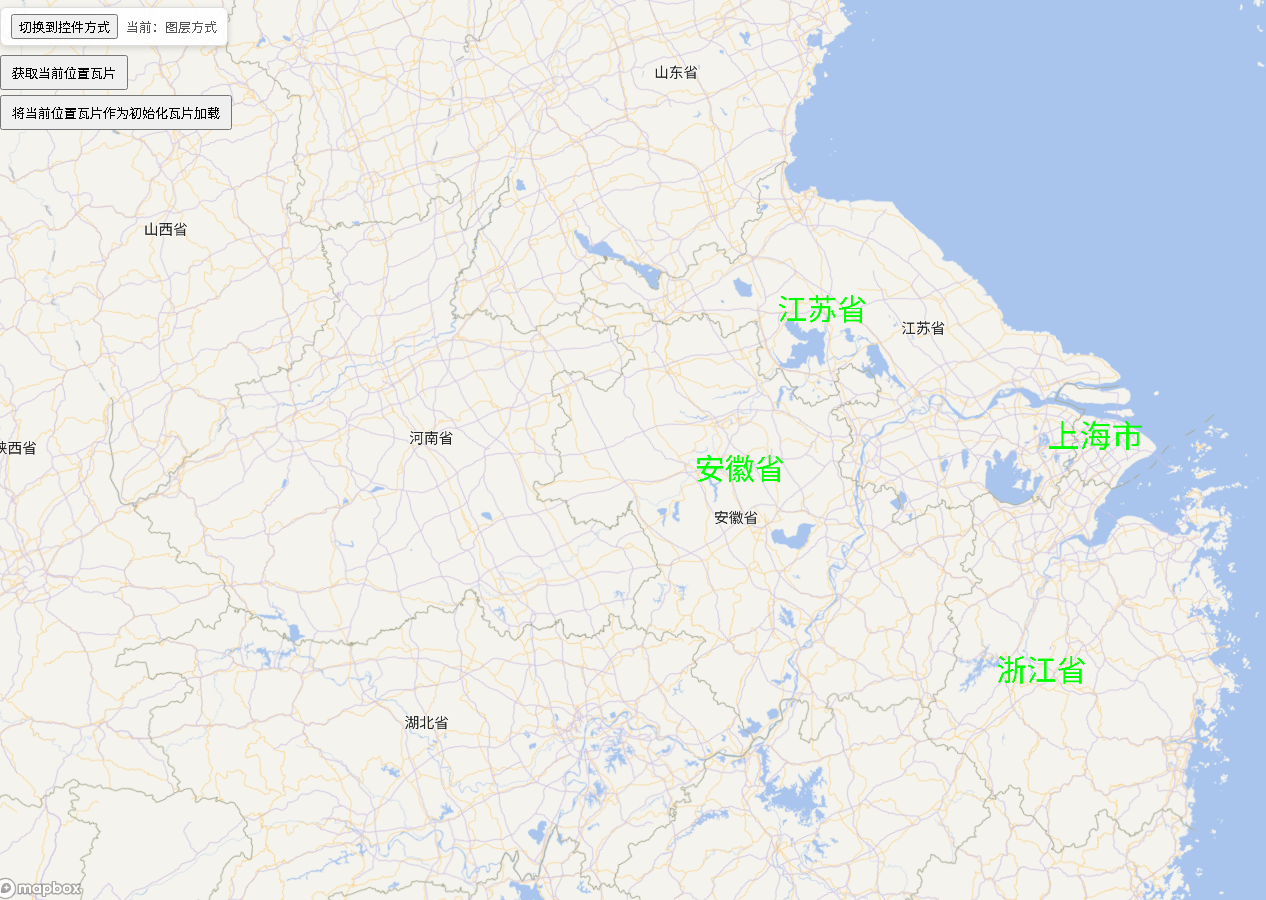
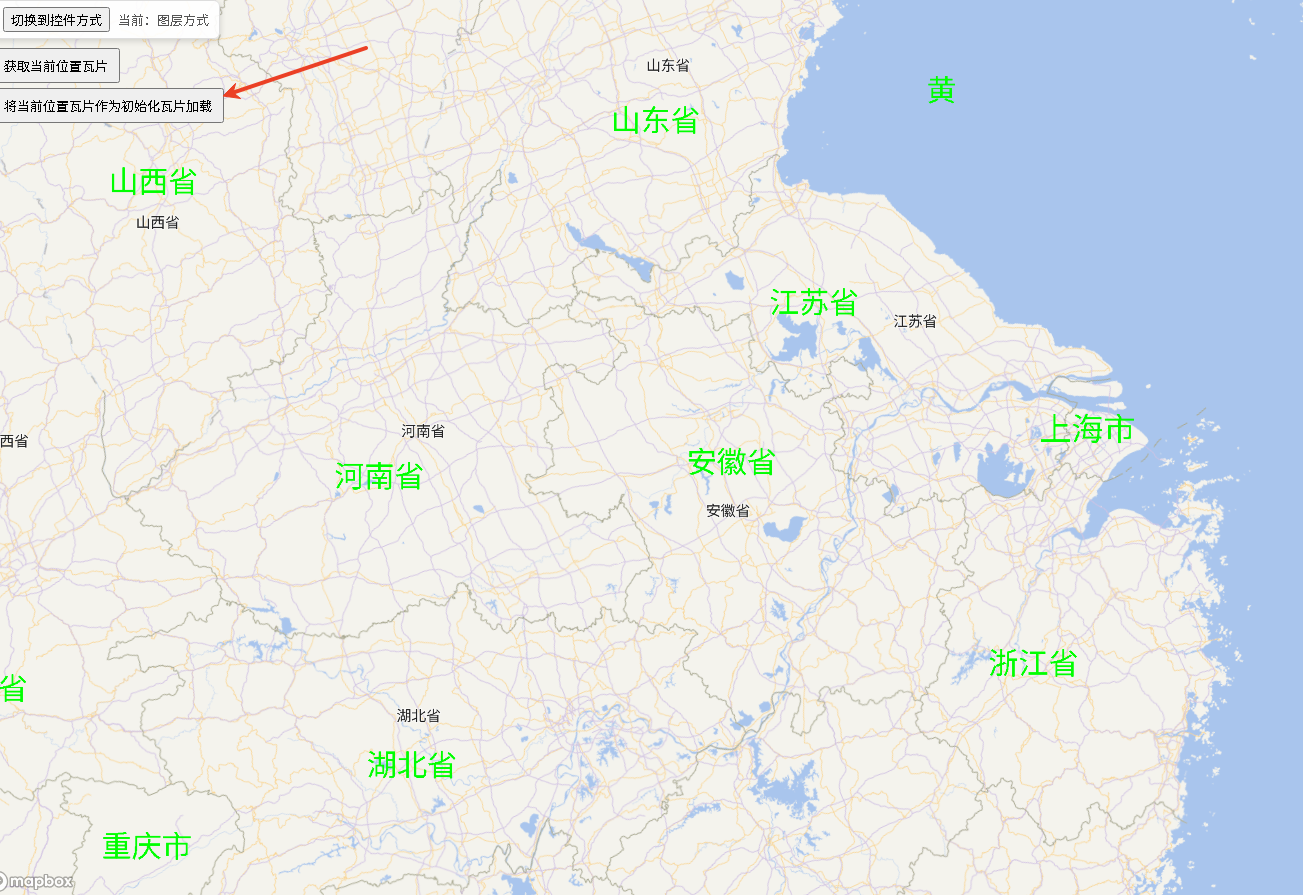
点击“将当前位置瓦片作为初始化瓦片加载”后,按当前场景加载全部瓦片(示例)
样式策略与合并
serverFirstStyle: true(推荐):以服务端样式为主,使用插件内置的默认表达式读取服务端属性(例如properties.label.*)。在此模式下,我们会用“默认样式覆盖用户样式”,确保服务端的样式语义优先。serverFirstStyle: false:完全采用用户指定的layerStyle;若未提供则回退到默认样式。
样式合并规则(浅合并):
- 当
serverFirstStyle: true:layout = {...user.layout, ...default.layout};paint = {...user.paint, ...default.paint}。 - 当
serverFirstStyle: false:layout = {...default.layout, ...user.layout};paint = {...default.paint, ...user.paint}。
选项说明(面向 WTFS)
sourceId/layerId:创建的数据源与图层 ID。默认:wtfs-labels/wtfs-label-layer。serverFirstStyle: boolean:是否以服务端样式为主(详见上文)。layerStyle: { layout?: object; paint?: object; }:用户样式(在serverFirstStyle: false时优先)。subdomains: string[]:天地图子域数组(如['t0',...,'t7'])。getTileUrl(x, y, z, s):瓦片 URL 构造器,s为选中的子域。getIcoUrl(id, s):图标资源 URL 构造器。getRoadTileUrl(x, y, z, s):道路/辅助瓦片 URL 构造器(若你的服务有路网地名层)。debugger: boolean:输出样式化调试日志。
字体与字形
- Mapbox 的
text-font是样式中定义的字体栈名,不是系统字体名。若 WTFS/glyph 服务不包含 CJK 字形,可在 Mapbox 初始化时设置localIdeographFontFamily使用系统中文字体(如“微软雅黑”)。 - 示例:
localIdeographFontFamily: "'Microsoft YaHei','Arial Unicode MS'"。 - 如使用自定义 glyph 服务,请确保字体栈名称与
text-font一致。
常见问题与排障
- 地名不显示或乱码:检查
tk是否有效、跨域/Referer 是否满足、URL 是否正确、是否存在 CJK glyph 或开启本地字体回退。 - 图层未添加成功:查看控制台日志(启用
debugger),检查是否有map.addLayer报错或 ID 冲突。
导出与入口
- 子路径导出:
wtfs-mapbox(插件主入口)wtfs-mapbox/control(控件入口)
- ESM 与 UMD:
exports["."].import→dist/wtfs-plugin.esm.jsexports["."].require→dist/wtfs-plugin.umd.jsexports["./control"].import→dist/wtfs-control.esm.jsexports["./control"].require→dist/wtfs-control.umd.js
许可与使用条款
- 使用天地图服务需遵守其官方授权与使用条款,请确保你的
tk与访问方式合规。