
wxapp-router
v0.1.12
Published
🛵 The router for Wechat Miniprogram


Readme
WxApp Router





一、动机
对于微信小程序原生路由:
- 原生的
wx.navigateTo/redirectTo/switchTab/navigateBack较底层,使用体验较原始。 - 暴露真实路由,通过小程序二维码等方式暴露出去的路径,不利于修改项目结构。
- 微信路由十层级路由问题、页面死循环问题。
- 小程序无限二维码解决方案。(短链参数解析)
二、介绍
- 虚拟路由,解决小程序对外暴露真实路径的问题。
- 动态路由参数。
- 智能跳转,解决小程序页面栈十层限制问题,与解决小程序页面死循环问题
三、下载
npm install wxapp-router四、使用说明
4.1 快速使用
import { Router } from 'wxapp-router';

// 创建路由实例
const router = new Router();

// 注册路由
router.register({
  path: '/user', // 虚拟路由
  route: '/pages/user/index', // 真实路由
});

const query = { name: 'jc', age: 18 };

// 智能跳转
router.gotoPage('/user', query);
// 跳转到 /pages/user/index
// onLoad(options) 中 options = {name: 'jc', age: 18};

// 显式跳转
router.redirectTo('/user', query);
router.navigateTo('/user', query);
router.navigateBack('/user', query);
router.switchTab('/user', query);
4.2 智能跳转策略
当我们使用 router.gotoPage() 的时候,wxapp-router 会根据一套计算逻辑来确定使用微信小程序路由 API 中的一个来实现路由跳转。
具体逻辑如下:
- 当跳转的路由为小程序 tab 页面时,则使用
wx.switchTab。 - 当页面栈达到 10 层之后,如果要跳转的页面在页面栈中,使用
wx.navigateBack({ delta: X })出栈到目标页面。 - 当页面栈达到 10 层之后,目标页面不存在页面栈中,使用
wx.redirectTo替换栈顶页面。 - 其他情况使用
wx.navigateTo
详细代码参考:navigator.ts/gotoPage
4.3 动态路由匹配
我们经常需要把某种模式匹配到的所有路由,全都映射到同个页面中去。
例如,我们有一个 Goods 页面,对于所有 ID 各不相同的商品,都要使用这个页面来承载。
那么,我们可以在 wxapp-router 的路由路径中使用 「动态路径参数」(dynamic segment) 来达到这个效果:
import { Router } from 'wxapp-router';

// 创建路由实例
const router = new Router();

// 注册路由
router.register({
  path: '/goods/:id', // 虚拟路由
  route: '/pages/goods/index', // 真实路由
});

// 跳转到 /pages/goods/index,参数: onLoad(options) 的 options = { id: '123' }
router.gotoPage('/goods/123');

// 跳转到 /pages/goods/index,参数: onLoad(options) 的 options = { id: '456' }
router.gotoPage('/goods/456');
wxapp-router 使用 path-to-regexp 作为路径匹配引擎,以支持更多高级的匹配模式。
如要学习更高级的路径匹配,参考 path-to-regexp 的 文档 - Parameters 章节
4.4 外部路由策略:「虚拟路由」 + 「落地中转」+ 「短链参数」
「外部路由」 指的是从小程序外部打开小程序的方式,例如:扫小程序码、公众号菜单、公众号文章等等。
根据小程序的设计,暴露给外部的连接是真实的页面路径,如:/pages/home/index,该设计在实践中存在的弊端:各个落地页分散,后期修改真实文件路径难度大。
在 「中长生命周期」 产品中,随着产品的迭代,我们难免会遇到项目的重构。如果分发出去的都是没经过处理的真实路径的话,我们重构时就会束手束脚,要做很多的兼容操作。因为你不知道,分发出去的小程序二维码, 有多少被打印到实体物料中。
那么,「虚拟路由」+「落地中转」 的策略就显得基本且重要了。
4.4.1「虚拟路由」+ 「落地中转」
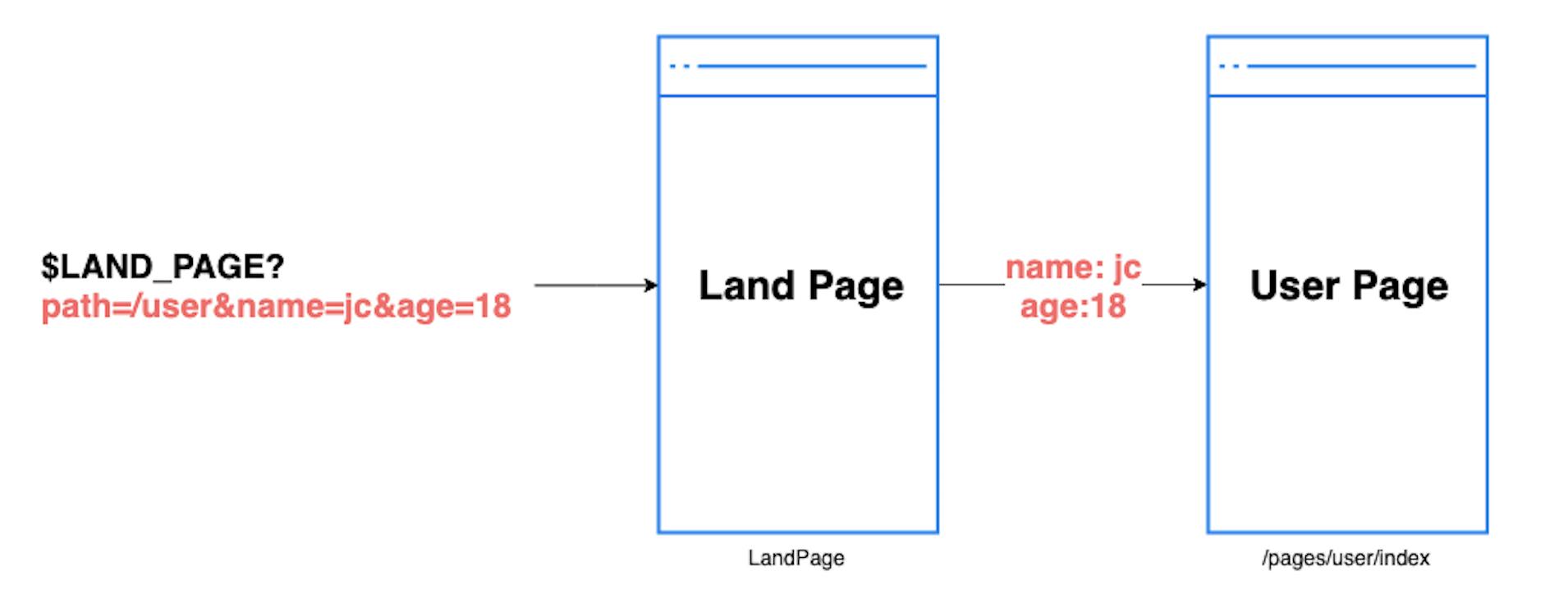
基本逻辑:
- 分发出去的真实路由,指向到唯一的落地页面,如:
$LAND_PAGE: /pages/land-page/index - 由这个落地页面,进行内部路由的重定向转发,通过接收 参数,如:
path=/user&name=jc&age=18
wxapp-router 提供了 「落地中转器」(LandTransfer)来让你更优雅的处理这种场景:
// /pages/land-page/index.ts

import { LandTransfer } from 'wxapp-router';

const landTransfer = new LandTransfer(landTransferOptions);

Page({
  onLoad(options) {
      landTransfer
        .run(options)
        .then(() => {...})
        .catch(() => {...});
  }
});
如果你的项目使用了 TS,LandTransfer 还提供了装饰器:
import { landTransferDecorator } from 'wxapp-router';

Page({
  @landTransferDecorator(landTransferOptions)
  onLoad(options) {
    // ...
  },
});
4.4.2「短链参数」
微信小程序主要提供了两个接口去生成小程序码:
- wxacode.get: 获取小程序码,适用于需要的码数量较少的业务场景。通过该接口生成的小程序码,永久有效,数量限制为 100,000 个
- wxacode.getUnlimited: 获取小程序码,适用于需要的码数量极多的业务场景。通过该接口生成的小程序码,永久有效,数量暂无限制。
第一种方式,wxacode.get 数量限制为 10w 个,虽然量很大了,绝大多数的小程序可能用不到这个量。
但如果我们运营的是一个中大型电商小程序的话,假如:1w 种商品 x 10 种商品规格,那就会超过这个数量。到时候再进行改造,就困难了。
所以,如果抱着是运营一个 「中长生命周期」 的产品的话,我们会使用第二种方式:wxacode.getUnlimited
不尽人意的是,虽然它没有数量限制,但是对参数会有 32 个字符的限制,显然是不够用的(一个 uuid 就 32 字符了)。
LandTransfer 会在同时符合以下情况的时候启用「短链参数」功能:
- 页面参数中含有
scene参数; new LandTransfer()设置了convertSceneParams;
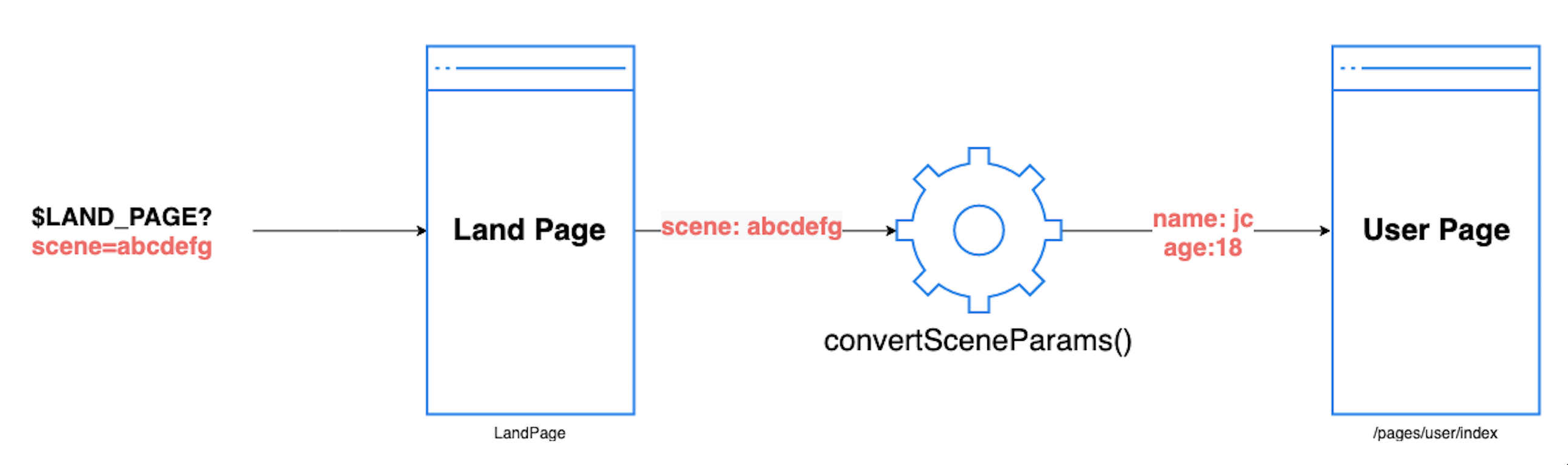
示例代码:
// in /pages/land-page/index.js
import { landTransferDecorator } from 'wxapp-router';

const landTransferOptions = {
  // 此处接收 onLoad(options) 中的 options.scene
  convertSceneParams: (sceneParams) => {
    return API.convertScene({ sceneParams }).then((content) => {
      // 假如后端存的是 JSON 字符串,前端decode
      // 要求 content = { path: '/home', a: 1, b:2 }
      return JSON.parse(content);
    });
  },
};

Page({
  @landTransferDecorator(landTransferOptions)
  onLoad(options) {
    // ...
  },
});
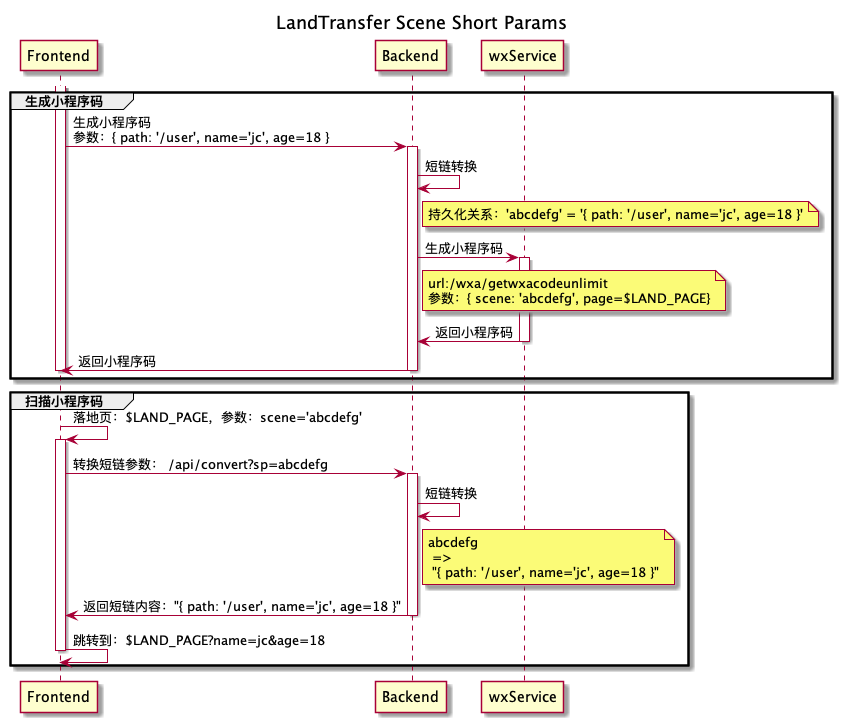
而其中的 API.convertScene 需要服务端提供 HTTP 接口服务来完成。
下面,以「小程序码生成与扫描」的场景为例,展示前后端交互的时序图,仅供参考:
4.5 内部路由策略:获取更好的开发体验
对于小程序内部的路由跳转,我们除了指定一个字符串的路由,我们是否也可以通过链式调用,像调用函数那样去跳转页面呢?类似这样;
routes.pages.user.go({ name: 'jc' });这样做的好处是:
- 更自然的调用方式。
- 能结合 TS,来做到类型提示和联想。
由于事先 wxapp-router 并不知道开发者需要注册的路由是什么样的,所以路由的 TS 声明文件,需要开发者来定义。
例如,我们在项目中维护一份路由文件:
// routes.ts

import { Router, Route } from 'wxapp-router';

// 创建路由实例
const router = new Router();

const routesConfig = [{
  path: '/user',
  route: '/pages/user/index',
}, {
  path: '/goods',
  route: '/pages/goods/index',
}];

type RoutesType {
  paegs: {
    user: Route<{name: string}>,
    goods: Route,
  }
}

// 注册路由
router.batchRegister(routesConfig);

// 获取 routes
const routes: RoutesType = router.getRoutes();

export default routes;
然后在别的地方使用它:
import routes from './routes.ts';

routes.pages.user.go({ name: 'jc' });
如果路由变多的时候,我们还需要手动去编写 RoutesType 的话,就有点难受了。
所以我提供了一个实例项目,在遵循既定的项目结构情况下,支持根据路由配置文件,生成对应的 TS 声明文件。
4.6 使用自定义组件跳转
wxapp-router 提供了一个充作粘合剂的自定义组件 <Router> ,让你可以在 wxml 文件中使用:
<Router path="/pageA" query="{{pageAQuery}}"></Router>
<Router path="/pageB" query="{{pageBQuery}}" type="redirectTo"></Router>
<Router path="/pageC/katy"></Router>你可以从示例项目中找到该组件的代码:/example/miniprogram/components/router
4.7 如何组织项目
wxapp-router 提供了一个示例小程序,来展示实际项目中使用 wxapp-router 的最佳姿势,它提供了以下功能;
- 自定义组件:
<Router>。 - 内部路由的 TS 支持,如
routes.pages.user.go(query)的联想提示和参数提示。 - 根据
app.json自动生成路由配置文件。
详情请看:wxapp-router/example
4.8 导航器 Navigator
wxapp-router 的跳转逻辑,是由内建的 Navigator 提供支持的,它提供了这些功能:
- 封装
wx.navigateTo/switchTab/redirectTo/navigateBack,并且返回 Promise 对象。 - 提供
gotoPage,实现 智能跳转策略
你完全可以跳过所有的顶层实现,直接使用 Navigator 进行底层调用:
import { navigator } from 'wxapp-router';

navigator.gotoPage('/pages/user/index', { name: 'jc' });
navigator.navigateTo('/pages/user/index', { name: 'jc' });
navigator.switchTab('/pages/user/index', { name: 'jc' });
navigator.redirectTo('/pages/user/index', { name: 'jc' });
navigator.navigateBack({ delta: 1 });
五、架构设计
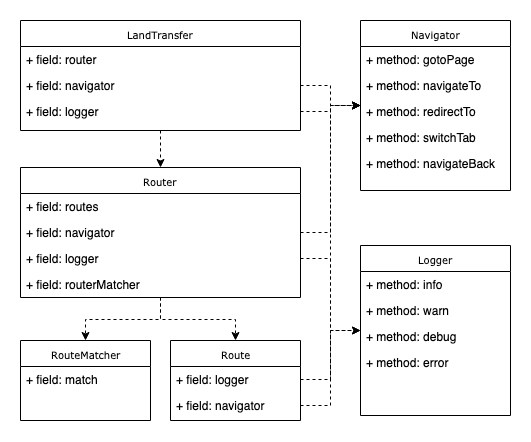
- Navigator:封装微信原生路由 API,提供智能跳转策略。
- LandTransfer:提供落地页中转策略。
- RouteMatcher:提供动态路由参数匹配功能。
- Route: 为每个路径创建路由器。
- Router:整合内部各模块,对外提供优雅的调用方式。
- Logger:内部日志器。
六、More API
更多的 API 的使用,详见官网:wxapp-router
七、License
This project is licensed under the MIT license.
Copyright (c) JerryC Huang ([email protected])