
xd-extract
v0.2.3
Published
Extract SVG vectors from Adobe XD share links and .xd files, with inventory and validation.

Maintainers
 jean.pierre
Readme
xd-extract


Extract SVG vector art from Adobe XD designs, from a public share link (xd.adobe.com/view/...) or a local .xd file. List the nodes, pick one, export it, and check the result.
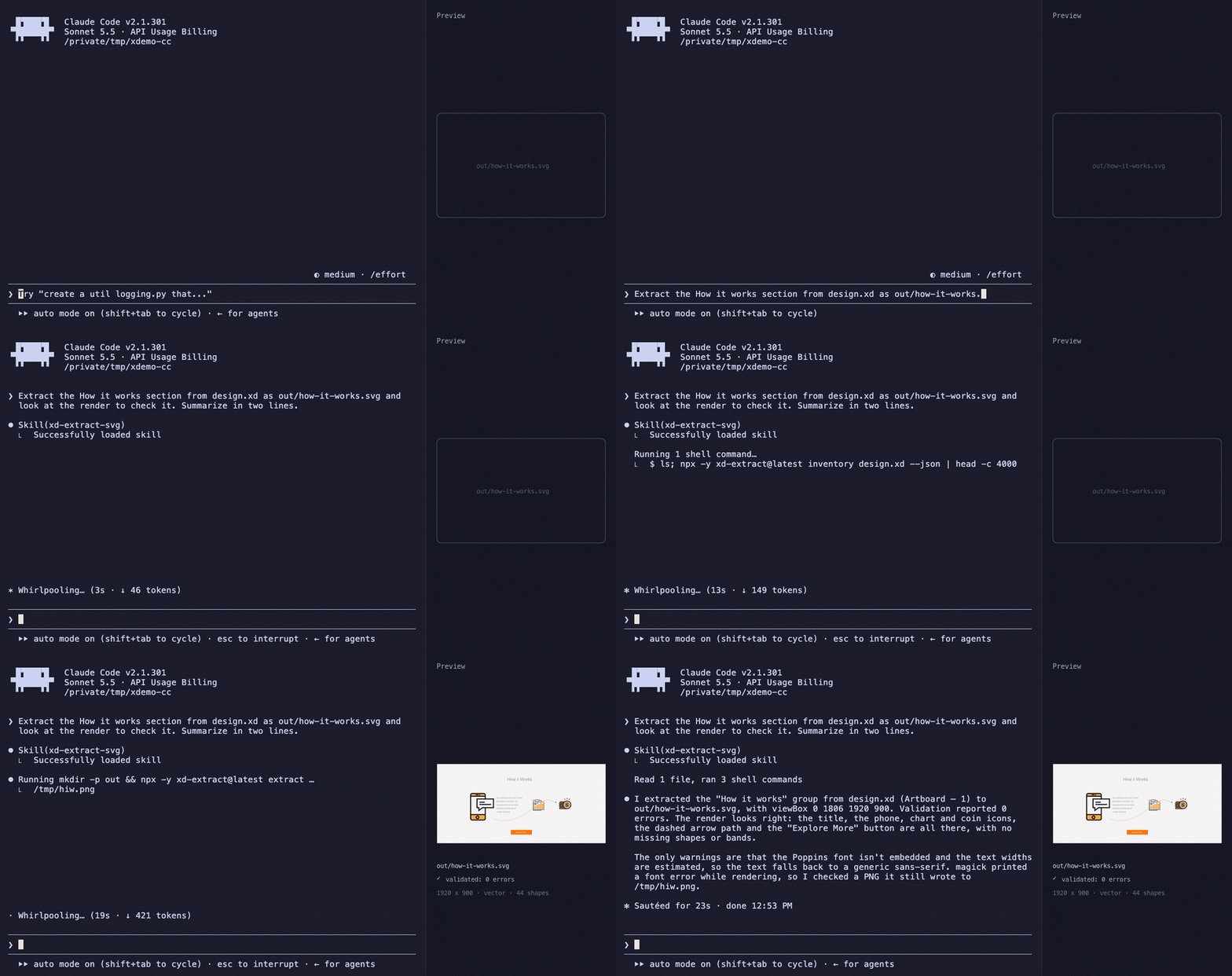
XD share links draw into a <canvas>, so right-click and download give you nothing usable, and a screenshot is raster. The vector data travels as a scene-graph JSON (AGC) that the viewer only paints. xd-extract reads that JSON directly and converts the node tree to SVG.
Status: 0.2.3, early
- Verified:
.xdfiles (one public sample), and a real share link that carries vector data (an XD 2.33 design with 6 artboards and 120 top-level nodes): the page, the manifest and every artboard were fetched on the first try, all 117 nodes with geometry converted, and the 26 exports that use masks (clipPath) validate. Only one such link has been tested. - Not verified on real data: the mask-drift correction (it never triggered; it has synthetic tests only),
/spec/links, password-protected links, and AGC versions other than1.5.0. The only public link we could find (an Adobe sample) is raster-only. If a link fails,xd inventory <link> --record dircaptures the exchange (see Privacy) and an issue with the error code helps a lot. - SVG only. Background blur and angular gradients are not converted; text is emitted as live
<text>and needs its font on the viewer's machine. Each is reported as a warning; nothing is dropped silently. See What is converted. - Developed and tested on macOS; CI runs on Linux. Windows is untested.
Quick start
Needs Node.js 22 or newer.
npx -y xd-extract inventory design.xd            # what is in the design?
npx -y xd-extract extract design.xd --node "Sign Up form" -o out/sign-up.svg
npx -y xd-extract validate out/sign-up.svg
A real session on a public sample (single.xd from xd2svg, MIT):
$ xd inventory design.xd
artboard | node | kind | bbox | colour | shapes | warnings
Artboard – 1 | Group 26 | group | 0,1080 1920x4205 | rgb(255,255,255) | 52 | -
Artboard – 1 | Footer | group | 0,5342 1920x821 | rgb(61,13,13) | 6 | text-font-not-embedded:Poppins,text-bbox-approximate
Artboard – 1 | Market watch | group | 394,4688.6 1180x513.4 | rgb(255,255,255) | 4 | text-font-not-embedded:Poppins,text-bbox-approximate
…

$ xd extract design.xd --node "Sign Up form" -o out/sign-up.svg
out/sign-up.svg  viewBox="1174 363.8 372 304.2" rule=content snaps=0 clips=0 warnings=2
  warning text-font-not-embedded:Poppins (5x): font "Poppins" is not embedded: the SVG renders with whatever the viewer has
  warning text-bbox-approximate (5x): a text line width is estimated from generic sans-serif metrics; the frame may be off

$ xd validate out/sign-up.svg
out/sign-up.svg: warn extraction:text-font-not-embedded:Poppins: font "Poppins" is not embedded: the SVG renders with whatever the viewer has (5x, e.g. "Read our Regulatory Compilances")
out/sign-up.svg: warn extraction:text-bbox-approximate: a text line width is estimated from generic sans-serif metrics; the frame may be off (5x, e.g. "Read our Regulatory Compilances")
out/sign-up.svg: warn text-not-rasterized: text is not rasterized during validation (fonts are not loaded): the raster checks ignore it
1 file(s): 0 error(s), 3 warning(s)
validate exits 0: warnings are hints, not verdicts. Here all three are real: the text uses Poppins, which the viewer must have, the frame around left-aligned text is an estimate, and validation cannot check text pixels. Open the SVG and look at it: validation removes obvious failures, it does not prove the art is right.
For a share link, pass the URL instead of the file: xd inventory https://xd.adobe.com/view/<id>/.
Commands
| Command | Does |
|---|---|
| xd inventory <source> [--artboard k] [--find <name\|colour>] [--json] [--preview file.html] | Lists artboards and top-level nodes with bounding box, dominant colour, shape count and warnings. --find "#ff9c29" ranks nodes by dominant fill; --preview writes an HTML contact sheet. |
| xd extract <source> --node <name\|id:ID> [--artboard k] -o file.svg | Exports one node. Also writes file.svg.report.json. |
| xd extract <source> --map map.json [-d dir] | Exports several nodes from [{"file": "cart.svg", "node": "cart"}]. Nothing is written if one job fails. |
| xd validate <svg...> [--expect-same-frame] [--json] | Static and raster checks. Exit 1 on any error. |
| xd redact <source> -o dir [--exclude <node>]... [--keep-images [--drop-image <uid>]...] | Writes an anonymised document.json (see Privacy). |
<source> is a share link, a .xd file, or a document.json from xd redact. Exit codes: 0 ok, 1 validation errors, 2 usage, 10-14 link errors, 20-21 file errors, 30 browser, 40-42 target errors, 70 unexpected.
What is converted
| Converted | Reported as a warning, not converted |
|---|---|
| Groups and nested transforms, rectangles (with corner radii), paths (including even-odd), compound shapes, lines, circles, ellipses, polygons; symbol instances (resolved to their master, with overrides) | Background blur (needs the pixels behind the shape), angular gradients, image fills on text, images on strokes, a moved or zoomed image fill, inner shadows; a blend mode only sees what is inside the exported SVG (blend-mode-backdrop) |
| Solid fills and strokes with alpha, caps, joins, miter limits, dashes; inside and outside stroke alignment on closed shapes; drop shadows (global) on shapes and groups, as an SVG filter; blend modes as mix-blend-mode; linear and radial gradients (fills and strokes, with stop alpha); object blur (Gaussian, with the frame grown to fit); strokes, gradient fills and superscript/subscript on text (the last two with assumed values: warned); image fills, embedded in the SVG as a data URI (cover or stretch; up to 2 MiB each, --max-embed-bytes) | Alignment on lines and open paths (drawn centred) |
| Masks as clipPath, including masks nudged off the art by a few pixels | style.clipPath (repeat-grid masks) |
| Text as live <text>: XD's own line breaks and baselines, per-range font, size, weight, italic and colour, left, centre and right alignment | Superscript and subscript, justified text, other text frame types, a font that is not installed (the viewer substitutes it) |
| The frame (viewBox): the background plate when there is one, else the tight content box | |
Warnings that mean art is missing (unsupported-fill:*, unsupported-stroke:*, unsupported-shape:*, unsupported-node:*) make validate fail. The others (text-*, skipped-text, unsupported-style:*, stroke-align-ignored:*) are listed so you know what differs from the design.
Only AGC 1.x has been seen (files from 2017-2019). Newer versions produce an agc-version-untested warning.
Full lists of errors, warnings, validation findings and file formats: docs/reference.md.
Share links
The page's static HTML contains the URL of the design manifest, so a link needs no browser. If a link does not expose it (private, password protected, or a layout this tool has not seen), retry with --browser, which uses agent-browser to find the manifest and then downloads it the same way.
A raster-only prototype (no vector payload, only rendered images) stops with NoVectorPayload: there is nothing to extract, and the tool will not substitute a screenshot or a traced bitmap.
Validation
- Static: XML parses,
viewBoxpresent, shapes present, no shape without explicit fill (it would render black), no<g>inside aclipPath, every<line>has a stroke, noNaN, plus every extraction warning. - Raster (resvg): empty render, the edge-band signature of a drifted mask, tight frames, and the frame size across a set (
--expect-same-frame).
The raster thresholds are initial values and have not been tuned on many designs.
Agent skills
Three skills for AI coding agents (the agentskills.io format) drive the CLI:
npx skills add jeanpfs/xd-extract --list
npx skills add jeanpfs/xd-extract --skill xd-extract-svg -g
Claude Code plugin: /plugin marketplace add jeanpfs/xd-extract, then /plugin install xd-extract@xd-extract.
| Skill | Use |
|---|---|
| xd-extract-svg | The whole flow: inventory, pick, extract, validate, preview |
| xd-inventory | List and search nodes; pick visually |
| xd-validate-svg | Validate exports and interpret findings |
Privacy
- The CLI only fetches the link you give it and the CDN URLs that page names. With
--browserthe page is opened in a real browser, so the page's own scripts (including Adobe's analytics) run as they would for any visitor. --record <dir>saves every HTTP response, including the full design JSON, with access tokens stripped. Do not commit a recording of a private design.- Image fills carry the picture's bytes into the SVG (base64).
--recordstores those bytes too.xd redactdrops every picture unless you pass--keep-images: pictures are other people's work more often than not. xd redactremoves names, ids, text and fonts so a design can become a public test fixture (text keeps its length and line breaks, asx, so it still lays out). It keeps the geometry: the artwork itself must be yours to publish. Use--exclude "<node name>"to drop top-level nodes (a client logo, say) before anonymising; a name that matches nothing is an error.- Designs often contain other companies' logos. The MIT license of this tool and of the sample files does not cover third-party marks.
Development
pnpm install
pnpm build                     # also needed once for the binary test (it is skipped without a build)
pnpm test                      # unit, public fixtures, recorded
pnpm fixtures:build            # re-download the pinned upstream files and redact them (needs network)
pnpm lint && pnpm typecheck && pnpm leakcheck && pnpm skills:check
Tests come in tiers: a synthetic fixture per rule, three public fixtures (anonymised: single.xd, plus Adobe's XD-to-Flutter test suite and example app; see fixtures/public/NOTICE), recorded HTTP (tokens stripped), a live check against the Adobe sample (pnpm test:live, nightly), and a private tier driven by XD_PRIVATE_FIXTURE_DIR that never leaves your machine. Contributor and agent notes are in AGENTS.md.
Contributing and security
See CONTRIBUTING.md and the Code of Conduct. Report vulnerabilities privately, as described in SECURITY.md.
License
MIT. Third-party sample material: see NOTICE.