
xframelib-taro
v0.1.9
Published
基于xframelib基础库改造,服务于Taro开发。

Maintainers
 zorrowm
Readme
xframelib-taro
xframelib-taro基础库
基于xframelib的面向Taro小程序开发的基础库
基于xframelib库v1.0.4版的精简和适配调整,服务于Taro 的小程序开发。 实现小程序开发与xframelib web开发模式统一化。 为适应小程序需求,追求极致地小巧,以降低小程序vendor.js大小。
- v0.1.9 更新依赖库版本;更新优化插件机制(与xframelib 1.1.4版本一致);
- v0.1.8 更新Taro等依赖库版本;改用vite8打包;
- v0.1.7 增加SwipeUpdown上下滑动组件、AudioPlayer语音播放组件;更新依赖库版本;
- v0.1.6 修改0.1.5版PathTourist直接初始化跳转页,无法返回主页的问题;
- v0.1.5 修改requestPost表单请求错误;完善增强PathTourist功能;更新依赖库版本;
- v0.1.4 去掉http请求头默认带“'Authorization':Bear undefined”;增加changeLocalToken允许外部修改默认Token;更新依赖库版本;
- v0.1.3 恢复WebCacheTool工具类,支持小程序资源缓存;增加Global.SvgWebCache,以支持SvgIconWeb在线图标的缓存;
- v0.1.2 增加packFilterLayoutWidgetConfig方法来加载分包widgetSetting,以解决会清空主包配置的BUG;
- v0.1.1 增加SvgIconWeb组件:使用在线Iconify图标服务;SysConfig.ServiceURL模型恢复在线图标服务IconServiceURL属性;用Taro.request取代axios请求;
- v0.1.0 增加统一路径导览对象:PathTourist,实现Page切换与View切换的统一;Global增加绑定全局Router对象:Global.Router=router;
- *v0.0.9 降低小程序vendor.js大小:移除hprose相关方法;删除GzipTool、ZipTool、WebCacheTool、FilenameUtils等;去掉Global.Logger改用Console.log代替;去掉MD5相关计算方法、window窗体变化事件、前端读文件方法;去掉permission文件夹;将H5Tool、DayjsTool基本方法单独导出,便于按需加载;增加initAxois方法,需要http请求时需要先调用一次;更新依赖库版本;
- v0.0.8 降低库目标版本为ES2015,解决微信小程序真机调试报错问题;修改Global增加getResourceURL方法获取外部图片等资源URL;修改IServiceURL接口:增加CDNURL、WebViewURL字段;修改init初始化方法:增加第一个参数为SysConfig进行配置初始化;
- v0.0.7 修改Storage:使用Taro统一存储代替globalThis.localStorage;修改简化ISystemConfig模型;更新依赖库版本;
- v0.0.6 调整Layout默认样式:增加--status-bar-height绑定taro获取的statusBarHeight值、启用左侧和右侧面板、调整面板大小和层级顺序;
- v0.0.5 解决Layout样式和100vh高度兼容taro小程序;解决web worker兼容小程序worker和网页worker;
- v0.0.4 更新部分方法以支持taro worker;精简基础依赖库,并删除低频使用方法;更新依赖库版本;
- v0.0.3 修改相关方法,默认支持taro webpack版本,并保留vite版本方法;
- v0.0.2 将lru-cache外置,解决编译运行错误;
- v0.0.1 精简webworker、window组件、document相关方法,适配微信小程序的初始版本。
主要功能:
系统配置SysConfig.js对应的Global.Config
公共事件总线Global.EventBus
Layout布局容器和Widget机制实现
Taro.request的Http请求封装实现TaroRequestHelper{get, post, requestPost, requestGet,requestPostBody}
应用示例
taro-vue-template主体框架结构图
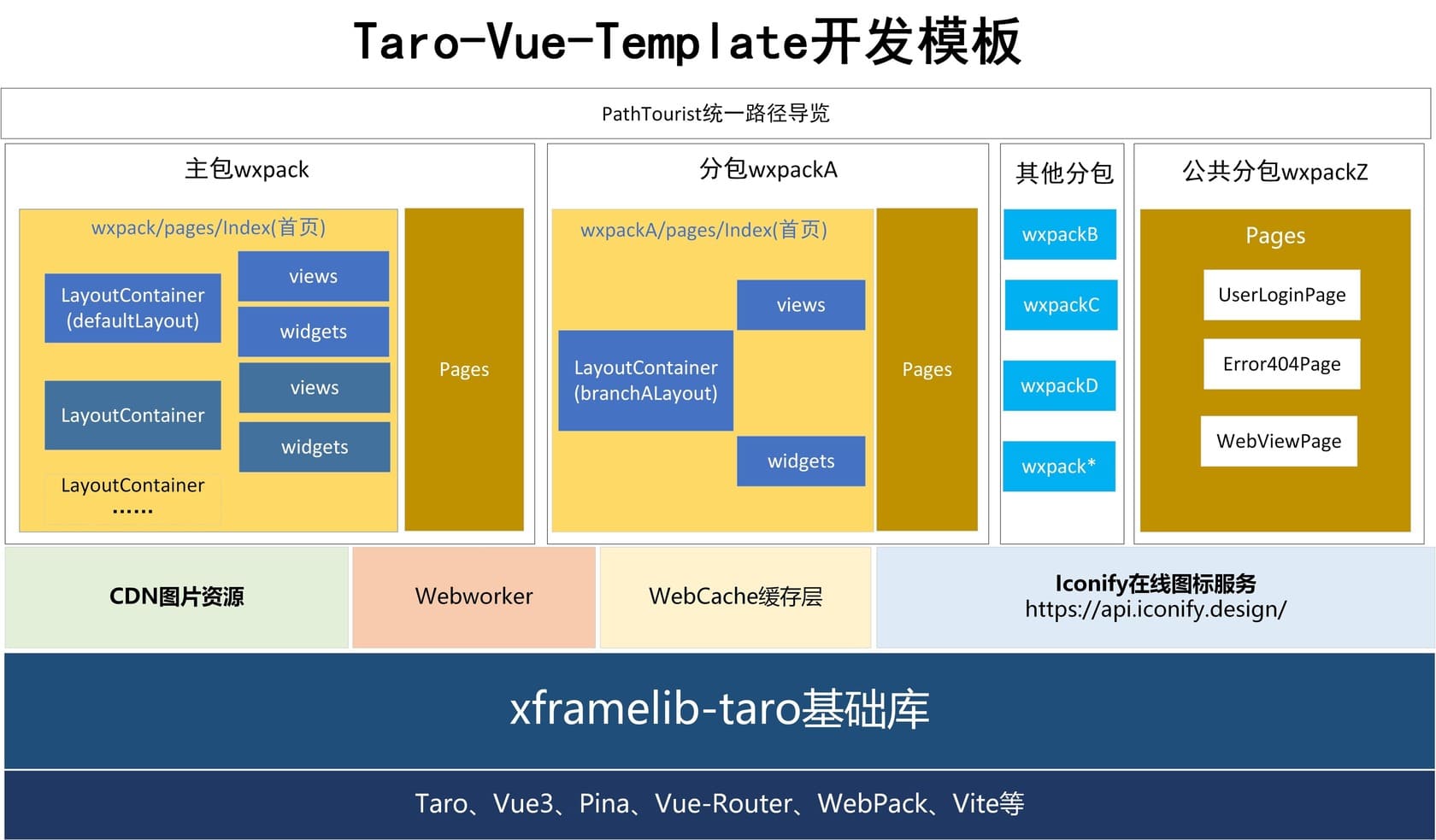
小程序项目示例
开源项目示例工程:https://github.com/zorrowm/xframelib-taro-public-example.git

使用
pnpm add xframelib-taro
or
npm i xframelib-taro
全局引入库样式:
import 'xframelib-taro/dist/index.css';
初始化调用示例代码:initXFrame.ts
import "xframelib-taro/dist/index.css";
import type { App } from "vue";
import { getRightWidgetConfig } from "src/permission";
import { message } from "src/utils/MessageNotify";
//封装的消息提示
import { init, SvgIconWeb } from "xframelib-taro";
import "../assets/SysConfig.js";
//UnoCSS 必须得有
import "uno.css";

export default function initBoot(app: App) {
  //初始化Xframelib
  //系统ID,唯一标识
  const sysID = SysConfig.SystemID;
  //初始化
  init(SysConfig, message, sysID);

  //免登录或只登录不验证功能
  getRightWidgetConfig();

  //注册全局组件
  app.component("svg-icon-web", SvgIconWeb);
}
SysConfig.js示例代码:
/**
 * 小程序版简化配置
 * 2025-9-24 规范与补充,针对0.0.8匹配
 */
const SysConfig = {
  /*必须,系统配置标题,必须 */
  SiteTitle: 'XXX小程序',
  //用小程序ID作为系统ID
  SystemID: "wxfc6db05a192af99xx",
  //#region ********后台服务地址配置
  ServiceURL: {
    /**
     * 资源路径(不能带"/")
     */
    CDNURL: 'https://zorrowm.github.io/weixin/taian',
     /**
     * 在线Icon图标服务
     */
    IconServiceURL:'https://icon.gis.digsur.com/online/',
    /**
     * 用户登录(统一用户登录)(不能带"/")
     * http://192.168.1.12:83
     */
    LoginAuthURL: '',
    /**
     * Axios普通WebAPI的BaseURL http://192.168.1.120:5139
     * 全局默认的http请求地址;文件上传地址
     */
    DefaultWebAPI: '',
  },
  //#endregion
};
重点更新内容
- 0.1.7 SwipeUpdown组件、AudioPlayer组件使用示例
==import {AudioPlayer,SwipeUpdown } from 'xframelib-taro';==
<SwipeUpdown class="soundBottom" @swipe="collapeTextPanel">
<svg-icon-web v-if="!isShow" icon="ep:arrow-up" :size="24" class="text-gray"></svg-icon-web>
<svg-icon-web v-else icon="ep:arrow-down" :size="24" class="text-gray"></svg-icon-web>
 <div class="text-#B74C33">{{ bottomInfo }}</div>
</SwipeUpdown>

<script setup lang="ts">
import { ref, computed, onMounted } from 'vue';
import { Global, PathTourist, getRandomInt,AudioPlayer,SwipeUpdown } from 'xframelib-taro';
const textPanelHeight = ref('50px');
const isShow = ref(false);
function collapeTextPanel(e) {
    if (e === 1)//向上滑动
    {
        if (!isShow.value) {
            textPanelHeight.value = "100%";
            isShow.value = true;
        }
    }
    else {
        if (isShow.value) {
            textPanelHeight.value = "50px";
            isShow.value = false;
        }
    }
}
</script>
<style lang="scss">
    .textShow {
        position: absolute;
        bottom: 10px;
        height: v-bind(textPanelHeight);
        width: 100%;
        display: flex;
        flex-direction: column;
        align-items: center;
        justify-content: flex-start;

        .soundBottom {
            position: absolute;
            top: 0;
            left: 30%;
            width: 40%;
            height: 80px;
            font-size: 24px;
            display: flex;
            flex-direction: column;
            align-items: center;
            justify-items: center;

        }
    }
   </style>
<div class="soundPanel">
<AudioPlayer src='https://zorrowm.github.io/weixin/taian/assets/img/test.mp3'> </AudioPlayer>
</div>- 0.1.5 PathTourist使用示例代码 TopNaviBar.vue组件代码
<template>
  <div class="custom-navbar">
    <nut-navbar :title="appState.navigationBarTitle" :left-show="false" >
                    <template #left>
                        <slot name="leftbar">
                            <svg-icon-web v-if="appState.showNavigationBarBack&&!appState.showNavigationBarHome" icon="ep:arrow-left-bold" size="25"  class="text-black"
                                @click="handleBack"></svg-icon-web>
                            <svg-icon-web v-else-if="appState.showNavigationBarHome" icon="ep:home-filled" size="25"  class="text-black"
                                @click="handleGoHome"></svg-icon-web>
                        </slot>
                    </template>
    </nut-navbar>
  </div>
</template>

<script setup lang="ts">
import { appStore } from '@/stores';
import { PathTourist} from "xframelib-taro";
const appState = appStore();

function filterMainMenu(nextRouteName:string):boolean
{
  const defaultMainMenues=['home','exhibit','relics','user'];
  const idx= defaultMainMenues.findIndex(p=>p===nextRouteName);
  return idx>=0;
}
// 处理返回逻辑
const handleBack = () => {
  // console.log(PathTourist.routeHistoryStack);
  const nextRouteName0=PathTourist.getLastHistoryView();
  //后退——浏览历史记录
  PathTourist.toBackView();
  let nextRouteName=PathTourist.getLastHistoryView();
  if(!nextRouteName)
  nextRouteName=nextRouteName0;
  if(nextRouteName)
  {
    const showTabmenu=filterMainMenu(nextRouteName);
    if(showTabmenu)
    appState.showLayoutBottom(showTabmenu);
  }
}
function handleGoHome()
{
  appState.showLayoutBottom(true);
  PathTourist.routeHistoryStack.length=0;
  //后退——浏览历史记录
  PathTourist.toHome();
}
</script>

<style lang="scss">
.custom-navbar
{
  .title
  {
    font-size:32px;
    color:#111;
    letter-spacing: 2px;
  }
}
</style>
    PathTourist.toView({
    name:'product-detail'
  });

  //转到登录页,然后返回
  PathTourist.toLogin();

  PathTourist.toPage("/wxpackZ/pages/webViewPage");
    //返回开始页
    PathTourist.toBackPage();
0.1.3 WebCacheTool的使用示例
默认缓存集合为1000个,缓存30分钟
import {WebCacheTool } from 'xframelib-taro';
//存
WebCacheTool.set('1', 'test1213132');
//取
WebCacheTool.get('1'); 自定义缓存集合 Global.SvgWebCache 示例代码
  Global.SvgWebCache=WebCacheTool.createCache({
    max: 2000, // 最大缓存数量
    maxAge: 1000 * 60 * 60 // 缓存时间,单位
  });
function getIconCache(cacheKey:string)
{
  if(WebCacheTool.has(cacheKey,Global.SvgWebCache))
    {
      iconContent.value = WebCacheTool.get(cacheKey,Global.SvgWebCache);
      return true;
    }
    return false;
}
0.1.1 增加SvgIconWeb组件:使用在线Iconify图标服务
<svg-icon-web icon="ant-design:heart-outlined" size="30"></svg-icon-web>用Taro.request取代axios请求;
import { requestGet,get, PathTourist} from "xframelib-taro";

const res=await get('https://icon.gis.digsur.com/online/ep.json?icons=arrow-left-bold');
 console.log('000000000',res);

requestGet('https://icon.gis.digsur.com/online/ep.json?icons=arrow-left-bold').then(res=>{
        console.log('3333333333',res)
    })
0.1.0 增加统一路径导览对象:PathTourist,
/**
 * 统一的路径导游对象
 */
declare class PathTourist {
    /**
     * 路由历史栈
     */
    static routeHistoryStack: string[];
    /**
     * pages路由历史栈
     */
    static pagesHistoryStack: string[];
    /**
     * 当前页面地址
     */
    static CurrentPageURL: string;
    static LastViewPath: string;
    /**
     * 默认首页URL
     */
    static PageHomeURL: string;
    /**
     * 默认404页面
     */
    static Page404URL: string;
    /**
     * 默认登录页面
     */
    static PageLoginURL: string;
    /**
     * 设置系统默认页面
     * @returns
     */
    private static getDefaultSysRoute;
    /**
     * 初始化路由
     * @param pathArray
     * @param homeURL
     */
    static initRoutes(pathArray: any[], homeURL?: string): void;
    /**
     * 跳转到视图
     * @param pathObject
     */
    static toView(pathObject: any): void;
    /**
     * 视图——后退
     */
    static toBackView(): void;
    /**
     * 去页面的初始view
     */
    static toInitView(): void;
    /**
     * 返回主首页
     */
    static toHome(): void;
    /**
     * 跳转到404页面
     */
    static toError404(): void;
    /**
     * 去登录
     */
    static toLogin(): void;
    /**
     * 跳转到页面
     */
    static toPage(pageObject: any): void;
    /**
     * 页面后退
     */
    static toBackPage(): void;
}
export default PathTourist;
Global增加绑定Router对象,initRouter.ts示例代码:
//绑定全局Router Global.Router=router;
//路由安装
export function initRouter(app: App){
  //createRouterGuards(router);
  app.use(router);
  //绑定全局Router
  Global.Router=router;
};
export default router;
//#endregion
0.0.8 修改IServiceURL增加字段;
//初始化方法
export const init = function (sysConfig:any,messageUI?: any, sysID?: string, sysGroup?: string);


interface IServiceURL {
  /**
   * 外部资源URL地址
   */
  CDNURL?:string;
  /**
   * 外部WebView资源引入URL
   */
  WebViewURL?:string;

  ……
  }
0.0.7简化ISystemConfig模型
/**
 * 系统配置信息
 */
export interface ISystemConfig {
  /**
   * 网站标题
   */
  SiteTitle?: string;
  /**
   * 服务URL
   */
  ServiceURL: IServiceURL;
  /**
   * API服务路径
   */
  APIPath?: object;
  /**
   * 框架商业授权KEY
   */
  KEY?:string;

  //其他配置信息
  [props: string]: any;
}
/**
 * 服务URL
 */
export interface IServiceURL {
  /**
   * 用户登录验证服务(统一用户登录:后台)
   */
  LoginAuthURL?: string; //用户验证
  /**
   * Axios普通WebAPI的BaseURL
   * 全局默认的http请求地址(一般与主hprose相同或不同);文件上传地址
   */
  DefaultWebAPI?: string;
  /**
   * 默认HproseAPI的服务地址
   */
  DefaultHproseAPI?: string;
  /**
   * 其他扩展的URL属性
   */
  [props: string]: any;
}
0.0.6更新Layout默认样式
.layoutContainer {
  position: absolute;
  //适应小程序 navi-bar
  top:var(--status-bar-height);
  bottom:0;
  width: 100%;
  //容器的布局变量
  --layout-top-height: 80px; //头容器高度
  --layout-left-width: 100%; //左侧容器的宽度
  --layout-right-width: 100%; //右侧容器的宽度
  --layout-bottom-height: 90px; //底容器的高度
  //纵向索引
  --layout-top-zindex: 100; //头部容器的索引
  --layout-bottom-zindex: 100; //底部容器的索引
  --layout-centermain-zindex: 80; //中间main索引
  --layout-centerback-zindex: 102; //中间main索引
  --layout-centerfront-zindex: 110; //中间main索引
  --layout-left-zindex: 105; //左侧索引 下
  --layout-right-zindex: 106; //右侧索引 上
}

.mainContainer {
  top: var(--layout-top-height);
  bottom: var(--layout-bottom-height);
  z-index: var(--layout-centermain-zindex);
}