
xima
v0.3.0
Published
集团前端规约配套的扫描工具包


Readme
本包已迁移至 f2elint,欢迎使用 :)
xima 是《集团前端规约》的配套工具,可以为工程一键接入规约、一键扫描和修复规约问题,保障工程的编码规范和代码质量。
背景
为了《集团前端规约》的落地,我们引入多个开源工具和规则包来实现不同的规约,包括:
| 规约 | 工具 | 规则包 | | -------- | -------- | -------- | | 《JavaScript 编码规约》 《TypeScript 编码规约》 《React 编码规约》 《Vue 编码规约》 | ESLint | eslint-config-ali | | 《CSS 编码规约》 | stylelint | stylelint-config-ali | | 《Git commit message 规约》 | commitlint | commitlint-config-ali |
可以看到这些工具和规则包比较零散,工程的接入和后续升级都需要一定成本。
xima 屏蔽收敛了这些依赖和配置细节,提供简单的 CLI 和 Node.js API,让工程能够一键接入、一键扫描、一键修复、一键升级,并为工程配置 git commit 卡点,降低工程实施规约的成本。
CLI 使用
安装
在终端执行:
npm install xima -g安装完成后,可执行 xima -h 以验证安装成功
功能
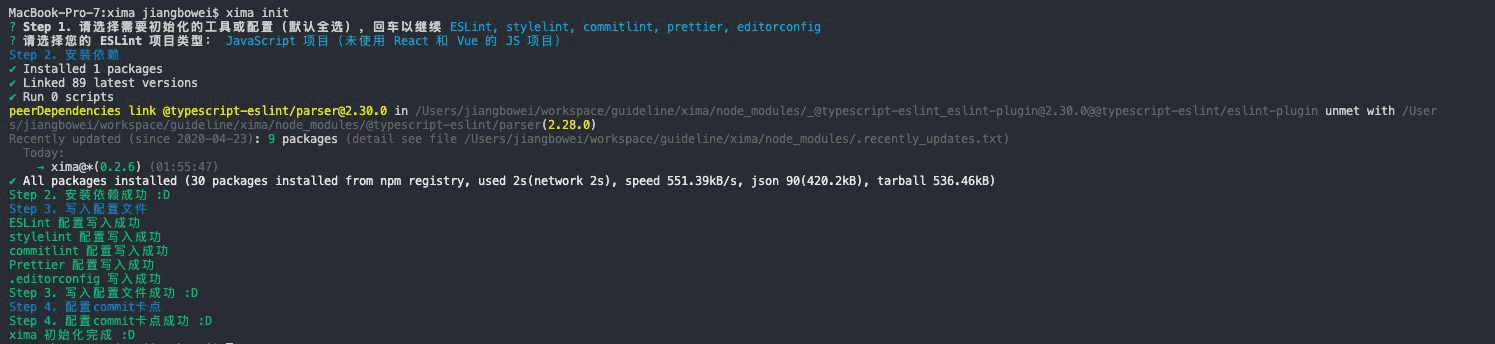
xima init:一键接入
在工程根目录执行 xima init,即可将工程一键接入规约体系,为工程安装开发阶段进行规约问题检查所需的依赖和配置,具体会做以下事情:
- 安装各种依赖:如工具依赖,包括 ESLint、stylelint、commitlint 等;配置依赖,包括 eslint-config-ali、stylelint-config-ali、@commitlint/config-ali 等
- 写入各种配置文件(到工程根目录):包括 .eslintrc.js、.eslintignore、.stylelintrc.js、.stylelintignore、commitlint.config.js、.prettierrc.js、.editorconfig、.vscode/settings.json 等;此外还会写入一个 xima.config.js 文件,包含 xima 工具的一些配置,如启用的功能、黑名单等
- 配置 git commit 卡点:使用 husky + lint-staged 设置代码提交卡点,在 git commit 时会运行
xima scan,若有规约问题则阻止提交
注 1. 如果项目已经安装和配置过 ESLint、stylelint,执行
xima init将会提示存在冲突的依赖和配置,并在你确认后进行覆盖
注 2. 如果项目里 .vscode/ 目录被 .gitignore 忽略,可以在拉取项目后单独执行
xima init --vscode命令写入 .vscode/settings.json 配置文件(若存在原配置,将进行合并)
xima scan:一键扫描
在工程的根目录执行命令,即可扫描工程的代码规约问题:
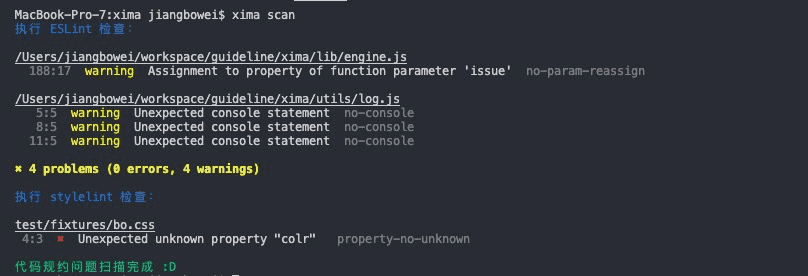
支持下列参数:
-q--quiet仅报告 error 级别的问题-o--output-report输出扫描出的规约问题日志-i--include <dirpath>指定要进行规约扫描的目录
xima fix:一键修复
在工程的根目录执行命令,即可自动修复工程的代码规约问题:
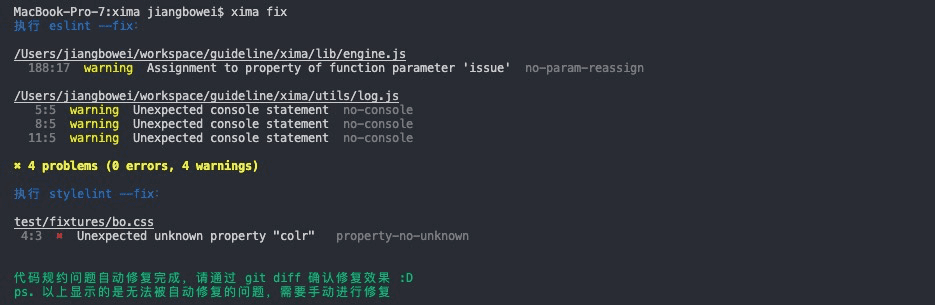
注意请 review 下修复前后的代码,以免工具误修的情况。
Node.js API 使用
安装
npm install xima --saveAPI
init:初始化
- xima.init(config):将工程一键接入规约体系,效果等同于 xima init
示例:
await xima.init({
  eslintType: 'react',
  enableStylelint: true,
});
config参数如下:
| 参数 | 说明 | 可选值 | 备注 | | -------- | -------- | -------- | -------- | | eslintType | 初始的语言和框架类型 | ESLintType | 如果不配置,等同于xima init,控制台会出现选择器,如果配置,控制台就不会出现选择器 | | enableStylelint | 是否启用 stylelint | boolean | 同上 |
ESLintType
- default: JavaScript 项目(未使用 React 和 Vue 的 JS 项目)
- react: JavaScript + React 项目
- vue: JavaScript + Vue 项目
- typescript/default: TypeScript 项目(未使用 React 和 Vue 的 TS 项目)
- typescript/react: TypeScript + React 项目
- typescript/vue: TypeScript + Vue 项目
- es5: ES5 及之前版本的 JavaScript 老项目
scan:扫描
- xima.scan(config): 扫描当前工程代码,效果等同 xima scan
示例:
await xima.scan({
  cwd: path.resolve(__dirname, '../fe'),
  include: '.',
  quiet: false,
  outputReport: false,
});
| 参数 | 说明 | 可选值 | 备注 | | -------- | -------- | -------- | -------- | | cwd | 工程绝对路径 | string | - | | include | 指定要进行规约扫描的目录 | string | - | | quiet | 仅报告错误信息 | boolean | 默认: false | | outputReport | 输出扫描出的规约问题日志 | boolean | 默认: false |
配置
xima 基于一份配置进行扫描,包括仓库类型、忽略目录等。但你也可以零配置使用,无配置时 xima 会嗅探仓库的情况使用一份默认配置。
使用 CLI 时,xima 会读取执行目录下的 xima.config.js 文件作为配置,执行 xima init 会在工程根目录下新增如下的 xima.config.js 文件:
module.exports = {
  enableStylelint: true
};