
xstate-offline-machine
v0.1.7
Published
The `offline` machine should be used within a browser to enable offline/online state management. It reacts to network state changes (You can force this in devtools) and has the ability to force `offline` for testing apps in an offline environment.


Readme
xstate offline machine
The offline machine should be used within a browser to enable offline/online state management.
It reacts to network state changes (You can force this in devtools) and has the ability to force offline for testing apps in an offline environment.
Installation
yarn add xstate-offline-machineStates
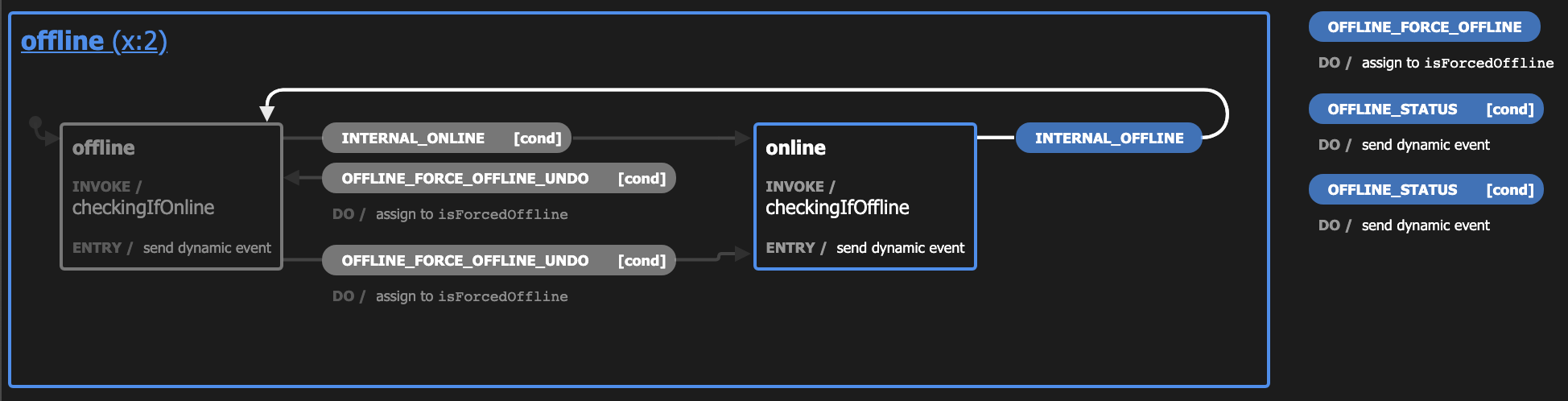
The offline machine can only ever be in two states: offline and online, with the additional capability to be forced offline for testing purposes.
Events
OFFLINE_STATUS
This event can be sent at any time and will send the current status back to the parent via a NotifyParent event.
Responses
STATUS_ONLINE when online
Configurable event name sent to parent.
// Example
app.send('OFFLINE_STATUS'); // ping the offline machine

// offline responds with
{
  "type": "STATUS_ONLINE",
  "isForcedOffline": false
}
STATUS_OFFLINE when offline
Configurable event name sent to parent.
// Example
app.send('OFFLINE_STATUS'); // ping the offline machine

// offline responds with
{
  "type": "STATUS_OFFLINE",
  "isForcedOffline": false
}
OFFLINE_FORCE_OFFLINE
This event can be sent to force the machine into an offline state even when online. Very helpful for testing applications under offline circumstances.
Any offline or online navigator events will be ignored while forced offline.
OFFLINE_FORCE_OFFLINE_UNDO
Disables forcing the machine offline, the machine is realigned into the current offline or online states depending on the current navigator.onLine status
NotifyParent
All the parent messages are of type NotifyParent
interface NotifyParent {
  type: string;
  isForcedOffline: boolean;
}
Integration
Should be invoked by a parent machine
The offline machine is much more useful when invoked by a parent. The idea is that this can be reused in any app, that needs to handle offline capabilities.
Example
import { assign, send, spawn } from 'xstate';
import isOfflineMachine from 'xstate-offline-machine';

const { Machine } = require('xstate');

const appMachine = Machine({
  id: 'app',
  initial: 'idle',
  context: {
    offline: undefined,
  },
  states: {
    idle: {
      on: {
        INITIALIZE: {
          target: 'ready',
          actions: assign({
            offline: () => spawn(isOfflineMachine, { name: 'offline' }),
          }),
        },
      },
    },
  },
});
And then running the app like this
import appMachine from './machines/app.machine';

const app = interpret(appMachine).start();
app.send('INITIALIZE');
Note: This is just an example, you can invoke however you want.
Configuration
buildOfflineMachine and buildOfflineMachineOptions are exported and can be used to configure the machine to suit your needs. If you would like to return different messages to the parent then it can be done like so.
import { buildOfflineMachine, buildOfflineMachineOptions } from 'xstate-offline-machine';

const isOfflineMachine = Machine(
  buildOfflineMachine({
    statusOnlineEventName: 'MY_APP_IS_ONLINE',
    statusOfflineEventName: 'MY_APP_IS_OFFLINE',
  }),
  buildOfflineMachineOptions({})
);
// ...
And the app would reecive MY_APP_IS_ONLINE and MY_APP_IS_OFFLINE events after an OFFLINE_STATUS event.