
xyf-app-publish
v1.2.6
Published
APP内部分发托管工具
Downloads
527


Readme
app内部分发托管工具
介绍
该工具用于帮助开发者快速实现app内部分发托管功能。支持 Android 和 iOS 两个平台。对于 Android 平台,上传的是 *.apk 文件,对于 iOS 平台,上传的是 *.ipa 文件。
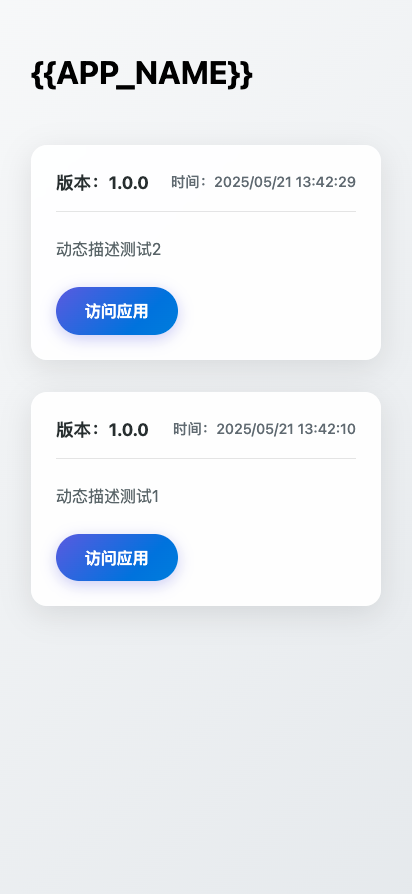
- 列表页面预览
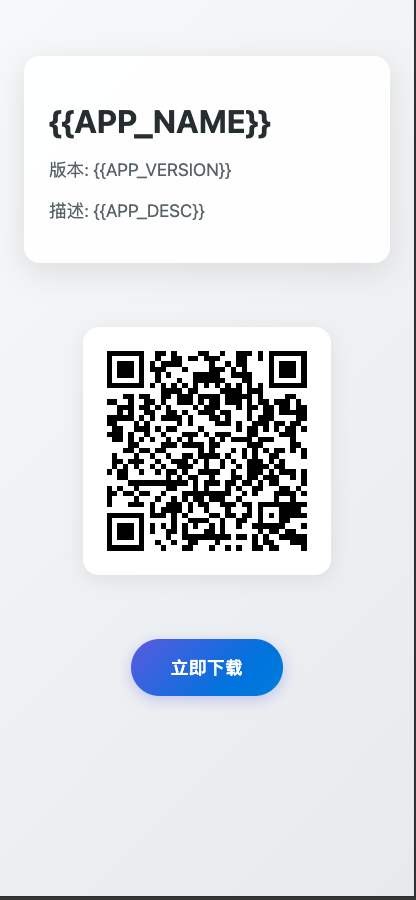
- 版本页面预览
使用方法
- 新建配置文件:app_config.json
# 使用命令初始化配置文件。此时,将在当前目录下生成配置文件 ./dist/app-publish/app_config.json
npm install -g xyf-app-publish
npx app-publish --init
配置文件示例:
// app_config.json
{
    "OSS_SECRET_ID": "xxxxxxxxxxxxxxxxxxxxxxxxxxxxxxxxxxxxxxxxxxxxxxxxxxxxxxxxxxxxxxxxxxxxxxxxxxxxxxxxxxxxxxxxxxxxxxxxxxxxxxxxxxxxxxxxxxxxxxxxxxxxxxxxxxxxxxxxxxxxxxxxxxxxxxxxxxxxxxxxxxxxxxxxxxxxxx",
    "OSS_SECRET_KEY": "xxxxxxxxxxxxxxxxxxxxxxxxxxxxxxxxxxxxxxxxxxxxxxxxxxxxxxxxxxxxxxxxxxxxxxxxxxxxxxxxxxxxxxxxxxxxxxxxxxxxxxxxxxxxxxxxxxxxxxxxxxxxxxxxxxxxxxxxxxxxxxxxxxxxxxxxxxxxxxxxxxxxxxxx",
    "OSS_BUCKET_NAME": "xxxxxxxxxxxxxxxxxxxxxxxxxxxxxxxxxxxxxxxxxxxxxxxxxxxxxxxxxxxxxxxxxxxxxxxxxxxxxxxxxxxxxxxxxxxxxxxxxxxxxxxxxxxxxxxxxxxxxxxxxxxxxxxxxxxxxxxxxxxxxxxxxxxxxxxxxxxxxxxxxxxxxxxx",
    "OSS_BASE_PATH":"",//在 OSS 中存放的目录
    "OSS_DOMAIN":"",//访问 OSS 的域名
    "APP_TYPE": "iOS", // 应用类型, iOS or Android
    "APP_NAME":"",// 应用名称
    "APP_ID": "xxx", // 应用包名(Android 时随便添,非空即可)
    "APP_DESC": "", // 应用版本描述
    "APP_VERSION": "1.0.0",// 当前应用版本号
    "APP_FILE_PATH": ""// 应用文件路径
}
注意: 执行 init 命令后,在 ./dist/app-publish/ 目录下,除了生成 app_config.json 文件,还会拷贝列表页面的 list.html 文件 和 版本页面的 template.html 文件到当前目录下,修改模板文件后,再执行 upload 命令对应访问页面的样式也会修改
- 执行文件上传命令:
# 默认使用 步骤 1  中配置的参数
npx app-publish --upload
# 自定义 app_config.json 文件(json文件可以放在任意位置)
npx app-publish --upload --config=/xxx/yyy/app_config.json
# 基于 json 配置文件,在执行 upload 命令时,可以通过命令行参数自定义配置文件内的参数
npx app-publish --upload --APP_DESC=appDesc- 执行文件上传命令时,自定义配置文件内的参数: npx app-publish --config=./dist/app_config.json --upload --APP_DESC=appDesc
- 上传完成后,控制台将打印应用上传成功信息,并返回应用下载页面链接。
在其他 JS 脚本中使用
- 安装依赖:
npm install xyf-app-publish # npm install -g xyf-app-publish - 在 JS 脚本中执行命令行
const { execSync } = require('child_process');
execSync('npx app-publish --init', { stdio: 'inherit' });