
yapi-get-interface-mcp
v0.1.2
Published
一个用于获取YAPI接口详情的MCP服务器

Maintainers
 gorvey
Readme
yapi-get-interface-mcp
一个用于获取YAPI接口详情的MCP(Model Context Protocol)服务器,支持与Cursor、Claude Desktop等AI开发工具集成。
使用方法
可用工具
yapi-get-interface
根据接口ID获取YAPI接口详情
参数:
id:接口ID(数字格式)
使用示例:
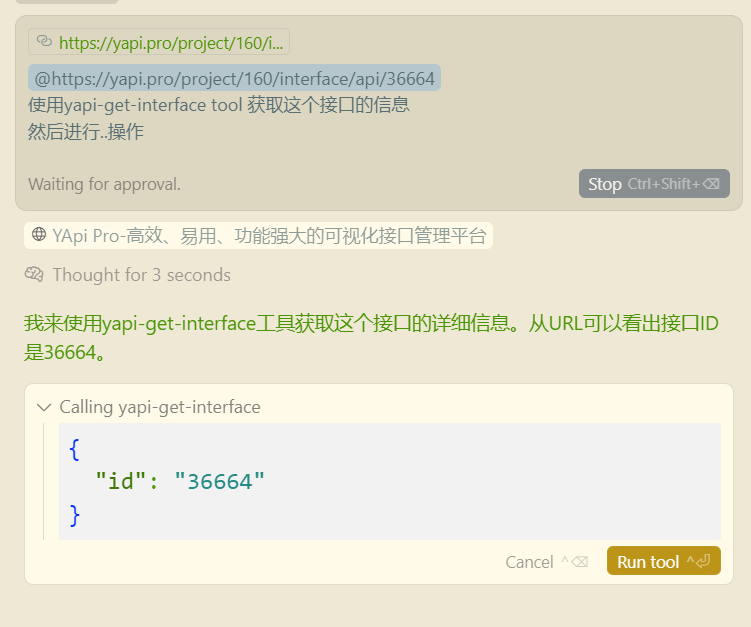
AI工具会自动调用该工具并返回接口的完整信息,包括:
- 接口基本信息(名称、路径、方法等)
- 请求参数(路径参数、查询参数、请求头、请求体)
- 响应信息(响应体、响应类型等)
- 其他元数据(创建时间、状态、标签等)
命令行参数
| 参数 | 说明 | 必需 | 示例 |
|------|------|------|------|
| --email | YAPI登录邮箱 | 是 | --email [email protected] |
| --password | YAPI登录密码 | 是 | --password mypassword |
| --url | YAPI服务器地址 | 是 | --url https://yapi.company.com |
快速开始
在Cursor中配置
创建或编辑 .cursor/mcp.json 文件(项目级配置)或 ~/.cursor/mcp.json 文件(全局配置):
{
    "mcpServers": {
        "yapi-get-interface-mcp": {
            "command": "npx",
            "args": [
                "yapi-get-interface-mcp",
                "--email", "[email protected]",
                "--password", "yourpassword",
                "--url", "https://yapi.yourcompany.com"
            ]
        }
    }
}
环境要求
- Node.js >= 18.0.0
- pnpm >= 8.0.0
安装
使用npx可以直接运行,无需本地安装:
# 克隆项目
git clone https://github.com/Gorvey/yapi-get-interface-mcp.git
cd yapi-get-interface-mcp

# 安装依赖
pnpm install

# 构建项目
pnpm run build
开发指南
项目结构
src/
├── config/           # 配置管理
│   └── yapi-config.ts
├── server/           # MCP服务器
│   ├── server.ts
│   ├── tools.ts
│   └── resources.ts
├── yapi/             # YAPI客户端
│   └── client.ts
└── index.ts          # 入口文件
开发脚本
# 开发模式(带示例配置)
pnpm run dev

# 监听文件变化自动构建
pnpm run watch

# 清理构建文件
pnpm run clean

# 构建项目
pnpm run build

# 使用MCP Inspector调试
pnpm run inspector
调试
使用MCP Inspector进行调试:
pnpm run inspector这将启动一个交互式界面,帮助你测试和调试MCP工具。
常见问题
1. YAPI连接失败
- 检查YAPI服务器地址是否正确
- 确认邮箱和密码是否正确
- 检查网络连接和YAPI服务器可访问性
2. 接口ID无效
- 确保接口ID是数字格式
- 检查接口在YAPI中是否存在
- 确认有访问该接口的权限
3. MCP服务器未被识别
- 确保已正确构建项目(
pnpm run build) - 检查配置文件中的路径是否正确
- 重启AI开发工具
许可证
MIT License
贡献
欢迎提交Issue和Pull Request来改进这个项目。