
yingclaw
v2.5.39
Published
Claude Code × 国产大模型一键接入:DeepSeek、Kimi、火山方舟、Qwen、MiniMax、GLM、MiMo、自定义接口

Maintainers
 two7722
Readme
yingclaw
Claude Code × 国产大模型,一键接入。
支持 DeepSeek、Kimi、火山方舟 Coding Plan、阿里云百炼(Qwen)、MiniMax、智谱 GLM、小米 MiMo、B.AI、OpenCode Zen/Go,也支持自定义 Anthropic、OpenAI、Google/Gemini 兼容接口,无需梯子即可使用 Claude Code。
安装
npm install -g yingclaw安装后注册 claw 命令。
快速开始
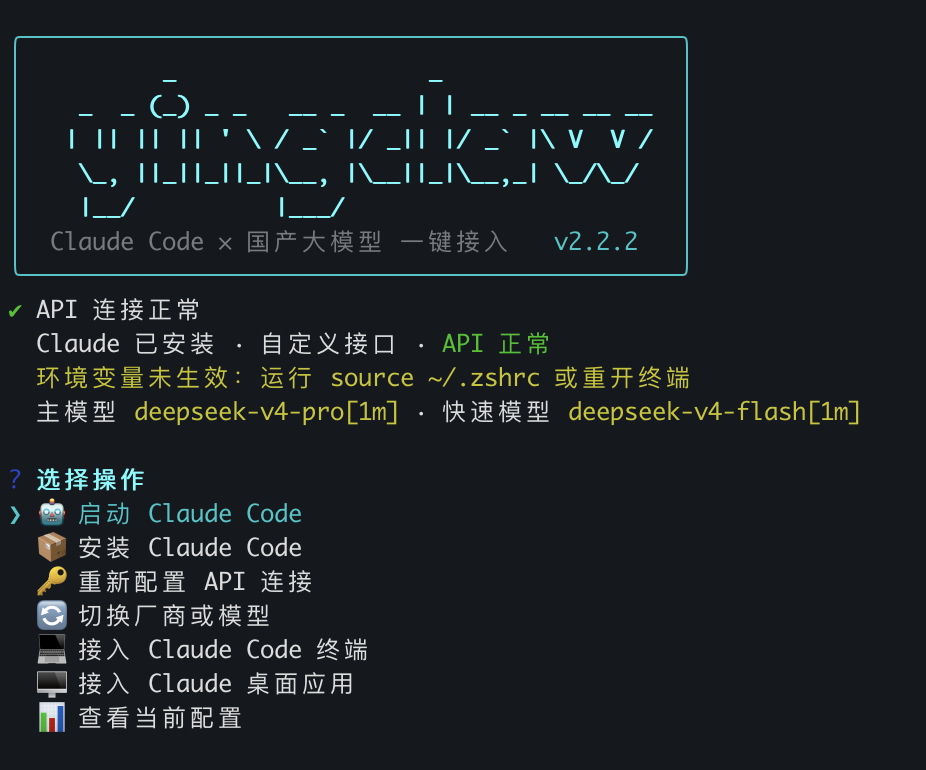
claw直接运行 claw 进入交互菜单,按步骤操作:安装 Claude Code → 配置 API 连接 → 接入终端或桌面应用。
也可以直接运行子命令:
第一步:安装 Claude Code
claw install-claude根据提示选择网络环境(有梯子走官方,没梯子走淘宝镜像)。
第二步:配置 API 连接
claw config选择厂商 → 输入 API Key → 选择模型。只保存连接信息,不修改终端环境变量,也不修改 Claude 桌面配置。
第三步:接入
接入 Claude Code 终端:
claw code写入 Claude Code 所需的环境变量,之后运行 claude 即可。
接入 VS Code Claude Code 扩展:
claw vscode写入 Claude Code 共享设置 ~/.claude/settings.json,并在 VS Code 用户设置中关闭 Claude Code 扩展登录提示。VS Code 已打开时需要执行 Developer: Reload Window 或完全重启。
接入 Claude 桌面应用:
claw desktopclaw desktop 会把 Claude Desktop 指向 yingclaw 本机 Gateway,并只暴露 claude-sonnet-4-6、claude-opus-4-7、claude-haiku-4-5 这类 Claude Desktop 可接受的模型名。真实第三方模型仍按 claw config 保存的主模型和快速模型转发。
claw desktop 默认只接入 Claude 桌面应用的 Cowork / Gateway,不写入 Claude Code 共享设置,因此不会自动接入 Claude Code 终端。交互面板会询问是否同时接入 Claude 桌面 Code 模式,默认选 No;选择 Yes 时才会写入 Claude Code 共享设置。
如果你需要同时接入 Claude Desktop 的 Code 模式,再显式运行:
claw desktop --with-code--with-code 会写入 ~/.claude/settings.json,这个文件也会被 Claude Code CLI / VS Code Claude Code 读取。只想用桌面 Cowork 时不要加这个参数。
claw desktop 会设置 Gateway 登录自动运行;如果自动启动失败,可以手动运行 claw gateway。
出现问题时先运行:
claw doctor
claw support -o yingclaw-support.json
Windows 桌面应用 / Gateway 问题建议运行:
claw doctor --windows
claw support --windows -o yingclaw-support.json
support 生成的是脱敏排障包,不包含 API Key / Gateway Key 明文。
支持的厂商
| 厂商 | 主模型 | 快速模型 | |------|--------|---------| | DeepSeek | deepseek-v4-pro[1m] | deepseek-v4-flash[1m] | | Kimi / Moonshot(OpenAI 兼容) | kimi-k2.5 | kimi-k2.5 | | 火山方舟 Coding Plan | ark-code-latest | ark-code-latest | | 阿里云百炼 | qwen3-max | qwen3.5-plus | | MiniMax | MiniMax-M2.7 | MiniMax-M2.7-Turbo | | 智谱 GLM | GLM-4.7 | GLM-5-Turbo | | 小米 MiMo | mimo-v2.5-pro | mimo-v2.5 | | B.AI | claude-sonnet-4.6 | claude-haiku-4.5 | | OpenCode Zen(按量) | claude-sonnet-4-6 | deepseek-v4-flash-free | | OpenCode Go(订阅制) | glm-5.1 | deepseek-v4-flash | | OpenRouter | deepseek/deepseek-r1-0528 | deepseek/deepseek-chat-v3-0324 | | 自定义 Anthropic 兼容接口 | 自动获取或手动输入 | 手动选择 | | 自定义 OpenAI 兼容接口 | 自动获取或手动输入 | 手动选择 | | 自定义 Google/Gemini 兼容接口 | 自动获取或手动输入 | 手动选择 |
DeepSeek 的 [1m] 后缀是真实 API 模型 ID,表示 100 万 token 上下文窗口(官方说明)。
火山方舟 Coding Plan 使用官方指定的 Anthropic 兼容 Base URL https://ark.cn-beijing.volces.com/api/coding,不要替换成普通推理 API Base URL。
命令列表
claw                 # 交互菜单(无参数时自动进入)
claw config          # 配置 API 连接
claw code            # 接入 Claude Code 终端
claw vscode          # 接入 VS Code Claude Code 扩展
claw vscode-reset    # 恢复 VS Code Claude Code 扩展默认配置
claw desktop         # 接入 Claude 桌面应用
claw desktop --with-code # 同时接入 Claude Desktop Code 模式,会写 Claude Code 共享设置
claw gateway         # 启动 Claude 桌面应用本机 Gateway
claw desktop --direct # 高级:直连写入厂商 Gateway URL
claw switch          # 快速切换厂商或模型
claw status          # 查看当前配置,验证 Key 是否有效
claw doctor          # 自检终端、VS Code、桌面、Gateway 和 API
claw doctor --windows # 追加 Windows 桌面/Gateway 专项检查
claw support         # 生成脱敏排障包
claw support --windows -o yingclaw-support.json
claw update          # 检查并升级到最新版本

claw code-reset      # 恢复 Claude Code 终端默认配置
claw desktop-reset   # 恢复 Claude 桌面应用默认配置
claw reset           # 清除所有 yingclaw 配置

claw install-claude  # 安装 Claude Code
claw setup           # 兼容旧命令:config + code
平台支持
| 平台 | 终端接入 | 桌面接入 |
|------|---------|---------|
| macOS | ✅ 写入 ~/.zshrc | ✅ 自动启动本机 Gateway 并重启 Claude Desktop |
| Linux / WSL | ✅ 写入 ~/.zshrc / ~/.bashrc | — |
| Windows | ✅ 写入用户级环境变量(需重开终端) | ✅ 同步写入 %APPDATA%\Claude-3p\ 和 %LOCALAPPDATA%\Claude-3p\,并写入登录启动脚本 |
原理
终端接入(claw code)写入 shell 配置文件或 Windows 用户环境变量:
ANTHROPIC_BASE_URL
ANTHROPIC_AUTH_TOKEN
ANTHROPIC_MODEL
ANTHROPIC_DEFAULT_OPUS_MODEL / SONNET_MODEL / HAIKU_MODEL
CLAUDE_CODE_SUBAGENT_MODEL
CLAUDE_CODE_EFFORT_LEVEL
新版只写入 ANTHROPIC_AUTH_TOKEN,并会清除旧版遗留的 ANTHROPIC_API_KEY,避免 Claude Code 同时检测到 token 和 API key 后报 Auth conflict。
桌面接入(claw desktop)默认写入本机 Gateway:
- macOS / Windows:写入
Claude-3p/configLibrary/中的 yingclaw entry - Claude Desktop 访问
http://127.0.0.1:18080/yingclaw - Gateway 再转发到当前保存的 Anthropic 兼容接口;如当前为 Kimi 或 OpenAI 兼容接口,则自动转换为
/v1/chat/completions - Google/Gemini 兼容接口会通过 Gateway 转换为 Gemini
generateContent/streamGenerateContent - macOS 使用 LaunchAgent 登录启动 Gateway,Windows 使用 Startup 目录脚本登录启动 Gateway
- Windows 会同时写入 Roaming / Local 两个 Claude-3p 位置,以兼容不同 Claude Desktop 安装方式
- Anthropic 兼容接口的终端接入仍直接使用
ANTHROPIC_*环境变量;Kimi、OpenAI 兼容接口和 Google/Gemini 兼容接口会通过本机 Gateway 转换协议 - 默认不会写入
~/.claude/settings.json,避免影响 Claude Code 终端或 VS Code 扩展;面板中选择同时接入 Code,或使用claw desktop --with-code时才写入
使用 inferenceProvider=gateway、inferenceGatewayAuthScheme=bearer,将 Gateway Base URL 指向 yingclaw 本机 Gateway。高级用户可用 claw desktop --direct 保留旧式直连写入,但新版 Claude Desktop 可能拒绝非 Claude 模型名。
自定义 Anthropic 兼容接口需支持 Anthropic /v1/messages 格式。自定义 OpenAI 兼容接口需支持 OpenAI /v1/models 和 /v1/chat/completions 格式,工具会通过本机 Gateway 转换为 Claude 可用的 Messages 格式。工具会根据 Base URL 自动尝试获取模型列表,失败则手动输入。
VS Code 接入(claw vscode)写入 Claude Code 官方共享设置:
- 接入时会让你单独选择 VS Code Claude Code 的主模型和快速模型,不影响终端或桌面配置
~/.claude/settings.json写入所选主模型,并把已获取的可用聊天模型写入availableModelsenv中启用 Gateway model discovery,并把所选快速模型写入ANTHROPIC_CUSTOM_MODEL_OPTION- VS Code 用户
settings.json写入claudeCode.disableLoginPrompt=true - 扩展与 CLI 共享 Claude Code 设置;如果 VS Code 已打开,需重载窗口或重启后生效
- 如需恢复默认,运行
claw vscode-reset,只移除 yingclaw 写入的 Claude Code env 和 VS Code Claude Code 扩展项,保留其它用户设置
排障
Gateway 未运行或端口被占用
Claude Desktop 报 Can't reach 127.0.0.1:18080 时,先确认 Gateway:
claw gateway如果端口被占用,claw gateway 会提示占用进程和 PID。可以关闭旧进程,或换端口后重新接入:
claw gateway --port 18081
claw desktop
Windows 桌面应用不生效
Windows 只关闭窗口可能不会退出 Claude 进程,配置也可能被 Roaming / Local 两个目录读取差异影响。建议运行:
claw doctor --windows它会检查:
- Gateway 端口是否监听
- Gateway 登录启动脚本是否存在
%APPDATA%\Claude-3p和%LOCALAPPDATA%\Claude-3p配置是否一致- 是否仍有 Claude 进程在后台运行
如果提示配置未生效,请从系统托盘退出 Claude,或在任务管理器结束所有 Claude 进程后重新打开。
OpenAI / Kimi / Gemini 为什么要 Gateway
Claude Code 和 Claude Desktop 原生期望 Anthropic Messages 协议。OpenAI 兼容接口使用 /v1/chat/completions,Gemini 使用 generateContent。yingclaw 会在本机 Gateway 中做协议转换,所以这类接口需要保持 Gateway 运行。
上游错误说明
Gateway 会把常见上游错误转换为中文说明:
| 类型 | 含义 | 建议 |
|------|------|------|
| 401 / 403 | Key 无效、过期或无权限 | 运行 claw config 重新输入 Key |
| 404 | 模型不存在或账号不可见 | 运行 claw switch 重新选择模型 |
| 408 / 504 / timeout | 上游响应超时 | 检查网络/VPN,或换快速模型 |
| subscription / quota | 套餐、余额或权限不足 | 到厂商控制台确认套餐和模型权限 |
| 429 | 请求限流 | 稍后重试或更换 Key / 模型 |
生成排障包
需要反馈问题时运行:
claw support --windows -o yingclaw-support.json排障包会包含当前配置摘要、doctor 检查、Gateway 状态、Desktop Code 状态和 Windows 专项检查,并脱敏 API Key / Gateway Key。公开发送前仍建议快速看一眼 Base URL 是否包含私有域名。
卸载
npm uninstall -g yingclaw
claw reset           # 可选:清除已写入的环境变量和桌面配置
License
MIT