
ym-sku
v2.1.1
Published
sku 数据处理插件, 为了样式的可定制化,只处理 sku 数据,UI 可自己随意绘制
Downloads
61


Readme
介绍
sku 数据处理插件 为了样式的可定制化,只处理 sku 数据,UI 可自己随意绘制 纯 js 封装,所有框架都能用 基本功能应该都能实现
安装
npm 安装
npm install ym-sku示例
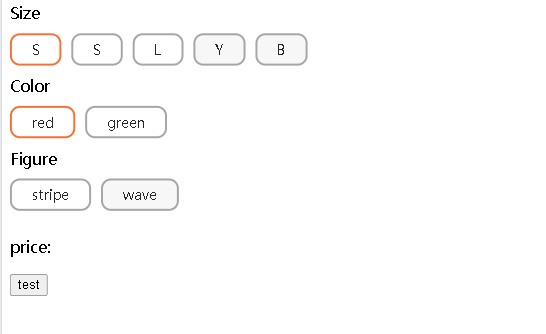
使用
vue3
<template>
  <div>
    <div v-for="(item, propertyIndex) in data.properties" :key="propertyIndex">
      <div>{{ item.name }}</div>
      <div class="attrbute">
        <div
          v-for="(attribute, attributeIndex) in item.attributes"
          :key="attributeIndex"
          @click="handleClick(propertyIndex, attributeIndex)"
          class="weight"
          :class="{
            seletedSpecifications: attribute.isActive,
            disabledStyle: attribute?.isDisabled,
          }"
        >
          <div>{{ attribute?.label || attribute.value }}</div>
        </div>
      </div>
    </div>
    <p>price:{{ dataSourse?.sku?.price }}</p>
    <button @click="testFn">test</button>
  </div>
</template>

<script lang="ts" setup>
import { reactive, ref } from "vue";
import { useSku } from "ym-sku";

const properties = [
  {
    name: "Size",
    attributes: [
      { label: "S", value: "S", isActive: true }, // 默认选中
      { label: "S", value: "M" },
      { label: "L", value: "L" },
      { label: "Y", value: "Y" },
      { label: "B", value: "B" },
    ],
  },
  {
    name: "Color",
    attributes: [
      { label: "red", value: "red", isActive: true },
      { value: "green" },
    ],
  },
  {
    name: "Figure ",
    attributes: [
      { label: "stripe", value: "stripe" },
      { label: "wave", value: "wave", isActive: true }, // 不存在 sku:["S","red","wave"],会抛出错误且不会被选中
    ],
  },
];

// id 和 attributes 必传其他属性可以根据业务决定加什么属性
const skuList = [
  {
    id: 10,
    attributes: ["S", "red", "stripe"],
    stock: 12,
    price: 10,
    originalPrice: 100,
  },
  {
    id: "20",
    attributes: ["S", "green", "wave"],
    stock: 30,
    price: 20,
    originalPrice: 100,
  },
  {
    id: "30",
    attributes: ["M", "red", "stripe"],
    stock: 20,
    price: 30,
    originalPrice: 100,
  },
  {
    id: "40",
    attributes: ["L", "red"],
    stock: 15,
    price: 40,
    originalPrice: 100,
  },
];

const props = {
  properties,
  skuList,
  // skuId: "40", // select skuId:40
};

const {
  data: dataSourse,
  selectAttribute,
  setOptions,
  unselectedName,
} = useSku(props, {
  onChange() {
    const { properties } = dataSourse;
    data.properties = properties;
  },
});

const data = reactive({ properties: dataSourse.properties });

const handleClick = (propertyIndex: number, attributeIndex: number) => {
  const attrbute = selectAttribute(propertyIndex, attributeIndex);
  console.log(attrbute);
};

const testFn = () => {
  const names = unselectedName();
  if (names.length) {
    alert(`请选择 ${names.join(",")}`);
  }
  // select skuId:40
  // setOptions({ skuId: "40" });
};
</script>

<style scoped>
.attrbute {
  display: flex;
  flex-direction: row;
  flex-wrap: wrap;
  flex: 1;
}

.weight {
  display: flex;
  flex-direction: row;
  align-items: center;
  justify-content: center;
  padding: 5px 20px;
  text-align: center;
  margin: 10px 0;
  background: #ffffff;
  border-radius: 10px;
  border: 2px solid #a6a6a6;
  font-size: 14px;
  color: rgba(0, 0, 0, 0.85);
  margin-right: 10px;
}

.disabledStyle {
  background-color: #f7f7f7;
}

.seletedSpecifications {
  border: 2px solid #fb6e23;
}
</style>
vue2
<template>
  <div>
    <div v-for="(item, propertyIndex) in data.properties" :key="propertyIndex">
      <div>{{ item.name }}</div>
      <div class="attrbute">
        <div
          v-for="(attribute, attributeIndex) in item.attributes"
          :key="attributeIndex"
          @click="handleClick(propertyIndex, attributeIndex)"
          class="weight"
          :class="{
            seletedSpecifications: attribute.isActive,
            disabledStyle: attribute?.isDisabled,
          }"
        >
          <div>{{ attribute?.label || attribute.value }}</div>
        </div>
      </div>
    </div>
    <p>price:{{ dataSourse?.sku?.price }}</p>
    <button @click="testFn">test</button>
  </div>
</template>

<script>
import { useSku } from "ym-sku";

export default {
  data() {
    const {
      data: dataSourse,
      selectAttribute,
      setOptions,
      unselectedName,
    } = useSku(null, {
      onChange: () => {
        const { properties } = this.dataSourse;
        this.data.properties = properties;
      },
    });

    return {
      properties: dataSourse.properties,
      dataSourse,
      selectAttribute,
      setOptions,
      unselectedName,
      data: { properties: dataSourse.properties },
    };
  },
  mounted() {
    const properties = [
      {
        name: "Size",
        attributes: [
          { label: "S", value: "S", isActive: true }, // 默认选中
          { label: "M", value: "M" },
          { label: "L", value: "L" },
        ],
      },
      {
        name: "Color",
        attributes: [
          { label: "red", value: "red", isActive: true },
          { value: "green" },
        ],
      },
      {
        name: "Figure ",
        attributes: [
          { label: "stripe", value: "stripe" },
          { label: "wave", value: "wave", isActive: true }, // 不存在 sku:["S","red","wave"],会抛出错误且不会被选中
        ],
      },
    ];

    const skuList = [
      {
        id: 10,
        attributes: ["S", "red", "stripe"],
        expired: true,
        stock: 12,
        price: 10,
        originalPrice: 100,
      },
      {
        id: "20",
        attributes: ["S", "green", "wave"],
        stock: 30,
        price: 20,
        originalPrice: 100,
      },
      {
        id: "30",
        attributes: ["M", "red", "stripe"],
        stock: 20,
        price: 30,
        originalPrice: 100,
      },
      {
        id: "40",
        attributes: ["L", "red"],
        stock: 15,
        price: 40,
        originalPrice: 100,
      },
    ];
    this.setOptions({
      properties,
      skuList: skuList.filter((item) => !item.expired),
    });
  },
  methods: {
    handleClick(propertyIndex, attributeIndex) {
      const attrbute = this.selectAttribute(propertyIndex, attributeIndex);
      console.log(attrbute);
    },
    testFn() {
      const names = this.unselectedName();
      if (names.length) {
        alert(`please select ${names.join(",")}`);
      }
      // select skuId:40
      // this.setOptions({ skuId: "40" });
    },
  },
};
</script>

<style scoped>
.attrbute {
  display: flex;
  flex-direction: row;
  flex-wrap: wrap;
  flex: 1;
}

.weight {
  display: flex;
  flex-direction: row;
  align-items: center;
  justify-content: center;
  padding: 5px 20px;
  text-align: center;
  margin: 10px 0;
  background: #ffffff;
  border-radius: 10px;
  border: 2px solid #a6a6a6;
  font-size: 14px;
  color: rgba(0, 0, 0, 0.85);
  margin-right: 10px;
}

.disabledStyle {
  background-color: #f7f7f7;
}

.seletedSpecifications {
  border: 2px solid #fb6e23;
}
</style>
react
import { useMemo, useState } from "react";
import "./styles.css";
import { useSku } from "ym-sku";
const properties = [
  {
    name: "Size",
    attributes: [
      { label: "S", value: "S", isActive: true }, // 默认选中
      { label: "S", value: "M" },
      { label: "L", value: "L" },
      { label: "Y", value: "Y" },
      { label: "B", value: "B" },
    ],
  },
  {
    name: "Color",
    attributes: [
      { label: "red", value: "red", isActive: true },
      { value: "green" },
    ],
  },
  {
    name: "Figure ",
    attributes: [
      { label: "stripe", value: "stripe" },
      { label: "wave", value: "wave", isActive: true }, // 不存在 sku:["S","red","wave"],会抛出错误且不会被选中
    ],
  },
];

// id 和 attributes 必传其他属性可以根据业务决定加什么属性
const skuList = [
  {
    id: 10,
    attributes: ["S", "red", "stripe"],
    stock: 12,
    price: 10,
    originalPrice: 100,
  },
  {
    id: "20",
    attributes: ["S", "green", "wave"],
    stock: 30,
    price: 20,
    originalPrice: 100,
  },
  {
    id: "30",
    attributes: ["M", "red", "stripe"],
    stock: 20,
    price: 30,
    originalPrice: 100,
  },
  {
    id: "40",
    attributes: ["L", "red"],
    stock: 15,
    price: 40,
    originalPrice: 100,
  },
];

const props = {
  properties,
  skuList,
};

export default function App() {
  const {
    data: skuData,
    selectAttribute,
    unselectedName,
  } = useMemo(() => {
    return useSku(props, {
      onChange() {
        setData(() => ({ ...skuData }));
      },
    });
  }, []);
  const [data, setData] = useState(skuData);
  const handleClick = (propertyIndex: number, attributeIndex: number) => {
    const attrbute = selectAttribute(propertyIndex, attributeIndex);
    console.log(attrbute, "attrbute");
  };

  const testFn = () => {
    const names = unselectedName();
    if (names.length) {
      alert(`请选择 ${names.join(",")}`);
    }
    // select skuId:40
    // setOptions({ skuId: "40" });
  };

  return (
    <div>
      {data.properties.map((item, propertyIndex) => (
        <div key={propertyIndex}>
          <div>{item.name}</div>
          <div className="attrbute">
            {item.attributes.map((attribute, attributeIndex) => (
              <div
                className={`weight ${
                  attribute.isActive ? "seletedSpecifications" : ""
                } ${attribute?.isDisabled ? "disabledStyle" : ""}`}
                key={attributeIndex}
                onClick={() => handleClick(propertyIndex, attributeIndex)}
              >
                <div>{attribute?.label || attribute.value}</div>
              </div>
            ))}
          </div>
        </div>
      ))}
      <p>price:{data.sku?.price}</p>
      <button onClick={testFn}>test</button>
    </div>
  );
}
.attrbute {
display: flex;
flex-direction: row;
flex-wrap: wrap;
flex: 1;
}
.weight {
display: flex;
flex-direction: row;
align-items: center;
justify-content: center;
padding: 5px 20px;
text-align: center;
margin: 10px 0;
background: #ffffff;
border-radius: 10px;
border: 2px solid #a6a6a6;
font-size: 14px;
color: rgba(0, 0, 0, 0.85);
margin-right: 10px;
}
.disabledStyle {
background-color: #f7f7f7;
}
.seletedSpecifications {
border: 2px solid #fb6e23;
}手动控制
可以自己选择传入配置项的时机,比如从接口获取到数据后,再传入配置项
const {
  data: dataSourse,
  selectAttribute,
  setOptions,
  unselectedName,
} = useSku(null, {
  onChange() {
    // ...
  },
});

const properties = [
  {
    name: "Size",
    attributes: [
      { label: "S", value: "S", isActive: true },
      { label: "S", value: "M" },
      { label: "L", value: "L" },
    ],
  },
  {
    name: "Color",
    attributes: [
      { label: "red", value: "red", isActive: true },
      { value: "green" },
    ],
  },
  {
    name: "Figure ",
    attributes: [
      { label: "stripe", value: "stripe" },
      { label: "wave", value: "wave", isActive: true },
    ],
  },
];

// id 和 attributes 必传其他属性可以根据业务决定加什么属性
const skuList = [
  {
    id: 10,
    attributes: ["S", "red", "stripe"],
    stock: 12,
    price: 10,
    originalPrice: 100,
  },
  {
    id: "20",
    attributes: ["S", "green", "wave"],
    stock: 30,
    price: 20,
    originalPrice: 100,
  },
  {
    id: "30",
    attributes: ["M", "red", "stripe"],
    stock: 20,
    price: 30,
    originalPrice: 100,
  },
  {
    id: "40",
    attributes: ["L", "red"],
    stock: 15,
    price: 40,
    originalPrice: 100,
  },
];

// 将 properties 中的 isActive 手动更改为 true 可以设置标签是否选中
setOptions({
  properties,
  skuList,
});
返回值说明
{
  // 更新后的数据
  data:{properties,skuList,selected,skuId,sku},
  // 选中 attribute 行为
  selectAttribute:(propertyIndex,attributeIndex)=>Attribute,
  // 手动更改指定数据
  setOptions:({
    properties,
    skuList,
    skuId
  })=>void,
  // 获取当前未选择的标签
  unselectedName:()=>any[]
}