
ymmv-cli
v0.15.1
Published
Publish and diff terminal-native developer tool-stack profiles at ymmv.fyi.

Maintainers
 bardisty
Readme
ymmv-cli
The tools you actually use. Publish from the CLI, diff against anyone's.
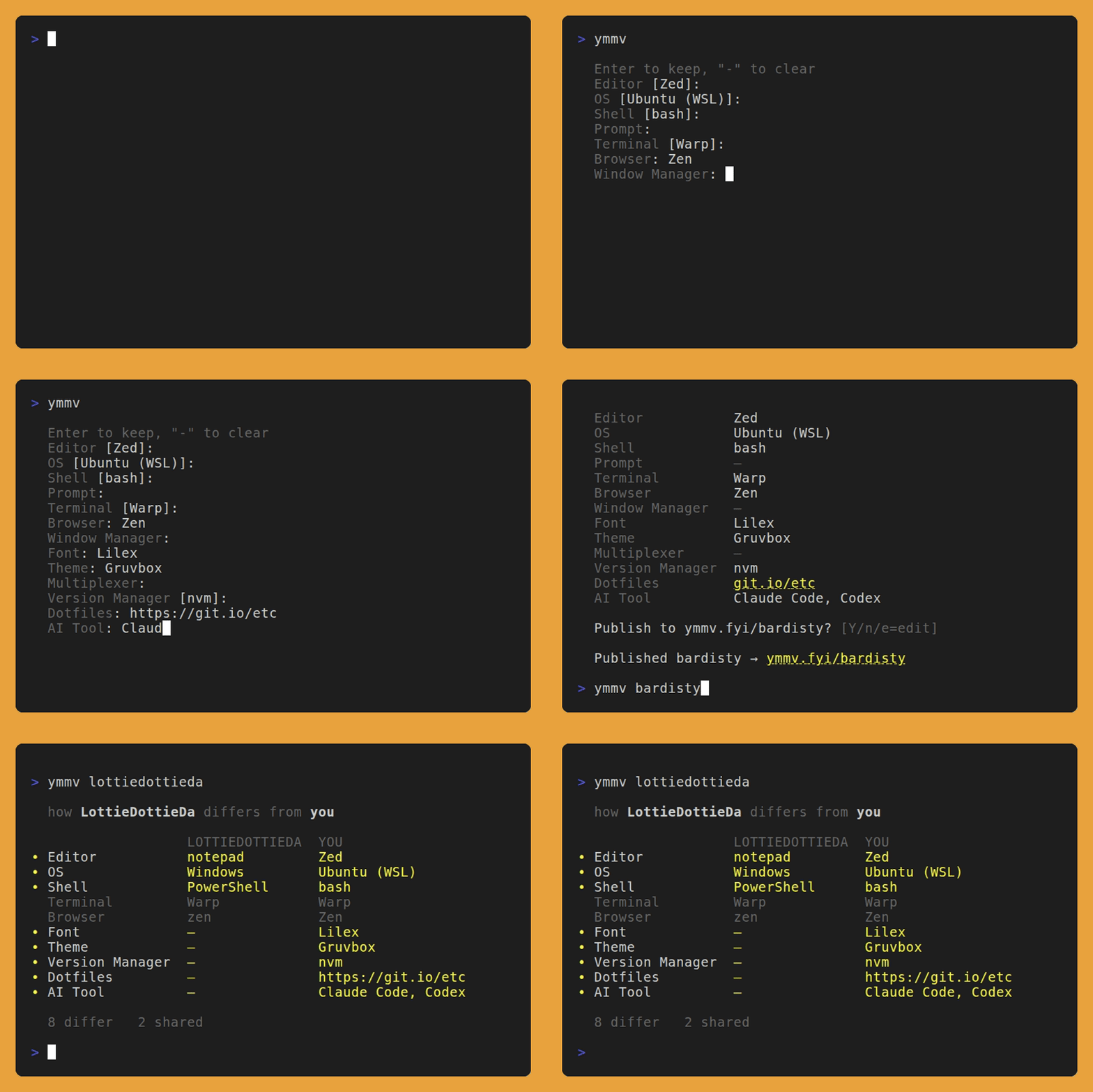
One command puts your editor, OS, shell, terminal, theme and the rest of your
setup on a page at ymmv.fyi/<handle>. It takes about 10 seconds. Here's a
live one: ymmv.fyi/bardisty.
Try it
npx ymmv-cli@latest            # detect your stack, confirm, go live at ymmv.fyi/<you>
npx ymmv-cli@latest bardisty   # view someone's stack in the terminal
Keep the @latest. Without a version, npx can keep running whichever release
it downloaded first.
Works on macOS, Linux, Windows, and WSL, with Node 22 or newer. If you'd
rather type ymmv, install it once:
npm i -g ymmv-cliThe rest of this page uses the short form.
When a newer release exists, the CLI mentions it after a command (in
interactive terminals only), and ymmv update upgrades a global install in
place.
The first run goes like this:
- It shows what it detected on your machine.
- You sign in with GitHub, once per machine. On a local terminal, Enter
copies the code and opens the sign-in page in your browser. Over SSH, Enter
opens it through
$BROWSERwhen that is set, as VS Code Remote-SSH and Codespaces do. Your GitHub username becomes your handle. - It asks for the fields it could not detect (font, theme and dotfiles always).
- You confirm, and the page goes live.
Nothing publishes until you confirm, and ymmv delete removes everything.
GitHub Actions publishes each release through npm Trusted Publishing, with
provenance.
Diff your stack against anyone's
Sign in, then view someone's profile. The CLI lines their stack up against yours:
  how bardisty differs from you

          bardisty  you
~ Editor  Zed       VS Code
= Shell   bash      bash
~ Theme   Gruvbox   Catppuccin
~ Font    Lilex     JetBrains Mono

  3 differ   1 shared
Updating your page
Run ymmv again. The preview marks what publishing would change on your live
page: ~ changed, + new, - cleared. If nothing would change, it says so
and Enter leaves the page alone. y still publishes, if you want to move your
updated date.
At the Publish to ymmv.fyi/<you>? prompt:
ypublishes.nstops without publishing.easksWhich field (all, or Enter to go back):. Type a key or a label, or just enough of one to pick a single field.fontedits the font,winthe window manager.wm,vm,muxandai toolswork too.allgoes through all 13, and Enter goes back to the card with nothing changed.dshows up when your machine now detects a different tool than the one you saved. Say you switched to Neovim. The Editor row then reads(detected: Neovim), anddasks about each marked row.ytakes the detected value.nkeeps yours, and the CLI stops marking that row on this machine until either value changes.
Commands
| Command | What it does |
| ---------------------------------- | ----------------------------------------------------------------------- |
| ymmv | Detect, confirm, publish. ymmv publish is the same command. |
| ymmv -y | Publish without prompts. See Publishing from CI. |
| ymmv --reset-marks | Forget your n answers to d, so every differing row is marked again. |
| ymmv <handle> | View a profile, or diff it against yours when you're signed in. |
| ymmv antfu vs bardisty | How one profile differs from another. No sign-in needed. |
| ymmv set editor Neovim | Change one value. |
| ymmv set --extra "Keyboard=HHKB" | Add a free-form line of your own. -e works too. |
| ymmv unset editor | Remove one value. ymmv set editor - does the same. |
| ymmv unset --extra "Keyboard" | Remove an extra. |
| ymmv delete | Delete your profile. -y skips the confirm, for scripts. |
| ymmv login | Sign in with GitHub. |
| ymmv logout | Sign out. |
| ymmv update | Update the CLI to the latest release. |
| ymmv version | Print the CLI version. It also notes a newer release when one is known. |
Some of these have more to them:
ymmv setandymmv unsettake a key in any case, with spaces or underscores:ymmv set "Window Manager" yabaiandymmv unset ai_toolboth work. A name that isn't a key saves nothing. When it's close to one, the error asksDid you mean "ai-tool"?.ymmv set dotfiles github.com/you/dotfilesoffers thehttps://form, since only a full URL turns into a link on your page. The publish prompts offer the same. Without a terminal, or underYMMV_TOKEN, it stores the value as typed and never asks.- If you're already signed in,
ymmv loginnames the account and asks before signing in again.ymmv login -yskips the question. You need-ywhen the output is piped or redirected. ymmv updateruns the matching upgrade for npm, pnpm and bun global installs. Under npx it prints the command to use instead. Anything else gets the commands to run by hand. If the npm, pnpm or bun on yourPATHisn't the one that installed the copy you're running, it updates nothing and prints both locations. Under WSL that is often a copy installed on the Windows side: update that one from Windows.
Limits
- A value can be up to 256 characters, and an extra's label up to 64.
- Values and labels each need at least one visible character.
- A profile holds up to 32 extras.
Profiles as JSON
Every profile is public JSON too: GET https://ymmv.fyi/api/v1/u/<handle>.
The shape, statuses, caching and CORS rules are in the
API docs.
Environment variables
NO_COLORturns color off. So doesFORCE_COLOR=0orFORCE_COLOR=false.YMMV_APIpoints the CLI at a different Worker, for development or staging. Give it a bare origin, likehttp://localhost:8788. It must usehttps://unless the host is localhost, and ymmv.fyi itself is onlyhttps://ymmv.fyi(unsetYMMV_APIfor that).ymmv logoutstill runs with any value, so a login stored under an old one can be revoked. That Worker must be at least as new as this CLI release, or these break:ymmv loginrequires every field the login response carries: the account id, and on a re-login, the server's answer to retiring the previous token. When one is missing, it revokes the token it just minted and refuses.YMMV_TOKENneeds the server's account lookup.ymmv,ymmv setandymmv unsetneed the profile lookup they read before writing.
YMMV_TOKENsigns you in without a browser, for CI and scripts (see below).- It takes precedence over the stored login.
- The CLI only reads it. It never writes, revokes or deletes it, and
ymmv loginandymmv logoutkeep acting on the stored login. - The CLI asks the server which account the token belongs to, and every
command runs as that account. That includes your side of a
ymmv <handle>diff. - The token goes to whichever server
YMMV_APIselects, so set the two together.
YMMV_HANDLEis optional, and ignored withoutYMMV_TOKEN. Set it to the GitHub username the token belongs to. If the server reports a different account,ymmv -y,ymmv set,ymmv unsetandymmv deleterefuse before sending anything, andymmv <handle>shows the profile without a diff.YMMV_NO_UPDATE_CHECKturns off the startup check for newer releases.NO_UPDATE_NOTIFIERworks too. The check is already off underCI, in pipes and in dev builds, and it never blocks or fails a command.
Publishing from CI
ymmv login needs a browser, so sign in on your machine and hand the token to
CI:
- Run
ymmvlocally. It signs you in and publishes your profile. - Copy the
tokenvalue from the token file:- Linux:
~/.config/ymmv/token.json - macOS:
~/Library/Preferences/ymmv/token.json - Windows:
%APPDATA%\ymmv\Config\token.json
- Linux:
- Save it as a CI secret named
YMMV_TOKEN. SettingYMMV_HANDLEto your GitHub username is optional. It makes the job fail if the secret ever holds another account's token. - In the job, run
npx ymmv-cli@latest set <key> <value>for each value it keeps up to date, such asset dotfiles https://github.com/you/dotfiles.
What to expect:
- Under CI (
CIset, as hosted runners do),ymmv -ydoesn't detect anything, so the runner's OS and shell never reach your page. It checks your saved profile against what's live and prints(detection off under CI)under the card. That normally ends inNothing to publish.and exit 0, without a write. With no saved profile it stops with an error and exit 1. To detect on the runner anyway, setCI=falsefor that step. ymmv setwrites nothing for a value the profile already holds, so a scheduled job doesn't move your updated date.- A rejected or revoked
YMMV_TOKENfailsymmv -y,ymmv set,ymmv unsetandymmv deletewith an error naming the variable. Nothing falls back to an interactive login, and any stored login file on the runner stays as it was.ymmv <handle>still shows the profile, prints why there's no diff on stderr, and exits 0. ymmv deleteacts on the account the token belongs to, and names that account's page when it asks you to confirm.
License
MIT. Source and issues: https://github.com/ymmv-fyi/ymmv.