
yo.js
v1.1.7
Published
Construction of the presentation layer solution is based on express, handlebars


Readme




yo是一个基于express的前端表现层的框架。 核心理念是,简化前端开发流程,同时实现前后端分离,分离的准则是基于接口定义而不涉及具体的技术实现细节。 使用了handlebars作为模板引擎,spm进行前端构建和依赖包管理,使用PJAX的方式,渐进使用history。
已实现功能:
- 后端接口适配(根据接口定义自动生成路由和输入验证)
- handlebars模板(根据数据+模板实现服务端渲染)
- pushstate的在现代浏览器的使用(基于pjax:push state+Ajax)
- 引入了SPM的调试中间件,可以进行代码的预处理依赖和调试(支持handlebars,es6,seajs预处理)
- 开发,测试,生产三个环境的yo应用开发过程和构建
- SPM集成部署到CDN
- 多应用下,session的存储介质适配
- PageCache的实现
- 服务端处理逻辑,以接口单元组,实现多个无关联接口的组合,异步获取
- yo框架的适配层中间件,可以对接口返回数据二次加工
- 优化log记录,统一使用winston,分文件记录(按接口调用,error信息,warn信息,info信息)
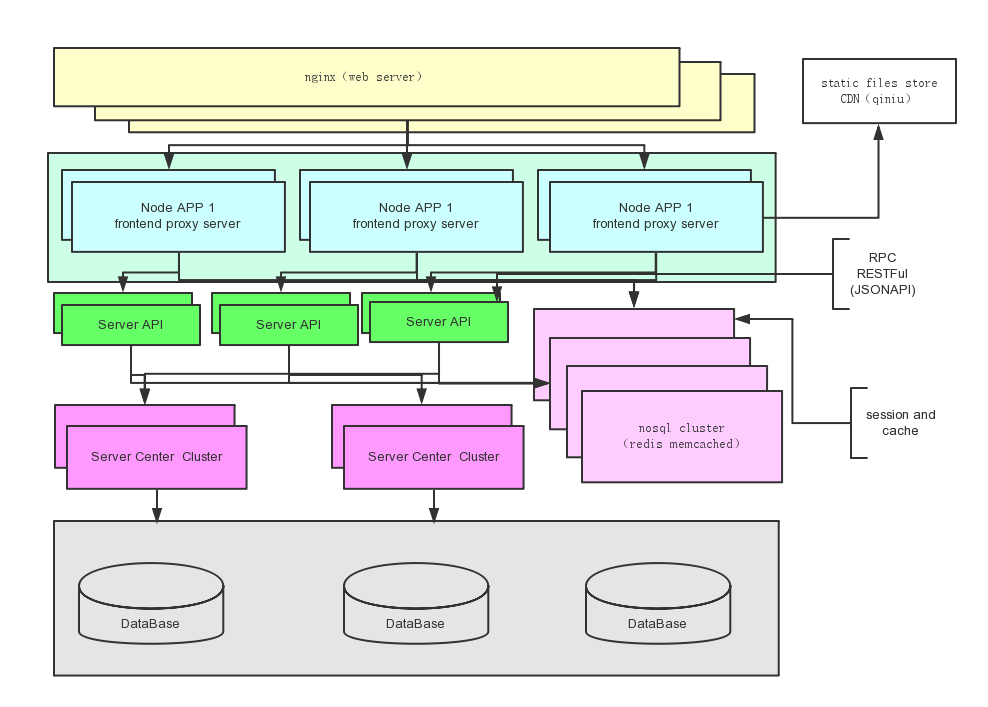
关于YO应用在整个系统架构体系的位置和作用
前端可以是nginx做一层反向代理,提高http request的吞吐,同时对外屏蔽了内部web APP结构。可以代理到同域的不同目录,或者是不同的域名。
- 关于Node App的业务粒度,建议是业务模块的粒度,如:登陆注册,频道聚合页,搜索页,资讯聚合。
- 多个Node App调用nosql的集群,实现状态共享。
- 对于SOA 服务封装的API,进行接口交互。(后续可以实现接口层,pagecache)。
- Node APP不会调用具体的SOA服务或者数据库持久层。
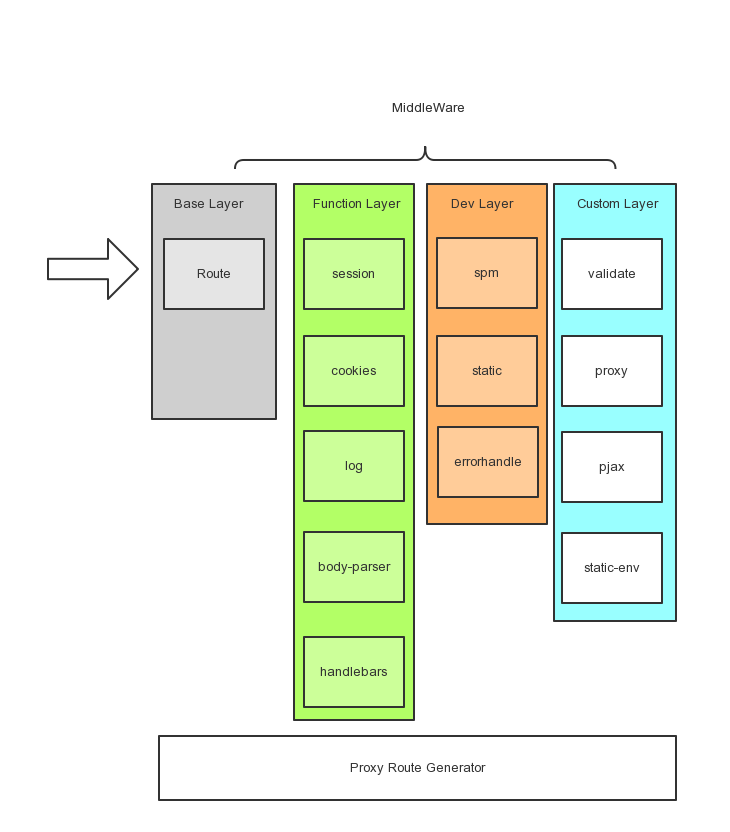
使用中间件来扩展
中间件包含四种类型:基础,功能,开发,自定义
- 基础:目前主要是路由器的实现(使用了express默认的路由封装)
- 功能:web需要的一些功能,如:session管理,cookies序列化,日志记录,http body序列化,模板引擎
- 开发:在开发和测试阶段需要进行调试,错误反馈等
- 自定义:主要实现框架的一些自定义处理功能:前置校验,接口代理,PJAX服务端处理,静态文件环境设置
同时通过proxy route生成接口对应的界面
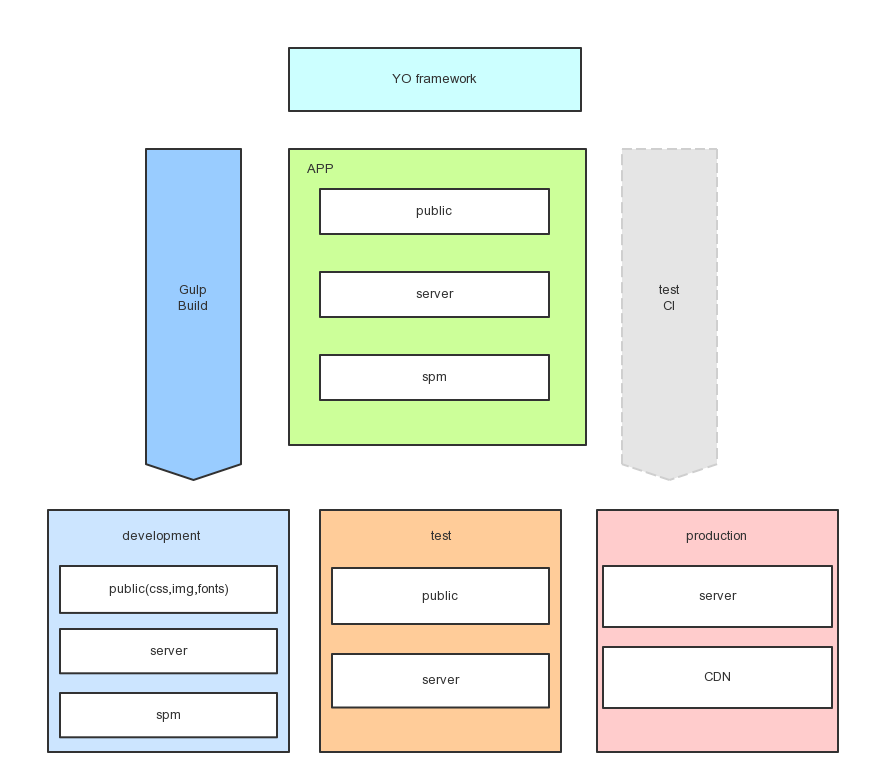
不同环境的构建和使用
yo的app主要是 使用Gulp和SPM来进行构建的,在构建的过程中,主要实现了compass的预编译,js模块的封装处理,js的合并压缩,生成业务依赖库打包,配置不同环境的静态文件位置,server的启动的任务。
构建分成3个环境:
- 开发环境:使用spm-serve实时封装处理,调用的js代码直接在spm目录下面
- 测试环境:使用了public目录下面合并的js业务代码和库依赖。
- 生产环境:部署到CDN,使用绝对路径的合并压缩的js和md5后的库依赖js包。
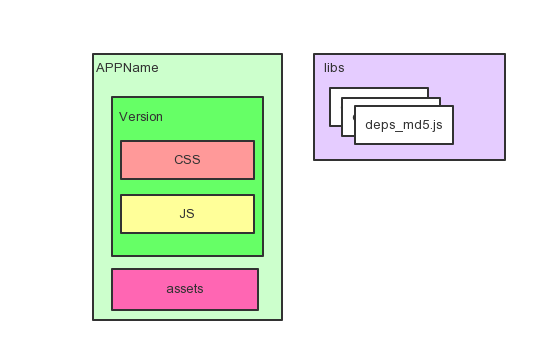
关于CDN的存储说明
CDN的静态存储会按照应用的名称打包,目录层次:name/version/css/,name/assets/,name/version/js/,libs/deps_[md5-value].js。
注意: libs下面是多个库的合并文件,命名采用
deps_[md5-value].js的方式,MD5是这个文件本身的MD5。在构建时,如果这个MD5在CDN上已存在,不会重复部署这个合并的依赖库文件。
YO使用方法
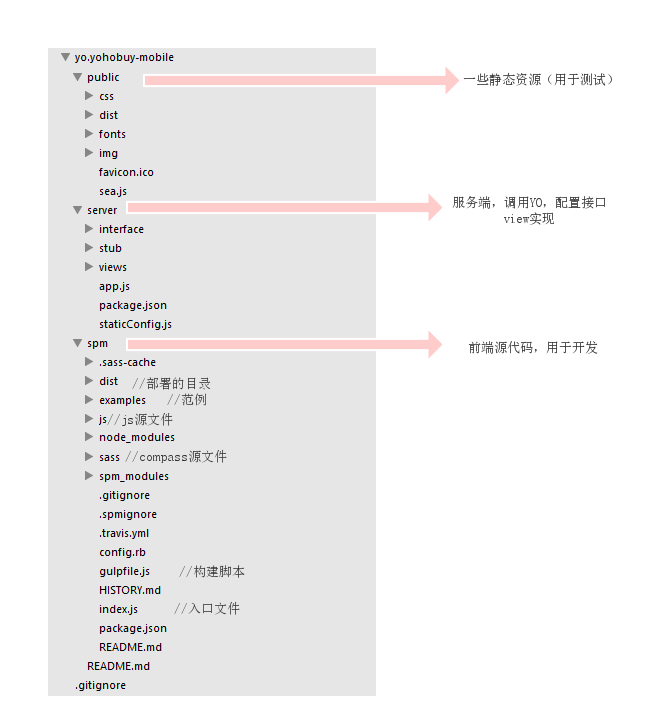
按照如上目录结构:新建项目
app.js
var yo = require('../../yo/index');  //引用YO框架
var staticDir = require('./staticConfig').staticDir; //获取静态文件的不同环境配置
var app = yo({    //初始化yo的app
    appPath: __dirname + '/../', //应用所在目录
    tempExt: 'html', //模板引擎的扩展名
    envStatic: staticDir //静态文件的环境配置
});

require('./stub/routers')(app);//添加桩服务
启动服务步骤:
git clone http://git.dev.yoho.cn/hbomb/yoweb.git
到YO,SPM目录下面,分别运行如下命令:
npm install -d
如果没有安装gulp的,需要安装下npm install gulp,
如果没有安装compass,需要安装下gem install compass。
在SPM目录下,执行spm install
运行服务:gulp 。
具体的gulp的任务可以看下gulpfile。
关于日志
yo采用了winston,作为日志记录,日志默认会保存四个文件:
- 接口调用的日志记录:
yo-api.log - 错误日志记录:
yo-err.log - yo框架日志记录:
yo.log - 应用日志记录:
app.log
默认配置日志文件保存到应用的根目录下的logs目录,同时配置日志文件的上限是50M,默认日志级别是info,出异常不退出记录
配置可以通过应用配置loggers进行修改。
范例:
var app = yo({
    appPath: __dirname + '/../',
    loggers:{
        app:{
            level:'info'
        }
    },
    logsFile:'/Data/logs/node'
});
如果日志目录不存在,会自动创建。同样可以配置更多的winston的日志配置(含日志的transport)。
默认配置如下:
/**
 * 默认配置
 * @type {Object}
 */
var defaultOptions = {
    Console: {
        handleExceptions:true,
        colorize: 'all',
        prettyPrint:true
    },
    File:{
        maxsize:50*1024*1024
    },
    exitOnError:false,
    level:'info'
}


/**
 * 日志默认配置
 * @type {Object}
 */
exports.config = {
    api: {
        file:'yo-api.log',
        level:'info',
        trans: {
            Console: {
                handleExceptions:false
            }
        }
    },
    yo: {
        file:'yo.log',
        level:'info',
        trans: {
            Console:{
                handleExceptions:true
            }
        }
    },
    error: {
        file: 'yo-err.log',
        level:'error',
        trans: {
             File:{
                handleExceptions:true
             }
        }
    },
    app: {
        file: 'app.log',
        level:'info',
        trans: {
            Console: {
                handleExceptions:false
            },
            File: {
                handleExceptions:false
            }
        }
    }
}
应用使用方法
可以直接使用 req.app.logger 进行打日志。
app.get('/test',function(req,res,next) {
    req.app.logger.log('info','test %s','hi baby!');//test hi baby!
});

app.logger.log('info','hi');//hi