
ys-text-annotation
v0.0.1
Published
文字标注组件 - 基于 Lit 的高性能文本标注工具,支持实体标注、关系标注、虚拟滚动功能。

Maintainers
 yangyushu
Readme
ys-text-annotation
文字标注组件 - 基于 Lit 的高性能文本标注工具,支持实体标注、关系标注、虚拟滚动功能。
0. 示例效果
- 创建标注、创建关系
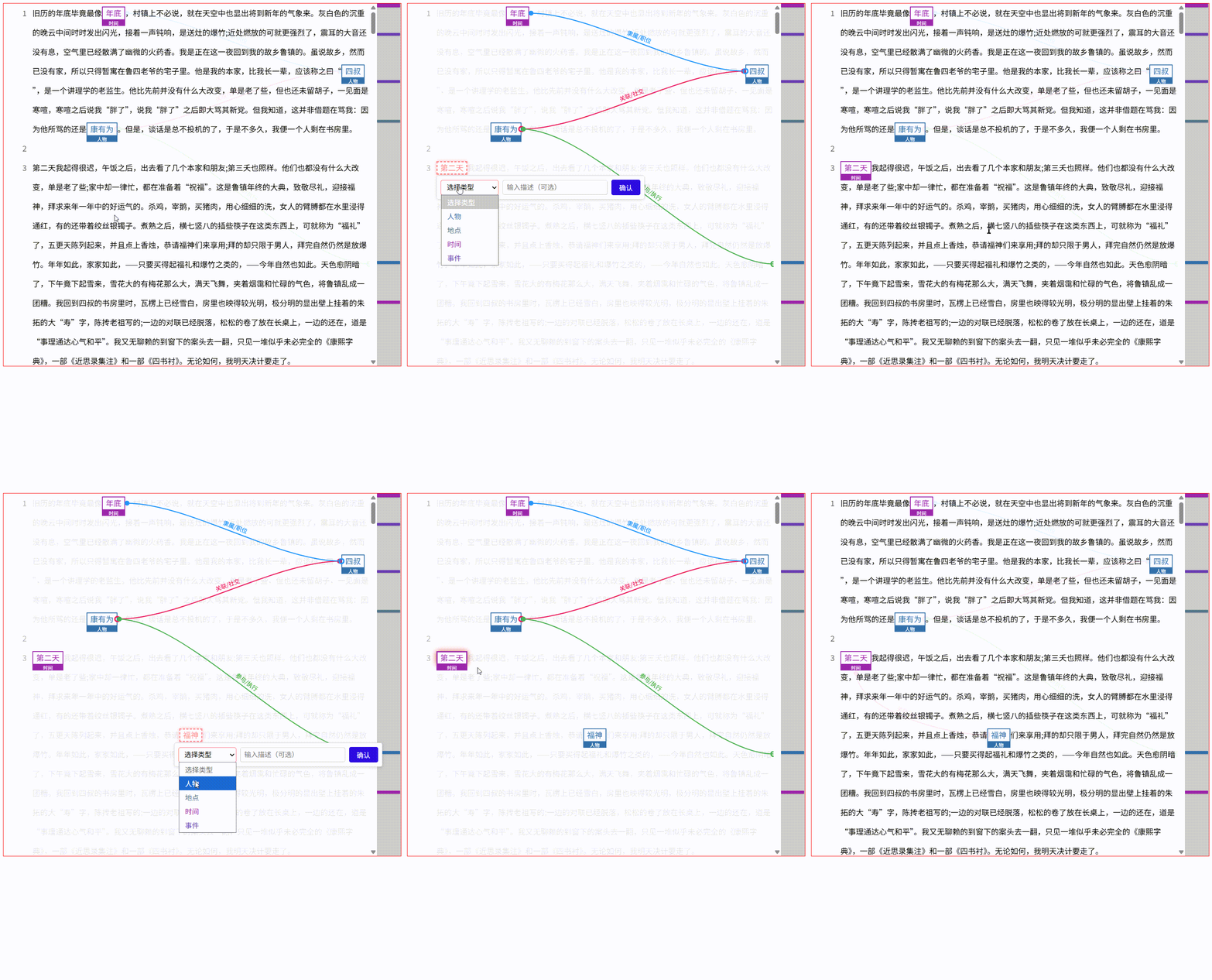
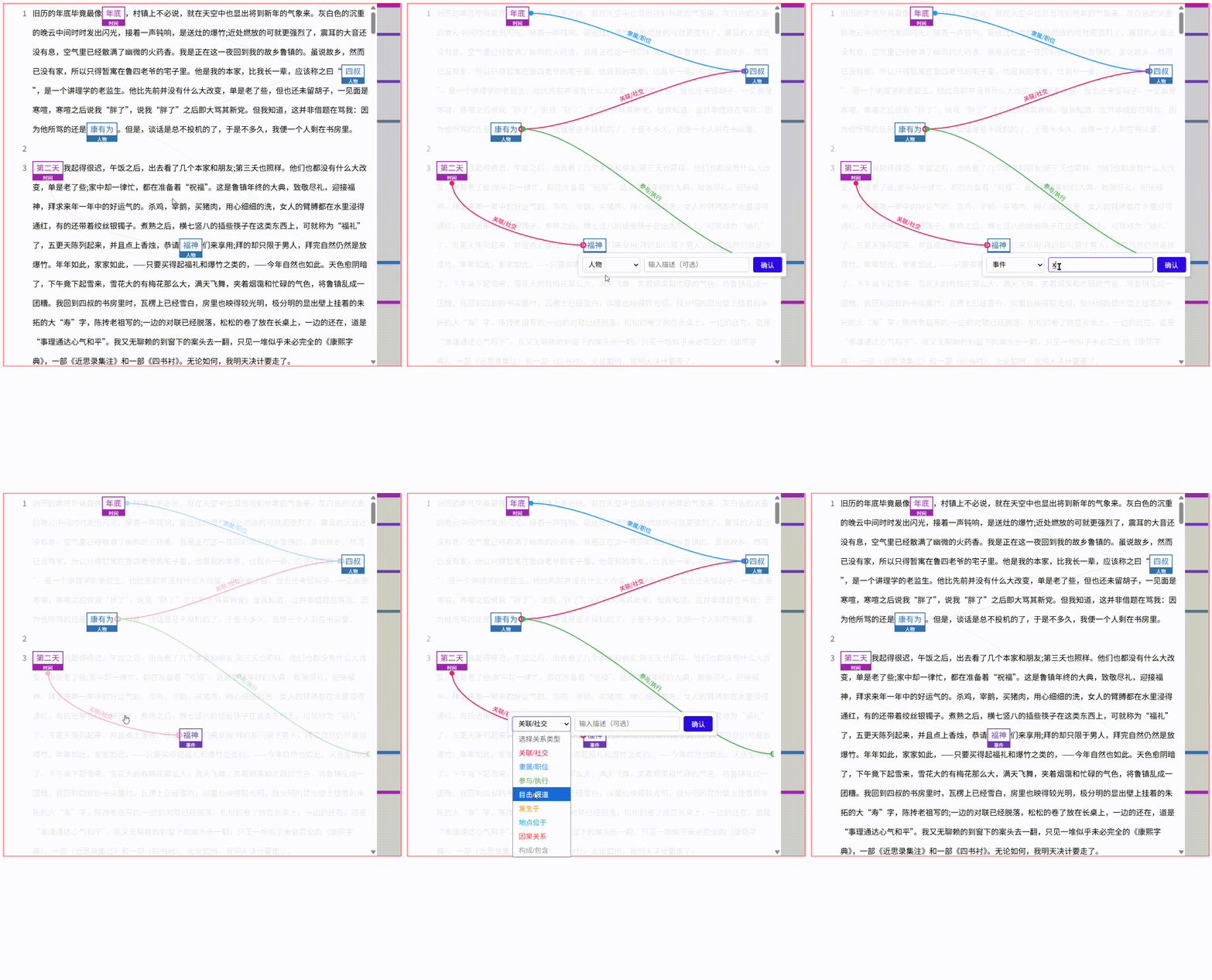
- 编辑标注、编辑关系
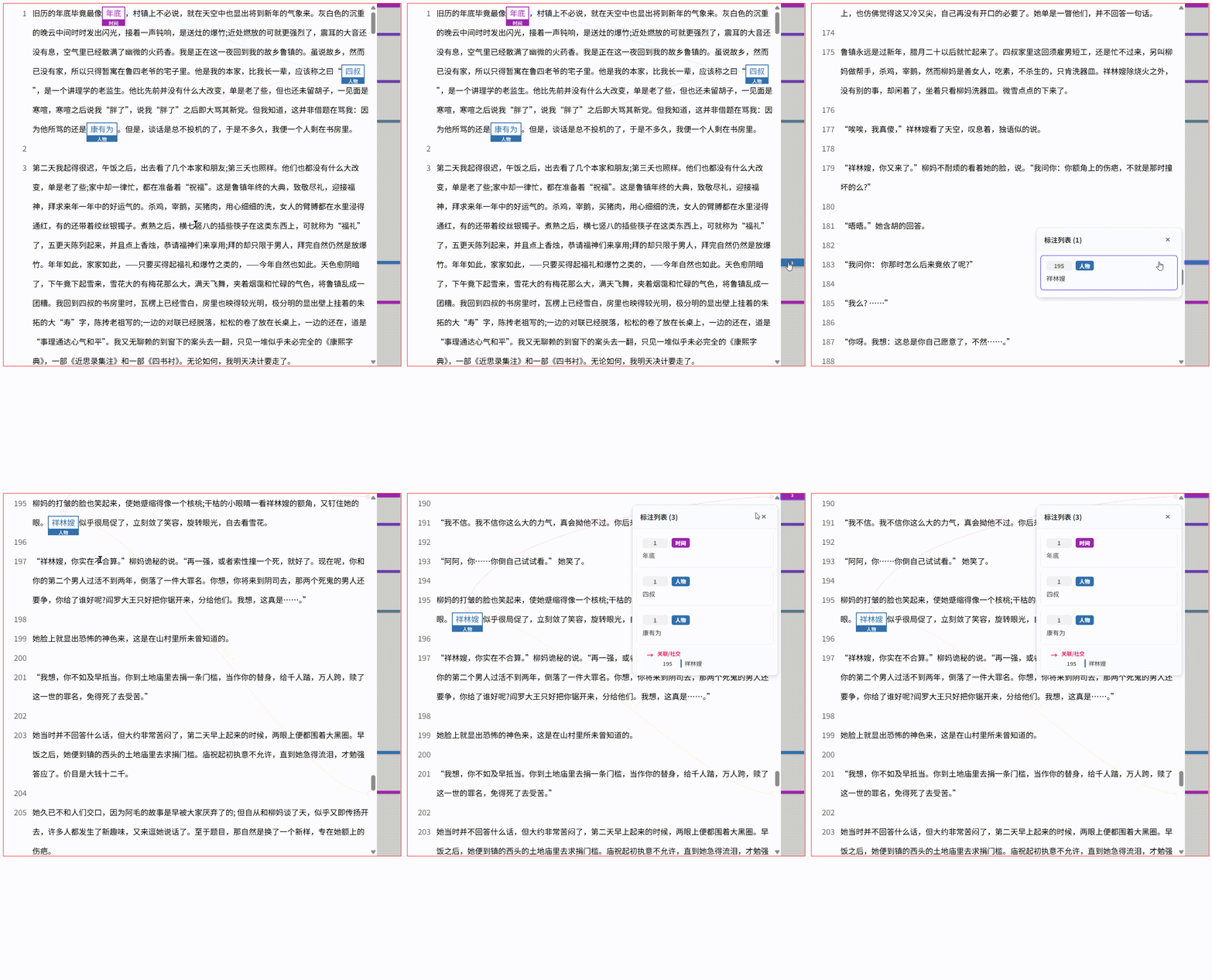
- 指定位置滚动、创建远距离标注
1. 组件名称及用法
组件名称
ys-text-annotation
基本用法
<!-- 引入组件 -->
<script type="module" src="./dist/ys-text-annotation.js"></script>

<!-- 使用组件 -->
<ys-text-annotation id="annotator"></ys-text-annotation>

<script>
  const annotator = document.getElementById('annotator');

  // 初始化组件
  annotator.init({
    editable: true,
    content: '这是一段需要标注的文本。\n可以包含多行内容。',
    annotationType: [
      { type: '人名', color: '#2d0bdf' },
      { type: '地名', color: '#c3427f' }
    ],
    relationshipType: [
      { type: '位于', color: '#ff6b6b' },
      { type: '属于', color: '#4ecdc4' }
    ]
  });
</script>
简单示例
// 1. 获取组件实例
const annotator = document.querySelector('ys-text-annotation');

// 2. 初始化配置
annotator.init({
  editable: true,
  content: '张三在北京工作。',
  annotationType: [
    { type: '人名', color: '#2d0bdf' },
    { type: '地名', color: '#c3427f' }
  ],
  relationshipType: [
    { type: '工作于', color: '#ff6b6b' }
  ]
});

// 3. 设置初始数据(可选)
annotator.setData({
  annotations: [
    {
      id: '1',
      lineId: 0,
      start: 0,
      end: 2,
      content: '张三',
      type: '人名',
      description: '人物实体',
      color: '#2d0bdf'
    }
  ],
  relationships: []
});

// 4. 获取标注结果
const result = annotator.getData();
console.log(result); // { node: [...], line: [...] }
2. 核心方法:init、setData、getData
2.1 init(config) - 初始化方法
功能说明:统一初始化组件配置,包括编辑模式、文本内容、标注类型、关系类型以及各种生命周期回调函数。
参数类型:
init(config: {
  editable?: boolean;                              // 是否启用编辑模式
  content?: string;                                // 文本内容(支持\n换行)
  annotations?: AnnotationItem[];                  // 初始标注数据
  relationships?: RelationshipItem[];              // 初始关系数据
  annotationType?: AnnotationType[];               // 标注类型配置
  relationshipType?: RelationshipType[];           // 关系类型配置
  relationshipTypeResolver?: relationshipTypeResolver;     // 关系选择器(生命周期)
  relationshipTypeFilter?: RelationshipTypeFilter;         // 关系类型过滤器(生命周期)
  annotationValidator?: AnnotationValidator;               // 标注验证器(生命周期)
  annotationConfirmValidator?: AnnotationConfirmValidator; // 标注确认验证器(生命周期)
  relationshipValidator?: RelationshipValidator;           // 关系验证器(生命周期)
}): void使用示例:
annotator.init({
  // 基础配置
  editable: true,
  content: '张三在北京工作。\n李四在上海生活。',

  // 标注类型
  annotationType: [
    { type: '人名', color: '#2d0bdf' },
    { type: '地名', color: '#c3427f' }
  ],

  // 关系类型
  relationshipType: [
    { type: '工作于', color: '#ff6b6b' },
    { type: '居住于', color: '#4ecdc4' }
  ],

  // 初始数据
  annotations: [],
  relationships: [],

  // 生命周期回调(详见第3节)
  relationshipTypeResolver: (start, end) => {
    // 根据标注类型自动选择关系类型
    if (start.type === '人名' && end.type === '地名') {
      return { type: '工作于', color: '#ff6b6b' };
    }
    return null;
  }
});
2.2 setData(config) - 设置数据方法
功能说明:动态更新标注和关系数据,用于外部数据同步或批量更新。
参数类型:
setData(config: {
  annotations?: AnnotationItem[];      // 标注数据
  relationships?: RelationshipItem[];  // 关系数据
}): void使用示例:
// 示例1:设置标注数据
annotator.setData({
  annotations: [
    {
      id: '1',
      lineId: 0,
      start: 0,
      end: 2,
      content: '张三',
      type: '人名',
      description: '主要人物',
      color: '#2d0bdf'
    },
    {
      id: '2',
      lineId: 0,
      start: 3,
      end: 5,
      content: '北京',
      type: '地名',
      description: '工作地点',
      color: '#c3427f'
    }
  ]
});

// 示例2:设置关系数据
annotator.setData({
  relationships: [
    {
      id: 'rel-1',
      startId: '1',
      endId: '2',
      type: '工作于',
      description: '工作关系',
      color: '#ff6b6b'
    }
  ]
});

// 示例3:同时设置标注和关系
annotator.setData({
  annotations: [...],
  relationships: [...]
});
2.3 getData() - 获取数据方法
功能说明:获取当前所有标注和关系数据,用于保存或导出。
返回类型:
getData(): {
  node: AnnotationItem[];      // 所有标注数据
  line: RelationshipItem[];    // 所有关系数据
}使用示例:
// 获取当前标注结果
const result = annotator.getData();

console.log('标注数据:', result.node);
console.log('关系数据:', result.line);

// 保存到服务器
fetch('/api/save', {
  method: 'POST',
  headers: { 'Content-Type': 'application/json' },
  body: JSON.stringify(result)
});

// 导出为JSON文件
const dataStr = JSON.stringify(result, null, 2);
const blob = new Blob([dataStr], { type: 'application/json' });
const url = URL.createObjectURL(blob);
const a = document.createElement('a');
a.href = url;
a.download = 'annotations.json';
a.click();
3. 生命周期方法(init中的回调函数)
生命周期方法在 init() 中初始化,用于在特定时机执行自定义逻辑。
3.1 relationshipTypeResolver - 关系选择器
触发时机:创建关系时,用于自动决定使用哪个关系类型。
函数签名:
relationshipTypeResolver: (
  startAnnotation: AnnotationItem,
  endAnnotation: AnnotationItem
) => RelationshipType | string | null参数说明:
startAnnotation: 关系起点标注endAnnotation: 关系终点标注
返回值:
RelationshipType对象:使用该关系类型string:关系类型名称,组件会从relationshipType中查找对应类型null:禁止创建关系
使用示例:
annotator.init({
  relationshipType: [
    { type: '工作于', color: '#ff6b6b' },
    { type: '居住于', color: '#4ecdc4' },
    { type: '学习于', color: '#95e1d3' }
  ],

  // 示例1:返回RelationshipType对象
  relationshipTypeResolver: (start, end) => {
    if (start.type === '人名' && end.type === '地名') {
      return { type: '工作于', color: '#ff6b6b' };
    }
    return null; // 禁止创建
  },

  // 示例2:返回类型名称字符串
  relationshipTypeResolver: (start, end) => {
    if (start.type === '人名' && end.type === '学校') {
      return '学习于';
    }
    if (start.type === '人名' && end.type === '公司') {
      return '工作于';
    }
    return null;
  },

  // 示例3:复杂业务逻辑
  relationshipTypeResolver: (start, end) => {
    // 根据标注内容判断
    if (start.content.includes('学生') && end.type === '地名') {
      return '学习于';
    }
    // 根据描述判断
    if (start.description?.includes('员工')) {
      return '工作于';
    }
    // 默认返回第一个类型
    return { type: '工作于', color: '#ff6b6b' };
  }
});
3.2 relationshipTypeFilter - 关系类型过滤器
触发时机:编辑关系时,用于过滤可选的关系类型列表。
函数签名:
relationshipTypeFilter: (
  relationship: RelationshipItem,
  startAnnotation: AnnotationItem,
  endAnnotation: AnnotationItem
) => RelationshipType[]参数说明:
relationship: 当前正在编辑的关系startAnnotation: 关系起点标注endAnnotation: 关系终点标注
返回值:
RelationshipType[]:可选的关系类型列表
使用示例:
annotator.init({
  relationshipType: [
    { type: '工作于', color: '#ff6b6b' },
    { type: '居住于', color: '#4ecdc4' },
    { type: '学习于', color: '#95e1d3' },
    { type: '属于', color: '#f38181' }
  ],

  // 示例1:根据标注类型过滤
  relationshipTypeFilter: (rel, start, end) => {
    if (start.type === '人名' && end.type === '地名') {
      return [
        { type: '工作于', color: '#ff6b6b' },
        { type: '居住于', color: '#4ecdc4' }
      ];
    }
    if (start.type === '人名' && end.type === '学校') {
      return [
        { type: '学习于', color: '#95e1d3' }
      ];
    }
    // 默认返回所有类型
    return [
      { type: '工作于', color: '#ff6b6b' },
      { type: '居住于', color: '#4ecdc4' },
      { type: '学习于', color: '#95e1d3' }
    ];
  },

  // 示例2:根据当前关系类型过滤
  relationshipTypeFilter: (rel, start, end) => {
    // 如果当前是"工作于",只允许切换到"居住于"
    if (rel.type === '工作于') {
      return [
        { type: '工作于', color: '#ff6b6b' },
        { type: '居住于', color: '#4ecdc4' }
      ];
    }
    return [
      { type: '工作于', color: '#ff6b6b' },
      { type: '居住于', color: '#4ecdc4' },
      { type: '学习于', color: '#95e1d3' }
    ];
  }
});
3.3 annotationValidator - 标注验证器(选中文本阶段)
触发时机:选中文本后、显示编辑层前,用于验证是否允许创建标注。
函数签名:
annotationValidator: (
  selectedText: SelectedTextInfo,
  existingAnnotations: AnnotationItem[]
) => { valid: boolean; message?: string }参数说明:
selectedText: 选中的文本信息lineId: 行号start: 起始位置end: 结束位置content: 选中的文本内容
existingAnnotations: 已有的标注列表
返回值:
{ valid: true }: 验证通过,允许显示编辑层{ valid: false, message?: string }: 验证失败,阻止显示编辑层,可选的message用于错误提示
使用示例:
annotator.init({
  // 示例1:限制标注长度
  annotationValidator: (selectedText, existingAnnotations) => {
    if (selectedText.content.length > 20) {
      return {
        valid: false,
        message: '标注内容不能超过20个字符'
      };
    }
    return { valid: true };
  },

  // 示例2:禁止重复标注
  annotationValidator: (selectedText, existingAnnotations) => {
    const isDuplicate = existingAnnotations.some(
      ann => ann.content === selectedText.content
    );
    if (isDuplicate) {
      return {
        valid: false,
        message: '该内容已被标注'
      };
    }
    return { valid: true };
  },

  // 示例3:限制每行标注数量
  annotationValidator: (selectedText, existingAnnotations) => {
    const lineAnnotations = existingAnnotations.filter(
      ann => ann.lineId === selectedText.lineId
    );
    if (lineAnnotations.length >= 5) {
      return {
        valid: false,
        message: '每行最多只能标注5个实体'
      };
    }
    return { valid: true };
  },

  // 示例4:正则验证
  annotationValidator: (selectedText, existingAnnotations) => {
    // 只允许标注中文
    if (!/^[\u4e00-\u9fa5]+$/.test(selectedText.content)) {
      return {
        valid: false,
        message: '只能标注中文内容'
      };
    }
    return { valid: true };
  }
});

// 监听错误事件,显示错误提示
annotator.addEventListener('error', (e) => {
  if (e.detail.code === 'ANNOTATION_VALIDATION_FAILED') {
    alert(e.detail.message);
  }
});
3.4 annotationConfirmValidator - 标注确认验证器(确认创建阶段)
触发时机:用户选择类型、输入描述后、点击确认按钮前,用于验证是否允许创建标注。
函数签名:
annotationConfirmValidator: (
  annotation: Omit<AnnotationItem, 'id'>,
  existingAnnotations: AnnotationItem[]
) => { valid: boolean; message?: string }参数说明:
annotation: 待创建的标注(不含id)lineId: 行号start: 起始位置end: 结束位置content: 标注内容type: 标注类型description: 描述color: 颜色
existingAnnotations: 已有的标注列表
返回值:
{ valid: true }: 验证通过,允许创建标注{ valid: false, message?: string }: 验证失败,阻止创建标注
使用示例:
annotator.init({
  // 示例1:必须填写描述
  annotationConfirmValidator: (annotation, existingAnnotations) => {
    if (!annotation.description || annotation.description.trim() === '') {
      return {
        valid: false,
        message: '请填写标注描述'
      };
    }
    return { valid: true };
  },

  // 示例2:限制特定类型的标注数量
  annotationConfirmValidator: (annotation, existingAnnotations) => {
    if (annotation.type === '人名') {
      const personCount = existingAnnotations.filter(
        ann => ann.type === '人名'
      ).length;
      if (personCount >= 10) {
        return {
          valid: false,
          message: '人名标注数量已达上限(10个)'
        };
      }
    }
    return { valid: true };
  },

  // 示例3:验证描述格式
  annotationConfirmValidator: (annotation, existingAnnotations) => {
    if (annotation.type === '日期') {
      // 描述必须是日期格式
      if (!/^\d{4}-\d{2}-\d{2}$/.test(annotation.description)) {
        return {
          valid: false,
          message: '日期描述格式必须为 YYYY-MM-DD'
        };
      }
    }
    return { valid: true };
  },

  // 示例4:组合验证
  annotationConfirmValidator: (annotation, existingAnnotations) => {
    // 验证1:描述长度
    if (annotation.description.length > 100) {
      return {
        valid: false,
        message: '描述不能超过100个字符'
      };
    }

    // 验证2:同一行不能有相同类型的重复标注
    const hasDuplicate = existingAnnotations.some(
      ann => ann.lineId === annotation.lineId &&
             ann.type === annotation.type &&
             ann.content === annotation.content
    );
    if (hasDuplicate) {
      return {
        valid: false,
        message: '该行已存在相同类型的标注'
      };
    }

    return { valid: true };
  }
});

// 监听错误事件
annotator.addEventListener('error', (e) => {
  if (e.detail.code === 'ANNOTATION_CONFIRM_VALIDATION_FAILED') {
    alert(e.detail.message);
  }
});
3.5 relationshipValidator - 关系验证器
触发时机:创建关系前,用于验证是否允许创建该关系。
函数签名:
relationshipValidator: (
  startAnnotation: AnnotationItem,
  endAnnotation: AnnotationItem,
  existingRelationships: RelationshipItem[]
) => { valid: boolean; message?: string }参数说明:
startAnnotation: 关系起点标注endAnnotation: 关系终点标注existingRelationships: 已有的关系列表
返回值:
{ valid: true }: 验证通过,允许创建关系{ valid: false, message?: string }: 验证失败,阻止创建关系
使用示例:
annotator.init({
  // 示例1:禁止重复关系
  relationshipValidator: (start, end, existingRelationships) => {
    const isDuplicate = existingRelationships.some(
      rel => rel.startId === start.id && rel.endId === end.id
    );
    if (isDuplicate) {
      return {
        valid: false,
        message: '该关系已存在'
      };
    }
    return { valid: true };
  },

  // 示例2:限制关系类型组合
  relationshipValidator: (start, end, existingRelationships) => {
    // 人名只能与地名建立关系
    if (start.type === '人名' && end.type !== '地名') {
      return {
        valid: false,
        message: '人名只能与地名建立关系'
      };
    }
    return { valid: true };
  },

  // 示例3:限制每个标注的关系数量
  relationshipValidator: (start, end, existingRelationships) => {
    const startRelCount = existingRelationships.filter(
      rel => rel.startId === start.id || rel.endId === start.id
    ).length;

    if (startRelCount >= 5) {
      return {
        valid: false,
        message: `标注"${start.content}"的关系数量已达上限(5个)`
      };
    }
    return { valid: true };
  },

  // 示例4:禁止自环关系
  relationshipValidator: (start, end, existingRelationships) => {
    if (start.id === end.id) {
      return {
        valid: false,
        message: '不能创建指向自己的关系'
      };
    }
    return { valid: true };
  },

  // 示例5:复杂业务规则
  relationshipValidator: (start, end, existingRelationships) => {
    // 规则1:同一对标注之间最多只能有2个关系
    const existingCount = existingRelationships.filter(
      rel => (rel.startId === start.id && rel.endId === end.id) ||
             (rel.startId === end.id && rel.endId === start.id)
    ).length;

    if (existingCount >= 2) {
      return {
        valid: false,
        message: '同一对标注之间最多只能有2个关系'
      };
    }

    // 规则2:检查是否会形成循环
    // (这里简化处理,实际可能需要更复杂的图算法)
    const wouldCreateCycle = existingRelationships.some(
      rel => rel.startId === end.id && rel.endId === start.id
    );

    if (wouldCreateCycle) {
      return {
        valid: false,
        message: '不能创建循环关系'
      };
    }

    return { valid: true };
  }
});

// 监听错误事件
annotator.addEventListener('error', (e) => {
  if (e.detail.code === 'RELATIONSHIP_VALIDATION_FAILED') {
    alert(e.detail.message);
  }
});
4. 事件监听
组件提供多种事件监听,用于响应用户操作和数据变化。
4.1 data-change - 数据变化事件
触发时机:标注或关系数据发生变化时(增删改)。
事件详情类型:
interface DataChangeEventDetail {
  annotations: AnnotationItem[];      // 当前所有标注
  relationships: RelationshipItem[];  // 当前所有关系
}使用示例:
annotator.addEventListener('data-change', (event) => {
  console.log('数据已变化');
  console.log('当前标注:', event.detail.annotations);
  console.log('当前关系:', event.detail.relationships);

  // 自动保存到本地存储
  localStorage.setItem('annotations', JSON.stringify(event.detail));

  // 或保存到服务器
  fetch('/api/save', {
    method: 'POST',
    headers: { 'Content-Type': 'application/json' },
    body: JSON.stringify(event.detail)
  });
});
4.2 error - 错误事件
触发时机:组件内部发生错误时(如验证失败、验证器执行错误等)。
事件详情类型:
interface ErrorEventDetail {
  message: string;  // 错误消息
  code?: string;    // 错误代码
  data?: any;       // 附加数据
}错误代码列表:
ANNOTATION_VALIDATION_FAILED: 标注验证失败(选中文本阶段)ANNOTATION_CONFIRM_VALIDATION_FAILED: 标注确认验证失败(确认创建阶段)RELATIONSHIP_VALIDATION_FAILED: 关系验证失败VALIDATOR_ERROR: 验证器执行错误SELECTOR_ERROR: 关系选择器执行错误FILTER_ERROR: 关系类型过滤器执行错误
使用示例:
annotator.addEventListener('error', (event) => {
  const { message, code, data } = event.detail;

  console.error('错误:', message);
  console.error('错误代码:', code);
  console.error('附加数据:', data);

  // 根据错误代码显示不同的提示
  switch (code) {
    case 'ANNOTATION_VALIDATION_FAILED':
      alert(`标注验证失败: ${message}`);
      break;
    case 'ANNOTATION_CONFIRM_VALIDATION_FAILED':
      alert(`标注确认失败: ${message}`);
      break;
    case 'RELATIONSHIP_VALIDATION_FAILED':
      alert(`关系验证失败: ${message}`);
      break;
    case 'VALIDATOR_ERROR':
      console.error('验证器执行错误:', data);
      alert('验证器执行出错,请检查配置');
      break;
    case 'SELECTOR_ERROR':
      console.error('关系选择器执行错误:', data);
      alert('关系选择器执行出错,请检查配置');
      break;
    case 'FILTER_ERROR':
      console.error('关系类型过滤器执行错误:', data);
      alert('关系类型过滤器执行出错,请检查配置');
      break;
    default:
      alert(`发生错误: ${message}`);
  }
});

// 示例:使用Toast库显示错误
annotator.addEventListener('error', (event) => {
  // 假设使用了某个Toast库
  Toast.error(event.detail.message);
});
5. 数据类型定义
5.1 AnnotationItem - 标注项
interface AnnotationItem {
  id: string;          // 唯一标识
  lineId: number;      // 所在行号(从0开始)
  start: number;       // 起始位置(字符索引)
  end: number;         // 结束位置(字符索引)
  content: string;     // 标注内容
  type: string;        // 标注类型
  description: string; // 描述信息
  color?: string;      // 颜色(可选,默认使用类型颜色)
}
5.2 RelationshipItem - 关系项
interface RelationshipItem {
  id: string;          // 唯一标识
  startId: string;     // 起点标注ID
  endId: string;       // 终点标注ID
  type: string;        // 关系类型
  description: string; // 描述信息
  color?: string;      // 颜色(可选,默认使用类型颜色)
}
5.3 AnnotationType - 标注类型
interface AnnotationType {
  type: string;   // 类型名称(唯一标识)
  color: string;  // 颜色值(支持hex、rgb等)
}
5.4 RelationshipType - 关系类型
interface RelationshipType {
  type: string;   // 类型名称(唯一标识)
  color: string;  // 颜色值(支持hex、rgb等)
}
6. 完整示例
<!doctype html>
<html lang="zh-CN">
  <head>
    <meta charset="UTF-8" />
    <title>文本标注示例</title>
    <style>
      body {
        margin: 0;
        padding: 20px;
        font-family: Arial, sans-serif;
      }
      ys-text-annotation {
        width: 100%;
        height: 600px;
        display: block;
        border: 1px solid #ddd;
      }
      .controls {
        margin-bottom: 20px;
      }
      button {
        margin-right: 10px;
        padding: 8px 16px;
      }
    </style>
    <script type="module" src="/src/ys-text-annotation.ts"></script>
  </head>
  <body>
    <div class="controls">
      <button onclick="saveData()">保存数据</button>
      <button onclick="loadData()">加载数据</button>
      <button onclick="clearData()">清空数据</button>
    </div>

    <ys-text-annotation id="annotator"></ys-text-annotation>

    <script type="module">
      const annotator = document.getElementById('annotator')

      // 初始化组件
      annotator.init({
        editable: true,
        content: `旧历的年底毕竟最像年底,村镇上不必说,就在天空中也显出将到新年的气象来。灰白色的沉重的晚云中间时时发出闪光,接着一声钝响,是送灶的爆竹;近处燃放的可就更强烈了,震耳的大音还没有息,空气里已经散满了幽微的火药香。我是正在这一夜回到我的故乡鲁镇的。虽说故乡,然而已没有家,所以只得暂寓在鲁四老爷的宅子里。他是我的本家,比我长一辈,应该称之曰“四叔”,是一个讲理学的老监生。他比先前并没有什么大改变,单是老了些,但也还未留胡子,一见面是寒喧,寒喧之后说我“胖了”,说我“胖了”之后即大骂其新党。但我知道,这并非借题在骂我:因为他所骂的还是康有为。但是,谈话是总不投机的了,于是不多久,我便一个人剩在书房里。

第二天我起得很迟,午饭之后,出去看了几个本家和朋友;第三夭也照样。他们也都没有什么大改变,单是老了些;家中却一律忙,都在准备着“祝福”。这是鲁镇年终的大典,致敬尽礼,迎接福神,拜求来年一年中的好运气的。杀鸡,宰鹅,买猪肉,用心细细的洗,女人的臂膊都在水里浸得通红,有的还带着绞丝银镯子。煮熟之后,横七竖八的插些筷子在这类东西上,可就称为“福礼”了,五更天陈列起来,并且点上香烛,恭请福神们来享用;拜的却只限于男人,拜完自然仍然是放爆竹。年年如此,家家如此,——只要买得起福礼和爆竹之类的,——今年自然也如此。天色愈阴暗了,下午竟下起雪来,雪花大的有梅花那么大,满天飞舞,夹着烟霭和忙碌的气色,将鲁镇乱成一团糟。我回到四叔的书房里时,瓦楞上已经雪白,房里也映得较光明,极分明的显出壁上挂着的朱拓的大“寿”字,陈抟老祖写的;一边的对联已经脱落,松松的卷了放在长桌上,一边的还在,道是“事理通达心气和平”。我又无聊赖的到窗下的案头去一翻,只见一堆似乎未必完全的《康熙字典》,一部《近思录集注》和一部《四书衬》。无论如何,我明天决计要走了。`,

        // 标注类型配置
        annotationType: [
          { type: '人名', color: '#2d0bdf' },
          { type: '地名', color: '#c3427f' },
          { type: '组织', color: '#ff6b6b' }
        ],

        // 关系类型配置
        relationshipType: [
          { type: '工作于', color: '#ff6b6b' },
          { type: '发生于', color: '#4ecdc4' },
          { type: '学习于', color: '#107c10' }
        ],

        // 关系选择器:根据标注类型自动选择关系类型
        relationshipTypeResolver: (start, end) => {
          if (start.type === '人名' && end.type === '地名') {
            // 根据上下文智能选择
            if (start.content.includes('学生') || start.description?.includes('学习')) {
              return '学习于'
            }
            return '工作于'
          }
          return null
        },

        // 标注验证器:限制标注长度
        annotationValidator: (selectedText, existingAnnotations) => {
          if (selectedText.content.length > 20) {
            return {
              valid: false,
              message: '标注内容不能超过20个字符'
            }
          }
          return { valid: true }
        },

        // 关系验证器:禁止重复关系
        relationshipValidator: (start, end, existingRelationships) => {
          const isDuplicate = existingRelationships.some(rel => rel.startId === start.id && rel.endId === end.id)
          if (isDuplicate) {
            return {
              valid: false,
              message: '该关系已存在'
            }
          }
          return { valid: true }
        }
      })

      // 监听数据变化事件
      annotator.addEventListener('data-change', event => {
        console.log('数据已变化:', event.detail)
        // 自动保存到本地存储
        localStorage.setItem('annotationData', JSON.stringify(event.detail))
      })

      // 监听错误事件
      annotator.addEventListener('error', event => {
        console.error('错误:', event.detail)
        alert(event.detail.message)
      })

      // 保存数据
      window.saveData = function () {
        const data = annotator.getData()
        const dataStr = JSON.stringify(data, null, 2)
        const blob = new Blob([dataStr], { type: 'application/json' })
        const url = URL.createObjectURL(blob)
        const a = document.createElement('a')
        a.href = url
        a.download = 'annotations.json'
        a.click()
        URL.revokeObjectURL(url)
        alert('数据已导出')
      }

      // 加载数据
      window.loadData = function () {
        const savedData = localStorage.getItem('annotationData')
        if (savedData) {
          const data = JSON.parse(savedData)
          annotator.setData(data)
          alert('数据已加载')
        } else {
          alert('没有保存的数据')
        }
      }

      // 清空数据
      window.clearData = function () {
        if (confirm('确定要清空所有标注数据吗?')) {
          annotator.setData({
            annotations: [],
            relationships: []
          })
          localStorage.removeItem('annotationData')
          alert('数据已清空')
        }
      }
    </script>
  </body>
</html>
7. 属性配置
7.1 editingEnabled - 编辑模式
类型:boolean
默认值:false
说明:是否启用编辑模式。设置为 true 时,用户可以创建、编辑、删除标注和关系。
// 通过 init 方法设置
annotator.init({ editable: true });

// 或直接设置属性
annotator.editingEnabled = true;
7.2 content - 文本内容
类型:string
默认值:''
说明:要标注的文本内容,支持 \n 换行符。
// 通过 init 方法设置
annotator.init({
  content: '第一行文本\n第二行文本\n第三行文本'
});

// 或直接设置属性
annotator.content = '新的文本内容';
7.3 showLineNumber - 显示行号
类型:boolean
默认值:true
说明:是否显示行号。
// 直接设置属性
annotator.showLineNumber = false; // 隐藏行号
8. CSS 自定义变量
组件支持通过 CSS 变量自定义样式:
ys-text-annotation {
  /* 默认标注颜色 */
  --default-node-color: #2d0bdf;
  /* 默认关系颜色 */
  --default-line-color: #c3427f;
}
9. 常见问题
9.1 如何禁止创建某些关系?
使用 relationshipTypeResolver 返回 null:
annotator.init({
  relationshipTypeResolver: (start, end) => {
    // 只允许人名与地名建立关系
    if (start.type === '人名' && end.type === '地名') {
      return { type: '工作于', color: '#ff6b6b' };
    }
    // 其他情况禁止创建
    return null;
  }
});
9.2 如何限制标注数量?
使用 annotationValidator 或 annotationConfirmValidator:
annotator.init({
  annotationConfirmValidator: (annotation, existingAnnotations) => {
    if (existingAnnotations.length >= 100) {
      return {
        valid: false,
        message: '标注数量已达上限(100个)'
      };
    }
    return { valid: true };
  }
});
9.3 如何实现自动保存?
监听 data-change 事件:
annotator.addEventListener('data-change', (event) => {
  // 保存到本地存储
  localStorage.setItem('annotations', JSON.stringify(event.detail));

  // 或保存到服务器
  fetch('/api/save', {
    method: 'POST',
    headers: { 'Content-Type': 'application/json' },
    body: JSON.stringify(event.detail)
  });
});
9.4 如何处理大文本?
组件内置虚拟滚动功能,可以高效处理大量文本:
// 支持数万行文本
const largeText = Array(10000).fill('这是一行文本').join('\n');
annotator.init({
  content: largeText
});
10. 贡献
欢迎提交 Issue 和 Pull Request!