
yy-spec
v2.2.0
Published
Transform your coding workflow with AI-DLC and Spec-Driven Development. One command installs 11 powerful slash commands, Project Memory, and structured development workflows for 8 AI coding agents.

Maintainers
 zoohero
Readme
yy-spec: Spec-driven development for your team's workflow


✨ Transform Claude Code / Cursor IDE / Gemini CLI / Codex CLI / GitHub Copilot / Qwen Code / OpenCode / Windsurf from prototype to production-ready development.
👻 Kiro-inspired — Similar Spec-Driven, AI-DLC style as Kiro IDE, so existing Kiro specs remain compatible and portable.
What's New in v2.0.0:
- ✅ Fast-to-Review Designs — Structured format with summary tables makes reviews 5x faster
- ✅ Separate Research — Keep discovery notes (Research.md) separate from final design (Design.md)
- ✅ Quality Gates — validate-gap/design/impl commands catch integration issues before coding
- ✅ Customize Once — Adapt templates to your team's process; all agents follow the same workflow
- ✅ Universal Workflow — 8 agents share the same 11-command process
- ✅ Project Principles —
steeringauto-discovers architectural constraints; compliance checked in design and tasks - ✅ Consistency Analysis — Cross-artifact checks (requirements ↔ design ↔ tasks) run automatically after task generation
- ✅ Ambiguity Detection — Requirements scanned for underspecified areas and marked inline with default assumptions
Acknowledgement: This project is a fork of cc-sdd by @gotalab. Thanks to the original author for the excellent Spec-Driven Development framework.
Need the legacy flow? Use
npx [email protected]. Upgrading from v1.x? See the Migration Guide: English | 简体中文.
🚀 Installation
Run one command to install AI-DLC (AI Driven Development Lifecycle) with SDD (Spec-Driven Development) workflows across your preferred AI coding agent. yy-spec also scaffolds team-aligned templates so generated requirements, design reviews, task plans, and steering docs fit your approval flow.
# Basic installation (defaults: English docs, Claude Code)
npx yy-spec@latest

# With language options (default: --lang en)
npx yy-spec@latest --lang zh    # Simplified Chinese
npx yy-spec@latest --lang en    # English (default)

# With agent options (default: claude-code / --claude)
npx yy-spec@latest --claude                  # Claude Code (6 workflow commands)
npx yy-spec@latest --claude-agent --lang zh  # Claude Code Agents (6 commands + 9 subagents)
npx yy-spec@latest --cursor                  # Cursor IDE
npx yy-spec@latest --gemini                  # Gemini CLI
npx yy-spec@latest --codex                   # Codex CLI
npx yy-spec@latest --copilot                 # GitHub Copilot
npx yy-spec@latest --qwen                    # Qwen Code
npx yy-spec@latest --opencode                # OpenCode (11 commands)
npx yy-spec@latest --opencode-agent --lang zh # OpenCode Subagents (12 commands + 9 subagents)
npx yy-spec@latest --windsurf                # Windsurf IDE
🌐 Supported Languages
| Language | Code |
|----------|------|
| English | en (default) |
| Simplified Chinese | zh |
Usage: npx yy-spec@latest --lang zh
✨ Quick Start
For Claude Code (--claude / --claude-agent)
# Establish project context first (essential for existing projects)
/yy:steering # AI learns project context
# Then use self-contained workflow commands
/yy:feature Build a user authentication system with OAuth # Auto-sizes → small: implement / large: plan
/yy:fix Login fails when email has uppercase letters # TDD fix → code review → update specs
/yy:investigate Why are sessions expiring early # Systematic diagnosis → conclusion → can fix
/yy:plan-exec auth-system # Execute a large feature plan
/yy:status auth-system # Check spec progress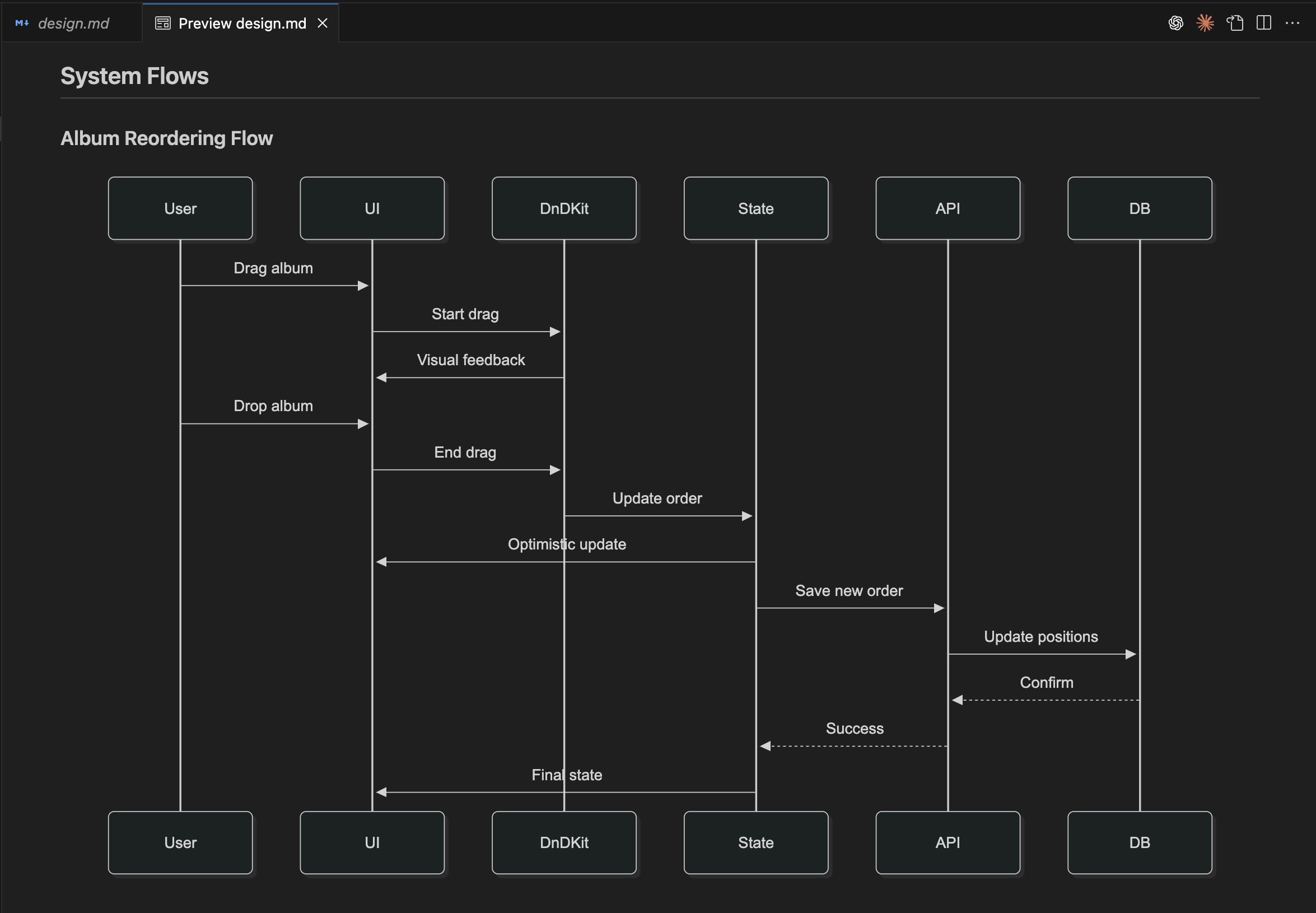 Example of system flow during the design phase
 design.md
For Other Agents (Cursor, Gemini, Codex, Copilot, etc.)
Command separator varies by agent — see table below or check your agent's installed commands.
| Agent | Separator | Example |
|-------|-----------|---------|
| Gemini, Qwen | /yy: | /yy:steering |
| Cursor | /yy/ | /yy/steering |
| Copilot, Windsurf, OpenCode | /yy- | /yy-steering |
| Codex | /prompts:yy- | /prompts:yy-steering |
# Workflow (shown with Gemini/Qwen syntax — adapt separator for your agent)
/yy:steering                                                   # AI learns existing project context
/yy:spec-init Add OAuth to existing auth system                # AI creates enhancement plan
/yy:spec-requirements oauth-enhancement                        # AI asks clarifying questions
/yy:validate-gap oauth-enhancement                             # Optional: Analyze existing vs requirements
/yy:spec-design oauth-enhancement                              # Human validates, AI designs
/yy:validate-design oauth-enhancement                          # Optional: Validate design integration
/yy:spec-tasks oauth-enhancement                               # Break into implementation tasks
/yy:spec-impl oauth-enhancement                                # Execute with TDD
30-second setup → AI-driven "bolts" (not sprints) → Hours-to-delivery results
Why teams install yy-spec
- Single source specs – requirements, design, tasks, and supporting references stay in sync, so reviewers approve faster.
- Greenfield or brownfield – net-new features boot in minutes, while validate gates and project memory keep legacy upgrades safe.
- Mix any agent – the same templates and rules power Claude, Cursor, Codex, Gemini, Copilot, Qwen, and Windsurf simultaneously.
- Customize once – edit
.yy-dev/settings/templates/or.yy-dev/settings/rules/and every agent/slash command reflects your workflow.
✨ Key Features
- 🚀 AI-DLC Methodology - AI-native processes with human approval. Core pattern: AI executes, human validates
- 📋 Spec-First Development - Comprehensive specifications as single source of truth driving entire lifecycle
- ⚡ "Bolts" not Sprints - AI-DLC terminology for intensive hours/days cycles replacing weeks-long sprints. Escape the 70% administrative overhead
- 🧠 Persistent Project Memory - AI maintains comprehensive context (architecture, patterns, rules, domain knowledge) across all sessions via steering documents
- 🛠 Template flexibility - Tweak
{{KIRO_DIR}}/settings/templates(steering, requirements, design, tasks) to mirror your team's deliverables - 🔄 AI-Native + Human Gates - AI Plans → AI Asks → Human Validates → AI Implements (rapid cycles with quality control)
- 🌍 Team-Ready - English/Chinese support, cross-platform, standardized workflows with quality gates
🤖 Supported AI Agents
| Agent | Status | Commands |
|-------|--------|----------|
| Claude Code | ✅ Full | 13 commands (/yy:*): 6 auto-workflow + 7 step-by-step |
| Claude Code Agents | ✅ Full | 13 commands (/yy:*) + 9 subagents |
| Cursor IDE | ✅ Full | 11 commands |
| Gemini CLI | ✅ Full | 11 commands |
| Codex CLI | ✅ Full | 11 prompts |
| GitHub Copilot | ✅ Full | 11 prompts |
| Qwen Code | ✅ Full | 11 commands |
| Windsurf IDE | ✅ Full | 11 workflows |
| Others (Factory AI Droid) | 📅 Planned | - |
📋 Commands
Claude Code Workflow (/yy:*)
Auto Workflow (end-to-end, self-closing):
/yy:steering                              # Create/update project context (run first)
/yy:feature <description>                 # New feature → auto-size → implement or plan
/yy:fix <description>                     # Known bug → TDD fix → code review
/yy:investigate <description>             # Uncertain issue → systematic diagnosis
/yy:plan-exec [spec-name]                 # Execute a large feature plan
/yy:status [spec-name]                    # Check spec progress
Step-by-Step Workflow (manual control per phase):
/yy:spec-requirements <feature_name>      # Generate requirements
/yy:spec-design <feature_name>            # Create technical design
/yy:spec-tasks <feature_name>             # Break into implementation tasks
/yy:spec-impl <feature_name> <tasks>      # Execute with TDD
/yy:validate-gap <feature_name>           # Analyze existing functionality gaps
/yy:validate-design <feature_name>        # Review design compatibility
/yy:validate-impl <feature_name>          # Validate implementation against specs
Other Agents Workflow (/yy:*)
/yy:spec-init <description>              # Initialize feature spec
/yy:spec-requirements <feature_name>     # Generate requirements
/yy:spec-design <feature_name>           # Create technical design
/yy:spec-tasks <feature_name>            # Break into implementation tasks
/yy:spec-impl <feature_name> <tasks>     # Execute with TDD
/yy:spec-status <feature_name>           # Check progress
/yy:validate-gap <feature_name>          # Analyze existing functionality gaps
/yy:validate-design <feature_name>       # Review design compatibility
/yy:validate-impl <feature_name>         # Validate implementation against specs
Specifications as the Foundation: Based on Kiro's specs - specs transform ad-hoc development into systematic workflows, bridging ideas to implementation with clear AI-human collaboration points.
📖 Complete Command Reference - Detailed usage, parameters, examples, and troubleshooting for all commands
Project Memory & Context
/yy:steering                              # Claude Code
/yy:steering                              # Other agents
Critical Foundation: Steering creates persistent project memory. Run first for existing projects to improve spec quality.
🎨 Customization
Edit templates in {{KIRO_DIR}}/settings/templates/ to match your workflow. Keep the core structure (requirement numbers, checkboxes, headings) and add your team's context—AI adapts automatically.
Common customizations:
- PRD-style requirements with business context and success metrics
- Frontend/Backend designs optimized for React components or API specs
- Approval gates for security, architecture, or compliance reviews
- JIRA/Linear-ready tasks with estimation, priority, and labels
- Domain steering for API standards, testing conventions, or coding guidelines
📖 Customization Guide — 7 practical examples with copy-paste snippets
⚙️ Configuration
# Language
npx yy-spec@latest --lang zh            # Simplified Chinese
npx yy-spec@latest --lang en            # English (default)

# Safe operations
npx yy-spec@latest --dry-run --backup

# Custom directory
npx yy-spec@latest --kiro-dir docs
📁 Project Structure
After installation, your project gets:
project/
├── .claude/commands/yy/      # 6 workflow commands (Claude Code)
├── .codex/prompts/           # 11 prompt commands (Codex CLI)
├── .github/prompts/          # 11 prompt commands (GitHub Copilot)
├── .windsurf/workflows/      # 11 workflow files (Windsurf IDE)
├── .yy-dev/settings/           # Shared rules & templates (variables resolved with {{KIRO_DIR}})
├── .yy-dev/specs/              # Feature specifications
├── .yy-dev/steering/           # AI guidance rules
└── CLAUDE.md (Claude Code)    # Project configuration
Note: only the directories for the agent(s) you install will be created. The tree above shows the full superset for reference.
📚 Documentation & Support
- Command Reference: English | 简体中文
- Customization Guide: English | 简体中文
- Spec-Driven Guide: English | 简体中文
- Claude Subagents Guide: English | 简体中文
- Migration Guide: English | 简体中文
- Issues & Support - Bug reports and questions
- Kiro IDE
Stable Release v2.0.0 - Production-ready. Report issues | MIT License
Platform Support
- Supported OS: macOS, Linux, Windows (auto-detected by default).
- Unified command templates across operating systems;
--osoverride is optional for legacy automation.
Heads-up: Passing
--osstill works for backward compatibility, but all platforms now receive the same command set.