
zg-virtual-tree
v1.0.1
Published
<!-- * @Author: caiwu * @Description: * @CreateDate: * @LastEditor: * @LastEditTime: 2022-10-31 16:01:06 --> # 安装 ```bash npm i zg-virtual-tree --save ``` # 使用


Readme
安装
npm i zg-virtual-tree --save使用
引入样式
    // main.js 局部何全局都需要引入样式
    import 'zg-virtual-tree/dist/virtualTree.css'
全局使用
    // main.js
    import 'zg-virtual-tree/dist/virtualTree.css'
    import { VirtualTree } from 'zg-virtual-tree'
    createApp(App).use(VirtualTree).mount('#app')
局部使用
    // demo.vue

    // html
    <virtual-tree
        :key="key"
        :default-checked-keys="defaultCheckedKeys"
        ref="virtualTree"
        v-slot="{ row }"
        :height="400"
        :width="800"
        :row-height="24"
        :data="data"
        :level-indent="20"
        :checkbox-bg="checkboxBg"
        :show-checkbox="showCheckbox"
        @select-change="selectChange"
        @node-click="nodeClick"
    >
    .....
    </virtual-tree>
    // js
    import { VirtualTree } from 'zg-virtual-tree'
    export default {
        name: 'tree-demo',
        components: {
            VirtualTree,
        },
        ....
    }
props
- checkboxBg: 复选框背景颜色;默认 '',
- row-height: 每一项的高度;默认 36
- levelIndent: 一个level缩进间距;默认 20
- showCheckbox: 是否展示复选框;默认 false
- sectionSize:虚拟滚动一个缓存片段的大小,默认自动计算,为一屏所能展示的最多行数
- height: 组件高度;默认 400,
- width: 组件宽度;默认 800
- data [Array] 展示数据
- defaultCheckedKeys [Array] 默认勾选项的key
RUN DEMO
    npm i
    npm start
events
- select-change 当复选框被点击的时候触发 返回选中元素列表
- node-click 节点点击回调 返回被点击的节点
设计文档
数据结构
 mockData = [
     {
         id:11,
         pid:10, // 父级id
         level:0, // 层级
         collapsed:true, // 是否折叠
         isLeaf:true, // 是否叶子节点
         position:'0', // id链 x-x-x-x-x
         childCount:'0', // 子集数量
         data:{},
     },
 ]
三层优化
渲染层:固定DOM数量,渲染无压力
浏览器列表dom数量超过1000会有明显的卡顿,本组件能控制固定数量的dom,顾不存在渲染性能问题。
数据处理层面:扁平的数据结构,有序的position,二分查找定位数据,百万数据无压力
除了渲染压力,百万级数据的计算也是一大性能瓶颈。把树状的数据拍平极大的简化了计算逻辑,并且每个元素的position字段是有序的,这使得元素查找可以使用二分查找来替代原生的数组查找方法,查找性能数量级提升。
传输层面:对于大数据传输采用独有的协议
百万级数据除了渲染和计算,和接口交互的数据传输也是一大性能点,如一个父节点有10万个字节的,用户全选再去除一个,如何把勾选的99999条数据给到服务端?直接给99999条数据肯定是不行的,此时需要一种特有的轻量的数据协议来描述用户的行为,如:
{protocol:'xxx',select:id,exclude:'id1,id2'}
原理图
四段缓存法,为什么最小是四段,因为三段无法保证前后各有一段缓存区,渲染慢画面会有拼接感觉;四段能完美保证数据在可视区外拼接,用户无感;每段的大小应该大于等于一屏的大小。
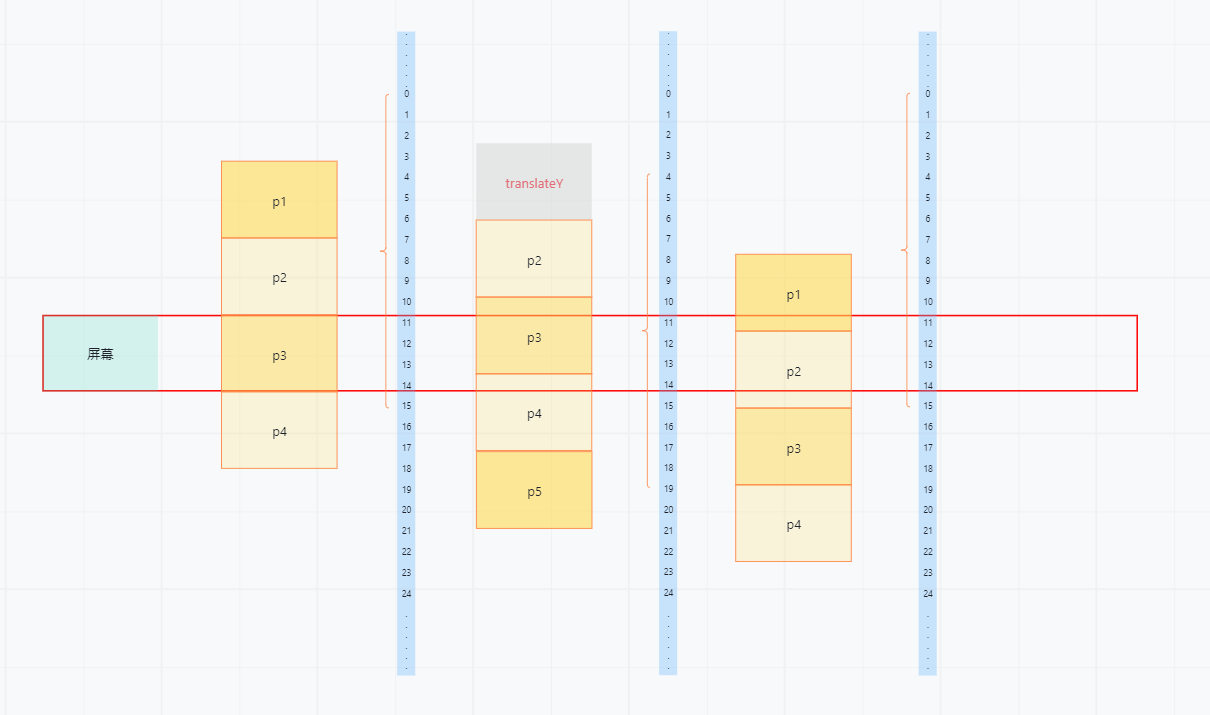
const forwardCriticalPoint = Math.ceil((this.start + this.end) / 2) // 指针前进临界点
const backCriticalPoint = forwardCriticalPoint - this.oneClientRowSize // 指针后退临界点
if (e.target.scrollTop > forwardCriticalPoint * this.rowHeight) {
    this.start += this.oneClientRowSize
    this.end += this.oneClientRowSize
    this.rangeChange()
}
if (e.target.scrollTop < backCriticalPoint * this.rowHeight && this.start > 0) {
    this.start -= this.oneClientRowSize
    this.end -= this.oneClientRowSize
    this.rangeChange()
}
if (this.end + this.oneClientRowSize > this.pageSize * this.pageNo) {
    // 需要增加数据
    this.pageNo++
    this.eventHandle['pageNoChange'](this.pageNo, this.pageSize)
}
TODO
交互细节优化;UI优化;超大数据结构设计(转化和解析算法)