
zhifufm
v0.0.6
Published
支付FM Node.js SDK,支持多种支付方式的集成支付解决方案。支持个人注册进行支付宝、微信收款。

Maintainers
 coffeex
Readme
zhifufm
支付FM Node.js SDK,支持多种支付方式的集成支付解决方案。
开通个人收款功能
支付FM,支持个人微信、支付宝收款。 支付FM官网
注册请点击链接 支付FM个人、商家注册
收费说明
使用支付FM接口 需消耗接口额度。额度按照1:300比例购买兑换(1元购买300额度,也可理解 0.3%费率预充值),也可以参与活动白嫖获得。
其他费用:您使用的收单机构收款、结算、提现过程可能会产生费用,包括但不限于支付宝、微信、杉德支付等收单机构签约接口通道费率等,并非本平台收取,与支付FM费率无关。
安装
npm install zhifufm快速开始
获取商户号、密钥、接口根地址
注册请点击链接 支付FM个人、商家注册
注册后即可在用户中心->API开发信息中获取到
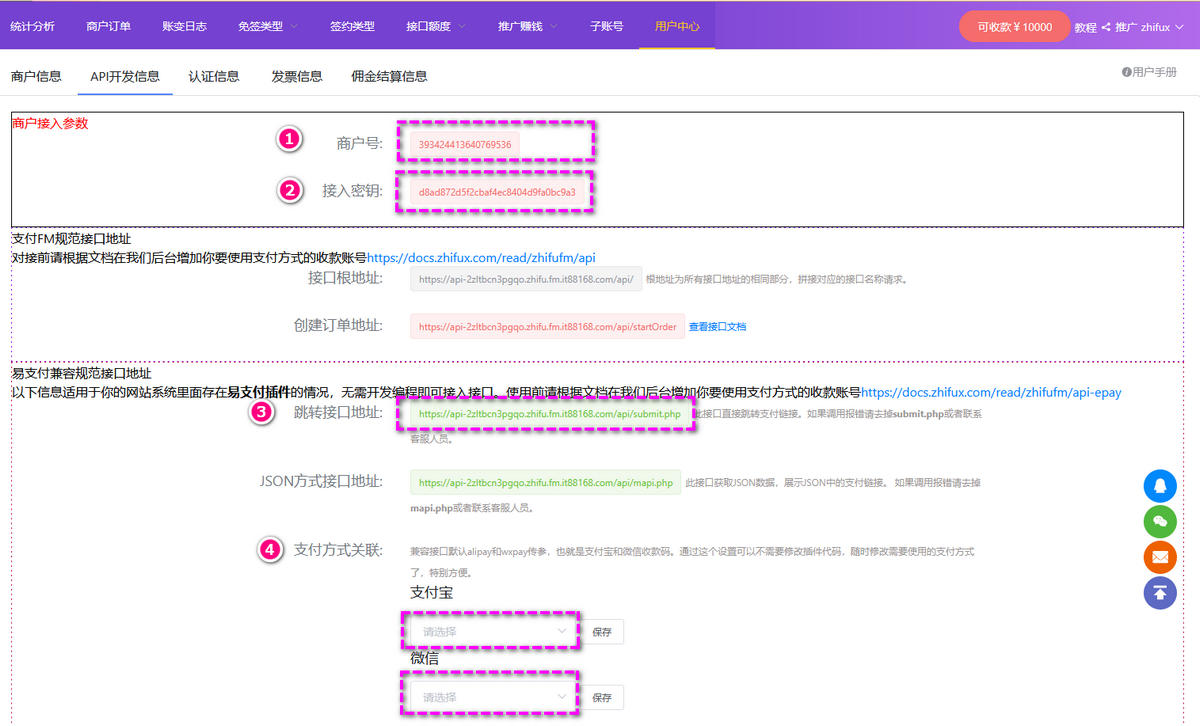
初始化配置
import { ZhuFuFm } from 'zhifufm'

const zhifufm = new ZhuFuFm({
  baseUrl: 'https://api-xxxxx.zhifu.fm.it88168.com/api', // 接口根地址(在`用户中心`->`API开发信息`中获取到 )
  merchantNum: 'your_merchant_num',   // 商户号(在`用户中心`->`API开发信息`中获取到 )
  merchantKey: 'your_merchant_key',   // 接入密钥(在`用户中心`->`API开发信息`中获取到 )
  notifyUrl: 'https://your-domain.com/notify', // 异步回调地址
  returnUrl: 'https://your-domain.com/return'  // 同步跳转地址
})
创建支付订单
// 使用 startOrder 方法创建订单
const orderResult = await zhifufm.startOrder({
  orderNo: 'ORDER123456',           // 商户订单号
  amount: 100.00,                   // 支付金额(元)
  payType: ZhuFuFmPayType.AlipayQrCode, // 支付方式
  subject: '商品标题',              // 商品标题
  body: '商品描述',                 // 商品描述
  attch: '自定义数据',              // 附加信息
  payee: '指定收款号',             // 可选:指定收款号
  returnType: 'json'               // 返回类型:'json' 或 'page'
})

console.log('支付链接:', orderResult.data.payUrl)
验证支付回调
// 在你的回调接口中验证签名
app.post('/notify', (req, res) => {
  const isValid = zhifufm.validateNotifySign(req.body)

  if (isValid) {
    // 签名验证成功,处理业务逻辑
    console.log('支付成功:', req.body)
    res.send('success')
  } else {
    // 签名验证失败
    res.status(400).send('fail')
  }
})
支持的支付方式
免签支付
ZhuFuFmPayType.WeChatQrCode- 微信收款码ZhuFuFmPayType.AlipayQrCode- 支付宝收款码ZhuFuFmPayType.UnionPayQrCode- 云闪付收款码ZhuFuFmPayType.AggregatedQrCode- 三方聚合收款码ZhuFuFmPayType.JsNxQrCode- 农商行收银宝收款码ZhuFuFmPayType.BankApp- 网银APP收款
直连官方支付
ZhuFuFmPayType.AlipayPcDirect- 支付宝PC网站支付ZhuFuFmPayType.AlipayWapDirect- 支付宝手机网站支付ZhuFuFmPayType.AlipayFaceToFace- 支付宝当面付ZhuFuFmPayType.AlipaySite- 支付宝网站支付接口(自适应PC/手机)ZhuFuFmPayType.WeChatH5- 微信支付H5ZhuFuFmPayType.WeChatNative- 微信支付NativeZhuFuFmPayType.WeChatJsApi- 微信支付JSAPI
间连支付
ZhuFuFmPayType.FuYouAliQr- 富友支付宝服务窗ZhuFuFmPayType.FuYouWxQr- 富友微信支付ZhuFuFmPayType.FuYouBankQr- 富友银联扫码ZhuFuFmPayType.FuYouPcQr- 富友收银台ZhuFuFmPayType.SandPayH5- 杉德收银台ZhuFuFmPayType.SandHmBankQr- 杉德银联扫码ZhuFuFmPayType.SandAlipay- 杉德支付宝ZhuFuFmPayType.SandWxPay- 杉德微信公众号ZhuFuFmPayType.HuiFuQuick- 汇付快捷支付
智能轮循池(2025-10-17新增)
ZhuFuFmPayType.AlipayLoop- 支付宝轮循池(池中通道按权重分配,支持 PC&WAP)ZhuFuFmPayType.WeChatLoop- 微信轮循池(池中通道按权重分配,支持 PC&WAP)ZhuFuFmPayType.BankLoop- 网银系轮循池(池中通道按权重分配,支持 PC&WAP)
轮询支付(2025-10-17废弃,请使用智能轮循池)
ZhuFuFmPayType.AlipayPcAll- 支付宝PC签约轮训ZhuFuFmPayType.AlipayWapAll- 支付宝WAP签约轮训ZhuFuFmPayType.WeChatPcAll- 微信PC签约轮训ZhuFuFmPayType.WeChatWapAll- 微信WAP签约轮训
API 文档
ZhuFuFm 类
构造函数
constructor(config: ZhuFuFmConfig)配置参数 (ZhuFuFmConfig)
| 参数 | 类型 | 必填 | 说明 |
|------|------|------|------|
| baseUrl | string | 是 | 接口根地址(在用户中心->API开发信息中获取到 ) |
| merchantNum | string | 是 | 商户号(在用户中心->API开发信息中获取到 ) |
| merchantKey | string | 是 | 接入密钥(在用户中心->API开发信息中获取到 ) |
| notifyUrl | string | 是 | 异步回调地址 |
| returnUrl | string | 是 | 同步跳转地址 |
方法
startOrder()
创建支付订单。
async startOrder(params: ZhiFuFmApiStartOrderParams): Promise<ZhiFuFmApiStartOrderVO>参数:
| 参数 | 类型 | 必填 | 说明 | |------|------|------|------| | orderNo | string | 是 | 商户订单号 | | amount | number | 是 | 支付金额(元) | | payType | ZhuFuFmPayType | 是 | 支付方式 | | notifyUrl | string | 否 | 异步回调地址(覆盖配置) | | returnUrl | string | 否 | 同步跳转地址(覆盖配置) | | returnType | string | 否 | 返回类型:'json' 或 'page' | | payee | string | 否 | 指定收款号 | | attch | string | 否 | 附加信息 | | subject | string | 否 | 商品标题 | | body | string | 否 | 商品描述 | | payDuration | number | 否 | 订单有效期(分钟,默认5,最大15) | | apiMode | string | 否 | 回调请求方式:'post_form' |
返回值:
interface ZhiFuFmApiStartOrderVO {
  code: number
  msg: string
  data: {
    id: string      // 订单ID
    payUrl: string  // 支付链接
  }
}
validateNotifySign()
验证支付回调签名。
validateNotifySign(params: ZhiFuFmNotifyDTO): boolean参数:
| 参数 | 类型 | 说明 | |------|------|------| | merchantNum | string | 商户号 | | orderNo | string | 商户订单号 | | amount | number | 订单金额 | | state | string | 支付状态 | | sign | string | 签名值 |
完整示例
import express from 'express'
import { ZhuFuFm, ZhuFuFmPayType } from 'zhifufm'

const app = express()
app.use(express.urlencoded({ extended: true }))
app.use(express.json())

// 初始化支付FM
const zhifufm = new ZhuFuFm({
  baseUrl: 'https://api-xxxxx.zhifu.fm.it88168.com/api', // 接口根地址(在`用户中心`->`API开发信息`中获取到 )
  merchantNum: 'your_merchant_num',   // 商户号(在`用户中心`->`API开发信息`中获取到 )
  merchantKey: 'your_merchant_key',   // 接入密钥(在`用户中心`->`API开发信息`中获取到 )
  notifyUrl: 'https://your-domain.com/notify', // 异步回调地址
  returnUrl: 'https://your-domain.com/return'  // 同步跳转地址
})

// 创建支付订单
app.post('/create-order', async (req, res) => {
  try {
    const { orderNo, amount, subject } = req.body

    const result = await zhifufm.startOrder({
      orderNo,
      amount: parseFloat(amount),
      payType: ZhuFuFmPayType.AlipayQrCode,
      subject: subject || '商品购买',
      returnType: 'json'
    })

    res.json({
      success: true,
      payUrl: result.data.payUrl
    })
  } catch (error) {
    res.status(500).json({
      success: false,
      error: error.message
    })
  }
})

// 支付回调处理
app.post('/notify', (req, res) => {
  try {
    const isValid = zhifufm.validateNotifySign(req.body)

    if (isValid && req.body.state === 'SUCCESS') {
      // 处理支付成功逻辑
      console.log('订单支付成功:', req.body.orderNo)

      // 更新订单状态等业务逻辑...

      res.send('success')
    } else {
      res.status(400).send('fail')
    }
  } catch (error) {
    console.error('回调处理错误:', error)
    res.status(500).send('fail')
  }
})

// 支付完成页面
app.get('/return', (req, res) => {
  // 处理支付完成后的页面跳转
  res.send('支付完成')
})

app.listen(3000, () => {
  console.log('服务器运行在端口 3000')
})
签名算法
SDK 已内置签名生成和验证逻辑,但如需手动实现:
订单签名
待签名字符串 = 商户号 + 商户订单号 + 支付金额 + 异步通知地址 + 接入密钥
签名值 = MD5(待签名字符串).toLowerCase()
回调验证
待签名字符串 = 付款成功状态state + 商户号 + 商户订单号 + 订单金额 + 接入密钥
验证签名 = MD5(待签名字符串).toLowerCase() === 回调中的sign
注意事项
- 商户号和接入密钥请在支付FM商户后台【用户中心】处查看
- 异步回调地址和同步跳转地址必须是公网可访问的 http(s) 地址
- 商户订单号仅允许字母或纯数字,建议不超过32字符
- 支付金额单位为元,最多保留2位小数
- 订单支付有效期默认5分钟,最大15分钟
- 建议在生产环境中对回调数据进行额外的业务逻辑验证
许可证
MIT