
zk-session-dashboard
v0.2.1
Published
List live Claude Code sessions with token usage, prompt-cache read/write, cache TTL and expiry countdown. CLI table, JSON output, and a local web UI with browser notifications.

Maintainers
 zero-legend
Readme
zk-session-dashboard



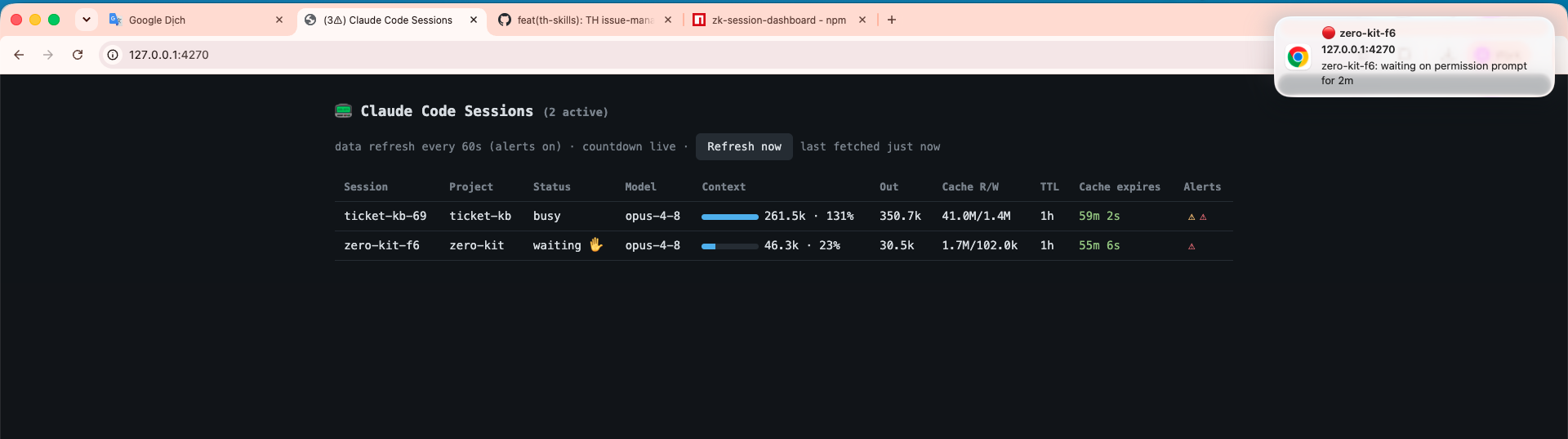
See all your running Claude Code sessions at a glance: context tokens, output totals, prompt-cache read/write, cache TTL (1h/5m) and a live expiry countdown.
Read-only over Claude Code's own files (~/.claude). No daemon, no telemetry, zero
dependencies, no system permissions.
Requirements
- Node.js ≥18
- Claude Code installed and used at least once, so session data exists under
~/.claude(or wherever$CLAUDE_CONFIG_DIRpoints).
Install
npm install -g zk-session-dashboard # recommendednpm link # symlink the bins into your PATH
npm install -g . # or: copied global installUsage
zk-sessions                 # table of live sessions
zk-sessions --watch [sec]   # re-render every N sec (default 10)
zk-sessions --all           # include recently finished sessions
zk-sessions --json          # machine-readable output (for scripts)

zk-sessions-ui [--port 4270]   # web UI at http://127.0.0.1:4270
The web UI refreshes every 10 min; the cache countdown ticks every second.
Each row is one session. Columns:
| Column | Meaning |
| --------------- | ------------------------------------------------------------------- |
| Context | Current context tokens and % of the window (see contextWindowTokens). |
| Out | Total output tokens generated. |
| Cache R/W | Prompt-cache tokens read / written. |
| TTL | Cache lifetime bucket — 1h or 5m. |
| Cache expires | Live countdown until the prompt cache expires. |
Alerts fire when: cache expires in <10 min (1h TTL) · context ≥70% / ≥85% · a session
is stuck waiting >2 min. Each fires once, then re-arms after the condition clears.
Get pop-up notifications
Alert badges show up in the table with no setup. For desktop pop-ups you must clear two separate permission layers — the browser alone isn't enough. If the OS layer is off, pop-ups silently never appear (no error).
- Open the UI in Chrome, Edge, Firefox, or Safari.
(
http://127.0.0.1works over plain HTTP — no HTTPS needed.) - Browser — click 🔔 Enable alerts → Allow. Scoped to
127.0.0.1only. - OS layer — let your browser post notifications, and turn off any quiet mode:
- macOS — System Settings → Notifications → your browser: turn Allow Notifications on, set style to Alerts (so critical pop-ups stay until clicked), and turn off Do Not Disturb / Focus (or add the browser to its allowed apps).
- Windows — Settings → System → Notifications: enable notifications for the browser, and turn off Do not disturb / Focus assist.
- Linux — allow the browser in your desktop's notification settings (GNOME/KDE) and disable Do Not Disturb.
- Keep the tab open (pin it) — pop-ups fire from the page's JS. With alerts on, polling tightens to 60s.
Not seeing pop-ups? Test a notification on any other site. If that fails too, the fix is in your OS settings, not here.
Config (optional)
Copy the bundled example and edit it (every key is commented):
# machine-global (recommended):
cp "$(npm root -g)/zk-session-dashboard/zk-sessions-config.example.jsonc" ~/.claude/zk-sessions-config.jsonc

# then open it in your editor:
vi ~/.claude/zk-sessions-config.jsonc
Defaults (times in ms, thresholds in %):
{
  "contextWindowTokens": 200000,
  "cacheExpiringMs": 600000,
  "ctxHighPct": 70,
  "ctxHighRearmPct": 65,
  "ctxFullPct": 85,
  "ctxFullRearmPct": 80,
  "stuckWaitingMs": 120000,
  "uiAlertPollMs": 60000,
  "uiIdlePollMs": 600000,
  "levels": { "stuck-waiting": "warn" }
}
Where it looks, in order — the first file that exists wins:
$ZK_SESSIONS_CONFIG— an absolute path you set yourself (highest priority)..zk/zk-sessions-config.jsonc— inside the folder you're standing in when you run the command (i.e.$PWD/.zk/), not the repo or the session's project.~/.claude/zk-sessions-config.jsonc— machine-global; used no matter where you run from.
⚠️ Because #2 depends on your current directory, it's easy to miss. If you installed globally and run from anywhere, prefer
~/.claude/(or set$ZK_SESSIONS_CONFIG).
contextWindowTokens sets the ctx% denominator. Claude Code's transcript doesn't say
whether a session runs 200k or 1M, so you opt in:
a single number —
200000(standard) or1000000(1M), applied to all; ora per-model map (unknown models fall back to
"default"):"contextWindowTokens": { "default": 200000, "claude-opus-4-8": 1000000 }
The safe 200000 default over-reports ctx% for a 1M session (alerts early) rather than
under-reporting silently. Restart zk-sessions-ui after editing. CLAUDE_CONFIG_DIR is
respected for non-default data locations.
Auditability
Everything that runs is a handful of .cjs files (2 in bin/, 4 in lib/) with zero
dependencies. Inspect the exact published package before installing:
npm pack zk-session-dashboard          # download the tarball
tar -tzf zk-session-dashboard-*.tgz    # list contents
No install scripts — installing only copies files and creates the two bin symlinks. At
runtime it's read-only over ~/.claude, binds 127.0.0.1 only, and asks for no system
permissions.
Caveats
- The transcript format is internal and may change between Claude Code versions; parsing is defensive (bad lines skipped, missing fields = 0) and pinned by a test fixture.
- A 1M session left at the default 200k window shows >100% ctx.
- Verified against Claude Code v2.1.216, on macOS and Ubuntu (WSL2 on Windows).
Contributing
Hit a bug or want a change? Open an issue
or send a PR — contributions are welcome. Run npm test before submitting.
License
MIT © ZeroToLegend