
zuiku-mcp
v1.3.1
Published
MCP server for round-tripping Zuiku diagrams between AI, Markdown, and the local editor

Maintainers
 kamotami
Readme
zuiku-mcp
Public release artifact. Not open source. Use is subject to the included
LICENSE.txt.
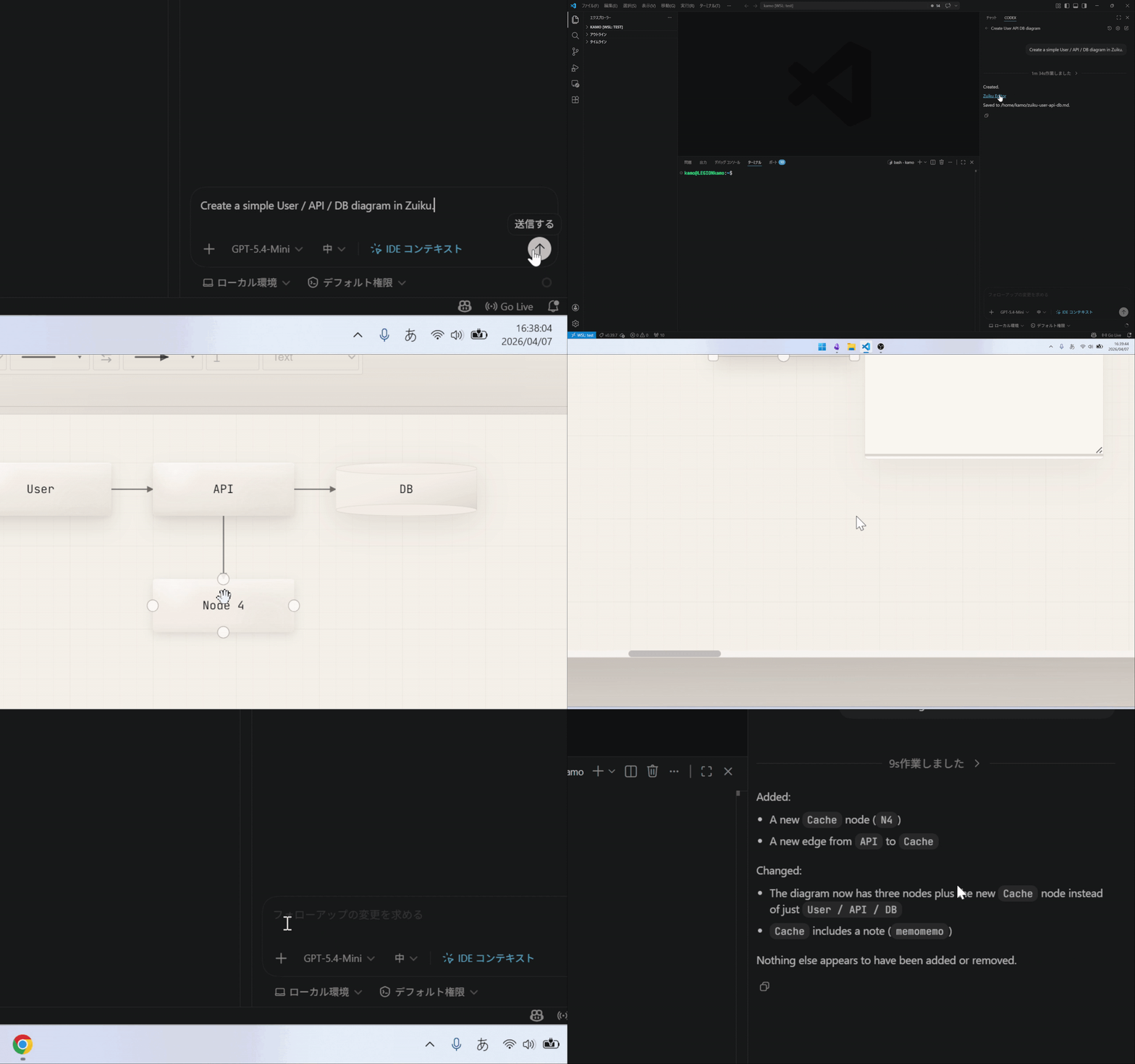
See the full demo on the web: https://zuiku.dev/?locale=en
Zuiku is a diagram editor that turns AI explanations and Markdown into editable diagrams, then lets you bring the refined result back into the same Markdown. Humans work with the UI, while AI can read and write the same Markdown through MCP.
zuiku-mcp is the primary MCP server package for that workflow.
Use it when you want an AI client such as Codex CLI, Claude Code, Gemini CLI, VS Code, or Cursor to read and write Zuiku Markdown, Mermaid diagrams, and exports through MCP.
npx -y zuiku-mcp is the shared entrypoint that CLI clients, IDE MCP settings, and optional IDE extensions call behind the scenes. It is usually configured once and then launched automatically by the client.
Licensing and usage terms
zuiku-mcpis distributed as a release package for evaluation and internal workflow use- It is not open source, and no rights are granted except as stated in the included
LICENSE.txt - Personal use, evaluation use, and internal business workflow use are allowed, including use by employees, contractors, and agents acting on your behalf for those internal purposes
- Redistribution, distribution of modified versions, hosted-service use, resale, and unauthorized trademark use are prohibited
- Future versions may be provided under different terms; the included
LICENSE.txtapplies to the version you received
Quick start
Run this in the directory you want Zuiku to edit.
For the default setup, register zuiku-mcp@latest so the client picks up the newest published build:
codex mcp add zuiku \
  --env ZUIKU_MCP_ALLOWED_ROOTS="$(pwd)" \
  -- npx -y zuiku-mcp@latest
More setup guides:
- Install:
https://zuiku.dev/install - Docs:
https://zuiku.dev/docs - X:
https://x.com/kamotami_dev
Entry command
npx -y zuiku-mcpWhat it exposes
zuiku.version: report the running package/server version and update hintszuiku.open: open an existing Zuiku markdown file, create a new file whenpath + markdownare both given, or open Mermaid-only / canonical Markdown in a temp session backed by a localhost session hostzuiku.read: read current Markdown and hash before updatingzuiku.apply: write Mermaid-only or canonical Markdown back as normalized Zuiku Markdown with hash-based conflict protectionzuiku.export: export Markdown, PNG, or SVGzuiku.ddl_to_er: turn an upstream-acquired DDL string into ER diagram payloads
Version and update
Check the package version a fresh npx launch would run:
npx -y zuiku-mcp --versionCheck the latest published npm version:
npm view zuiku-mcp versionRun the latest package one-shot:
npx -y zuiku-mcp@latestAfter npm publishes a newer build, restart the client or IDE session so it launches the updated package. zuiku.version reports the server that is already running, while npx -y zuiku-mcp --version shows what a fresh launch resolves to.
Update a global install:
npm install -g zuiku-mcp@latestTypical usage
- Codex CLI / Claude Code / Gemini CLI: register it as an MCP server command
- VS Code / Cursor: point MCP settings at
npx -y zuiku-mcp - IDE extensions: optional helper path that still launches the same MCP server
- Removing the npm package and removing IDE workspace MCP config are separate steps when you have also added
zuikuto.vscode/mcp.jsonor.cursor/mcp.json
Common use cases
- Turn AI explanations into diagrams for easier understanding
- Adjust diagrams managed in Markdown through the local editor
- Generate ER diagrams from DDL and refine them in the same round-trip workflow
- Keep AI and humans on the same Markdown source instead of splitting UI edits and file edits
Common environment variables
ZUIKU_MCP_ALLOWED_ROOTS: allowed file roots (:separated)ZUIKU_MCP_ENABLE_EDITOR_HOST:1to enable the localhost session host that bridges the web editor to local files (default:1)ZUIKU_MCP_OPEN_BROWSER: optional. Defaults to1, which opens the web editor afterzuiku.openand afterzuiku.applysaves. Set0only when you want a quieter setup that relies oneditorUrlZUIKU_MCP_EDITOR_HOST/ZUIKU_MCP_EDITOR_PORT: host bind settingsZUIKU_EDITOR_URL: override only. By default, Zuiku uses the local-origin editor athttp://127.0.0.1:<port>/editorZUIKU_MCP_EDITOR_APP_DIR: advanced override for the bundled local editor assets directory
Open behavior
zuiku.openreturns an exacteditorUrl- The default
editorUrltarget is the local-origin editor athttp://127.0.0.1:<port>/editor ZUIKU_EDITOR_URLis only for intentionally overriding that target, for example tohttps://zuiku.dev/editor- If your client does not open it automatically, open that exact
editorUrl - Do not open bare
/editor; it can show unrelated local state zuiku.open(path, markdown, openInBrowser=true)can create a new real file when the save path is already decidedzuiku.open(markdown, openInBrowser=true)can start a temp session when the save path is not decided yet- A temp session is still backed by a temporary
.mdfile; it is just not the user's chosen final save location yet - The result also includes
healthUrl, which is the first place to check if loading fails - The editor UI is served locally by default, and reads and writes the local markdown file through the localhost session host
- The first open can take a moment while the local bridge and browser are starting
- After a human edits the diagram in the editor, the AI should call
zuiku.read(path)again before applying the next update - If
zuiku.applyreturnsconflict, that means the file changed after the lastzuiku.read(path). Callzuiku.read(path)again and retry with the returned hash. Do not treat that conflict as a local editor startup failure.
Built-in AI guides
zuiku://guide/start-here: read this first when an AI client is unsure how Zuiku opens or saves diagramszuiku://guide/temp-session-vs-file: choose between a temporary session and a real.mdfilezuiku://guide/format-guide: short contract for fast-path sample creation, canonical markdown shape, and read-before-apply updateszuiku://guide/flowchart-example: minimal canonical Zuiku Markdown example for a small flowchartzuiku://guide/edit-existing-guide: read-before-apply flow for existing diagramszuiku://guide/er-from-ddl-guide: DDL responsibility boundary for ER workflows
When in doubt, start with zuiku://guide/start-here, then only pull in the narrower guides you actually need.
Why the npm page shows GitHub links
homepagepoints to Zuiku's install guide because npm users usually need setup firstrepositorypoints to the source repository, so npm can show aCodelinkbugspoints to GitHub Issues, so npm can show an issue/report link- The published npm package ships the runnable artifact (
bin/,dist/,editor-app/) plus npm-facing docs files - Public npm distribution and public source-repository visibility are related but not the same decision; the current package intentionally links to the public source repo for package visibility, transparency, and issue reporting
Notes
- Requires Node.js 20+
zuiku.versioncan be called from MCP clients to confirm the running build and show update hints- The default setup opens the web editor automatically; set
ZUIKU_MCP_OPEN_BROWSER=0only when you want a quieter chat or CI flow - When browser auto-open is enabled,
zuiku.applyopens or reuses the web editor session after save by default - In a quieter setup,
zuiku.apply(openAfterApply=true)can still request opening or reusing the web editor session after save - The published package includes the bundled local editor app used for the default local-origin
/editorflow - Discovery guides are exposed over MCP resources/prompts so AI clients can avoid external lookup, starting with
zuiku://guide/start-here - For ER workflows, Zuiku converts the DDL string you give it; acquiring DDL itself belongs to the upstream AI environment or another tool
- After updating, restart the MCP client or IDE session so the new package is launched
- CLI and manual MCP setup are the source of truth; optional IDE extension listings can be added on top later
- Install guide:
https://zuiku.dev/install - Docs:
https://zuiku.dev/docs - X:
https://x.com/kamotami_dev