
zustand-async-slice
v1.0.9
Published
Zustand Utility For Creating Async Slice easily


Readme
Zustand Async Slice
🦄 Zustand Utility For Creating Async Slice easily in TypeScript!

Introduce
The asyncSlice function automatically creates and manages various states inside the Zustand Store by simply passing the slice name to name and the asynchronous function to asyncFn.
It even provides full support for TypeScript. 🔥
It minimizes the hassle for developers to manually write types, ensuring a smooth developer experience
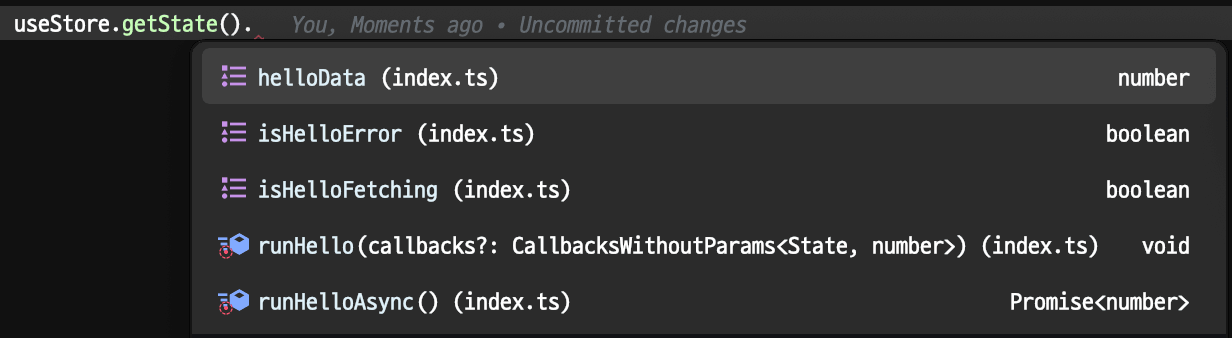
If we pass hello, it generates like that.
Install
yarn add zustand-async-sliceUsage
Auto Generated States in Store ♥️
name: hello
isHelloFetching: booleanisHelloError: booleanhelloData: Data | undefined- type parameter
Datais inferred return type ofasyncFn
- type parameter
runHello: (params: Params, callbacks?: Callbacks) => voidrunHello: (callbacks?: Callbacks) => void- type parameter
Paramsshould be passed second argument ofasyncSlice - is there no params? then no arg function will be generated ‼
- callbacks are
onRun,onSettled,onSuccess,onError. You can pass callbacks from the caller at the runtime or definition of the async slice.
- type parameter
runHelloAsync: (params: Params) => Promise<Data>runHelloAsync: () => Promise<Data>- returnning
Promise<Data>function is available too
- returnning
Step 1. Create Async Slice with asyncSlice
Let's create a async slice named Hello by passing Hello string to name parameter.
No Parameter Version
const helloSlice = asyncSlice<MyStoreState>()({
  name: 'hello',
  asyncFn: async ({ get, set }) => {
    await new Promise((r) => setTimeout(r, 3000)); // wait 3 seconds
    return 1;
  },
  // on asyncFn has been called
  onRun: ({ get, set }) => {},
  // on asyncFn has been completed as success or failure
  onSettled: ({ get, set, data, error, isError, isSuccess }) => {},
  // on asyncFn has been completed as success
  onSuccess: ({ get, set, data }) => {},
  // on asyncFn has been completed as error
  onError: ({ get, set, error }) => {},
});
[!NOTE] Yes,
getandsetare those in Zustand store API. The type ofgetandsetare inferred from first type parameter ofasyncSlice(MyStoreState).
With Parameter Version
const helloSlice = asyncSlice<MyStoreState, { arg1: number; arg2: string }>()({
  name: 'Hello',
  asyncFn: async ({ arg1, arg2 }, { get, set }) => {
    await new Promise((r) => setTimeout(r, 3000)); // wait 3 seconds
    return 1;
  },
  onRun: ({ params, get, set }) => {},
  onSettled: ({ params, get, set, data, error, isError, isSuccess }) => {},
  onSuccess: ({ params, get, set, data }) => {},
  onError: ({ params, get, set, error }) => {},
});
Check that the parameter type of the async function is defined as the second argument of asyncSlice and that params are added to each callback function.
[!TIP] Why currying?
()(...)> Read on Zustand TS docs
Step 2. Inject slice into original store create process.
import type { WithAsyncState } from 'zustand-async-slice';

export type MyStoreState = { age: number };

export const useMyStore = create<WithAsyncState<typeof helloSlice>>()((set, get, store) => ({
  age: 0,
  ...helloSlice(set, get, store), // Inject
}));
Thanks to WrapAsyncState, we can simply pass the slice's type to it, and without needing to redefine the existing Store's type using &, we can just pass it as a type argument to create.
Step 3. Use the store in the way you enjoy.
Full Example
import { asyncSlice, WithAsyncState } from 'zustand-async-slice';

type MyState = { age: number; };

const helloSlice = asyncSlice<MyState>()({
  name: 'hello',
  asyncFn: async ({ set }) => { // can be async or not
    set({ age: 1 });
    return 1;
  },
});

const useMyStore = create<WithAsyncState<typeof helloSlice>>((...s) => ({
  age: 0,
  ...helloSlice(...s),
}));