
zzy-scroll-timer
v1.1.1
Published
A scroll timer plugin for Vue 2, Vue 3 and React

Maintainers
 marshall151
Readme
zzy-scroll-timer
一个跨框架的滚动定时器插件,支持 Vue 2、Vue 3 和 React,实现上下方向的滚动效果。
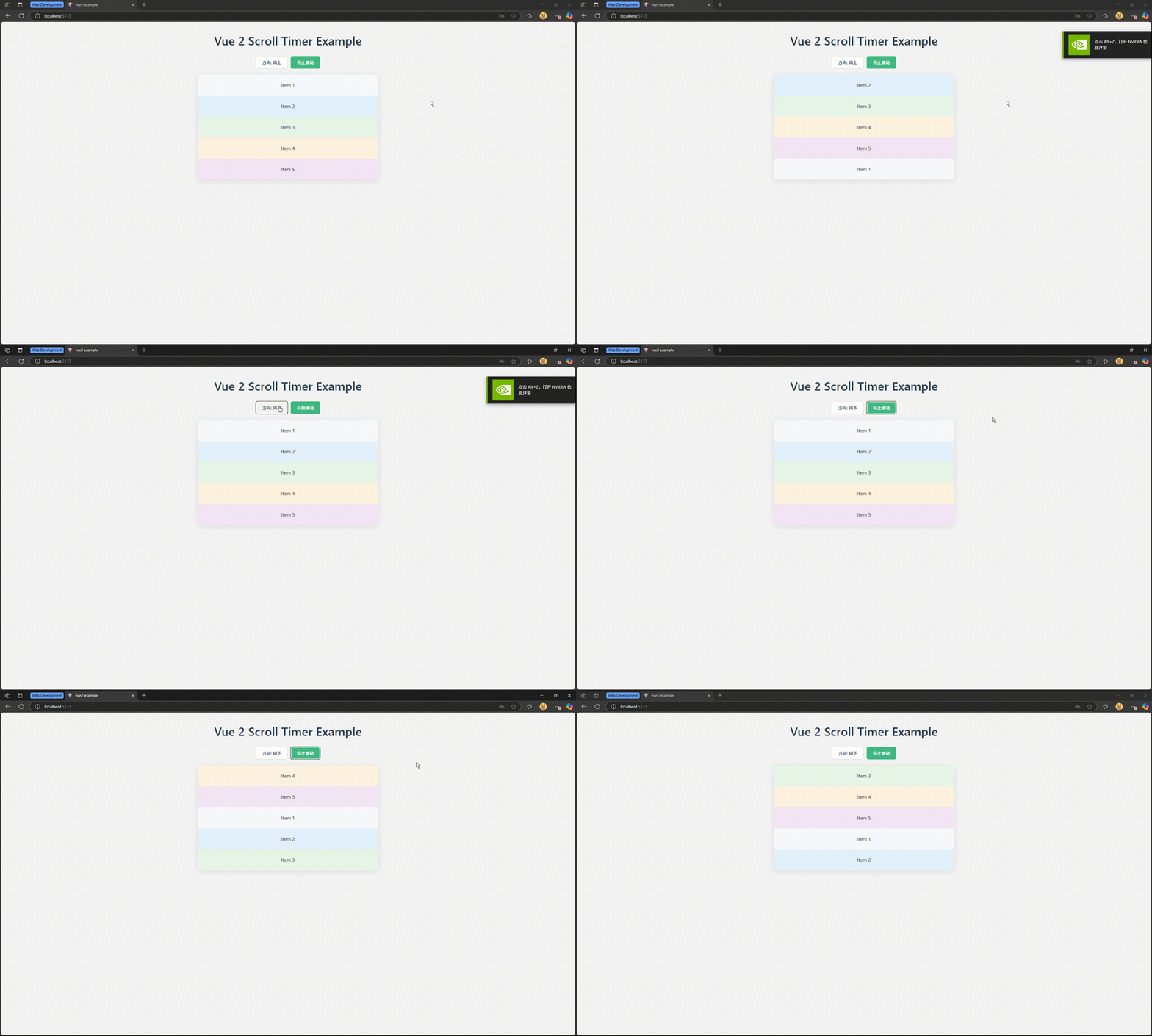
安装
npm install zzy-scroll-timer使用方法
Vue 2
<template>
  <div class="scroll-timer-container">
    <ZScrollTimerVue2
      ref="scrollTimerRef"
      :interval="2000"
      direction="up"
      :autoStart="true"
    >
      <ZScrollTimerItem>
        <div class="scroll-item">Item 1</div>
      </ZScrollTimerItem>
      <ZScrollTimerItem>
        <div class="scroll-item">Item 2</div>
      </ZScrollTimerItem>
      <ZScrollTimerItem>
        <div class="scroll-item">Item 3</div>
      </ZScrollTimerItem>
    </ZScrollTimerVue2>
  </div>
</template>

<script>
import { ZScrollTimerVue2, ZScrollTimerItem } from 'zzy-scroll-timer/vue2';

export default {
  components: {
    ZScrollTimerVue2,
    ZScrollTimerItem
  },
  methods: {
    startScroll() {
      this.$refs.scrollTimerRef.start();
    },
    stopScroll() {
      this.$refs.scrollTimerRef.stop();
    }
  }
}
</script>

<style>
.scroll-timer-container {
  width: 500px;
  height: 300px;
  background-color: #f5f5f5;
}

.scroll-item {
  height: 100%;
  width: 100%;
  display: flex;
  align-items: center;
  justify-content: center;
  background-color: #ffffff;
}
</style>
Vue 3
<template>
  <div class="scroll-timer-container">
    <ZScrollTimerVue3
      ref="scrollTimerRef"
      :interval="2000"
      direction="up"
      :autoStart="true"
    >
      <ZScrollTimerItem>
        <div class="scroll-item">Item 1</div>
      </ZScrollTimerItem>
      <ZScrollTimerItem>
        <div class="scroll-item">Item 2</div>
      </ZScrollTimerItem>
      <ZScrollTimerItem>
        <div class="scroll-item">Item 3</div>
      </ZScrollTimerItem>
    </ZScrollTimerVue3>
  </div>
</template>

<script setup>
import { ref } from 'vue';
import { ZScrollTimerVue3, ZScrollTimerItem } from 'zzy-scroll-timer/vue3';

const scrollTimerRef = ref(null);

const startScroll = () => {
  scrollTimerRef.value?.start();
};

const stopScroll = () => {
  scrollTimerRef.value?.stop();
};
</script>

<style>
.scroll-timer-container {
  width: 500px;
  height: 300px;
  background-color: #f5f5f5;
}

.scroll-item {
  height: 100%;
  width: 100%;
  display: flex;
  align-items: center;
  justify-content: center;
  background-color: #ffffff;
}
</style>
React
import React, { useRef } from 'react';
import { ZScrollTimerReact, ZScrollTimerItem } from 'zzy-scroll-timer/react';

function App() {
  const scrollTimerRef = useRef(null);

  const startScroll = () => {
    scrollTimerRef.current?.start();
  };

  const stopScroll = () => {
    scrollTimerRef.current?.stop();
  };

  return (
    <div className="scroll-timer-container">
      <ZScrollTimerReact
        ref={scrollTimerRef}
        interval={2000}
        direction="up"
        autoStart={true}
      >
        <ZScrollTimerItem>
          <div className="scroll-item">Item 1</div>
        </ZScrollTimerItem>
        <ZScrollTimerItem>
          <div className="scroll-item">Item 2</div>
        </ZScrollTimerItem>
        <ZScrollTimerItem>
          <div className="scroll-item">Item 3</div>
        </ZScrollTimerItem>
      </ZScrollTimerReact>
    </div>
  );
}

export default App;
.scroll-timer-container {
width: 500px;
height: 300px;
background-color: #f5f5f5;
}
.scroll-item {
height: 100%;
width: 100%;
display: flex;
align-items: center;
justify-content: center;
background-color: #ffffff;
}参数说明
组件参数
| 参数 | 类型 | 说明 | 默认值 | | --- | --- | --- | --- | | interval | number | 滚动间隔时间(毫秒) | 2500 | | direction | string | 滚动方向,可选值:'up' 或 'down' | 'up' | | scrollPx | number | 每次滚动的像素数,默认使用子元素的高度 | 0 | | transitionDuration | number | 过渡动画持续时间(毫秒) | 300 | | transitionTimingFunction | string | 过渡动画 timing 函数 | 'ease-in-out' | | transition | string | 完整的过渡动画设置,优先级高于上面两个参数 | 无 | | immediate | boolean | 是否立即开始第一次滚动 | false | | autoStart | boolean | 是否自动开始滚动 | true |
方法
通过 ref 调用组件方法:
| 方法 | 说明 | | --- | --- | | start() | 开始滚动 | | stop() | 停止滚动 |
方法使用示例
Vue 2:
this.$refs.scrollTimerRef.start();
this.$refs.scrollTimerRef.stop();
Vue 3:
scrollTimerRef.value?.start();
scrollTimerRef.value?.stop();
React:
scrollTimerRef.current?.start();
scrollTimerRef.current?.stop();
动态更新
组件支持动态更新所有参数,当参数变化时会自动重新初始化:
- 方向变更:会重置滚动位置并保留原始子元素结构
- 其他参数变更:会销毁旧实例并创建新实例
示例项目
项目包含以下示例:
example/vue2-example- Vue 2 示例example/vue3-example- Vue 3 示例example/react-example- React 示例
开发
# 安装依赖
npm install

# 构建项目
npm run build

# 开发模式(监视文件变化)
npm run dev

# 启动示例项目
npm run start:example
许可证
MIT